
Terraform is a popular open-source infrastructure as code tool used to create and manage infrastructure resources. The state of the infrastructure resources managed by Terraform is stored in a backend, which can be a remote storage location such as Amazon S3.
To configure Terraform to use an S3 backend, you will need to perform the following steps:
- Create an S3 bucket – create a new S3 bucket or use an existing one for storing the Terraform state file.
- Create an S3 access key – generate an access key and secret key with the appropriate permissions for accessing the S3 bucket.
- Configure Terraform backend – add the following code block to your Terraform configuration file, replacing the values with your specific S3 bucket and access key information:
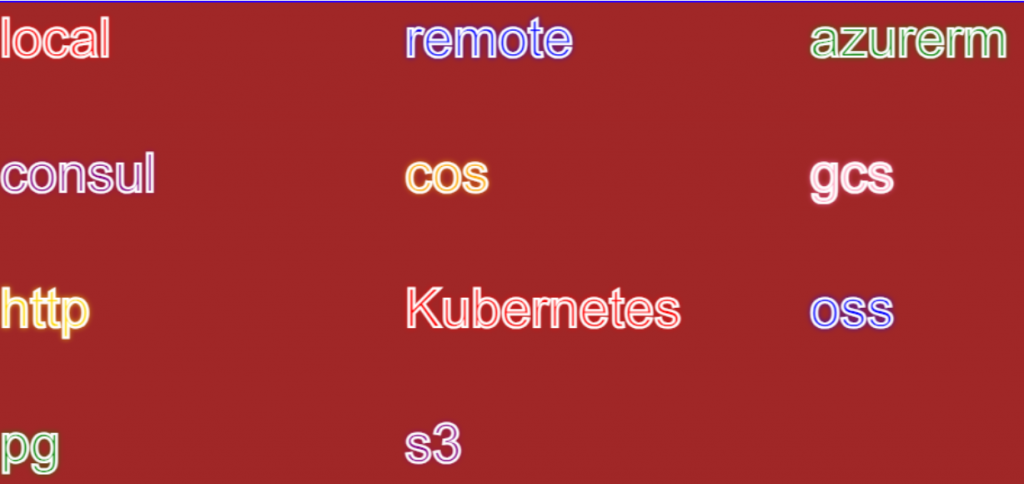
List of Terraform Backends Options (May 2026)
| # | Terraform Backend | Supported in latest Terraform v1.15.x May 2026 | Used For / Cloud |
|---|---|---|---|
| 1 | local | Yes | Local machine state file |
| 2 | remote | Yes | HCP Terraform / Terraform Enterprise |
| 3 | s3 | Yes | AWS S3 remote state |
| 4 | azurerm | Yes | Azure Storage Account backend |
| 5 | gcs | Yes | Google Cloud Storage backend |
| 6 | consul | Yes | HashiCorp Consul state backend |
| 7 | cos | Yes | Tencent Cloud Object Storage |
| 8 | http | Yes | Generic HTTP remote backend |
| 9 | kubernetes | Yes | Kubernetes Secret-based state |
| 10 | oci | Yes | Oracle Cloud Infrastructure Object Storage |
| 11 | oss | Yes | Alibaba Cloud Object Storage Service |
| 12 | pg | Yes | PostgreSQL backend |
Terraform uses backends to determine how the state is loaded and how an operation such as apply is executed. The backend configuration can control where the state is stored and how the operations are executed.
Here’s a list of commonly used Terraform backends:
- Local:
- Stores state on the local filesystem.
- Executes operations locally.
- Remote:
- Uses the Terraform Cloud to store state and optionally execute operations.
- It’s the default backend for Terraform Cloud workspaces.
- Consul:
- Stores the state in Consul’s key/value store.
- Executes operations locally.
- AzureRM:
- Stores the state in an Azure Storage Blob.
- Executes operations locally.
- S3:
- Stores state in an Amazon S3 bucket.
- It can use DynamoDB for state locking and consistency.
- Executes operations locally.
- Google Cloud Storage (GCS):
- Stores state in a Google Cloud Storage bucket.
- Executes operations locally.
- Swift:
- Stores state in OpenStack Swift.
- Executes operations locally.
- Artifactory:
- Stores state in JFrog Artifactory.
- Executes operations locally.
- Etcd V2 & V3:
- Store the state in Etcd’s key/value store.
- Executes operations locally.
- Manta:
- Stores the state in Joyent’s Manta service.
- Executes operations locally.
- OSS:
- Stores state in Alibaba Cloud Object Storage Service.
- Executes operations locally.
- Pg:
- Stores state within a configured PostgreSQL database.
- Executes operations locally.
- Kubernetes:
- Stores state within a Kubernetes Secret.
- Executes operations locally.
terraform {
  backend "s3" {
    bucket = "your-bucket-name"
    key    = "path/to/terraform.tfstate"
    region = "your-aws-region"
    access_key = "your-access-key"
    secret_key = "your-secret-key"
  }
}Code language: JavaScript (javascript)
Initialize the backend – run the terraform init command to initialize the backend configuration and create the state file in the S3 bucket.
terraform {
  required_providers {
    aws = {
      source  = "hashicorp/aws"
      version = "~> 4.0"
    }
  }
  backend "s3" {
    bucket = "art54654654546546456"
    key    = "aug"
    region = "ap-south-1"
	access_key = ""
    secret_key = ""
  }
}


# Configure the AWS Provider
provider "aws" {
  region = "ap-south-1"
  access_key = ""
  secret_key = ""
}Code language: PHP (php)
Terraform Backend Credentail Pass Through Command line
$ terraform init -backend-config=”access_key=ASSSSSSSSSSSSSY” -backend-config=”secret_key=VddddddddddddddG” -reconfigure
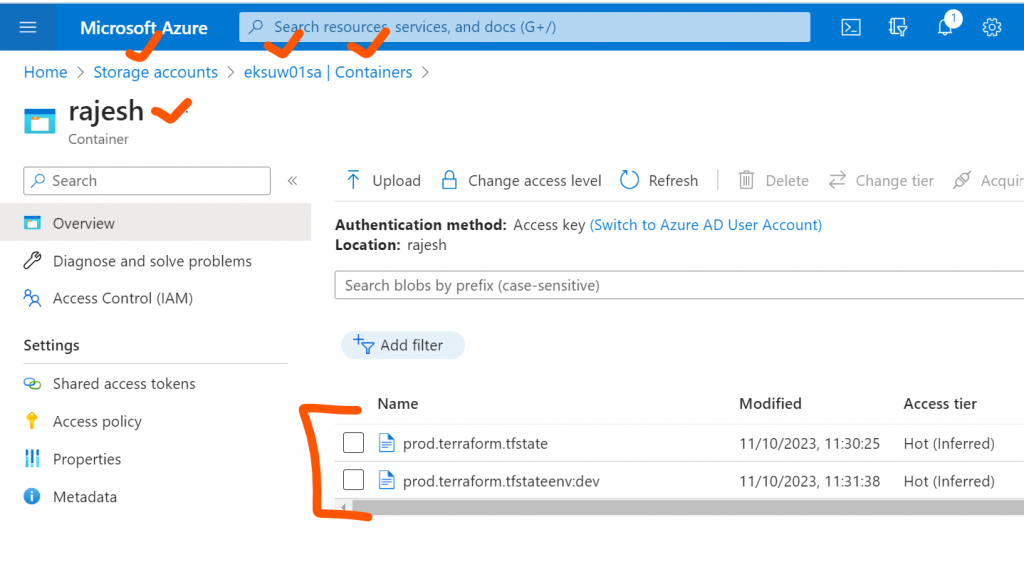
How to Setup Terraform Backend with Azure Blob Container?
terraform {
  required_providers {
    azurerm = {
      source = "hashicorp/azurerm"
      version = "3.75.0"
    }
	aws = {
      source = "hashicorp/aws"
      version = "5.20.0"
    }
	github = {
      source = "integrations/github"
      version = "5.39.0"
    }
  }
  backend "azurerm" {
    resource_group_name  = "eksuw01-rg"
    storage_account_name = "eksuw01sa"
    container_name       = "rajesh"
    key                  = "prod.terraform.tfstate"
	subscription_id = "b3dbe884-c3dc"
    client_id       = "6046fe74-dfd2-4"
    client_secret   = "3XJ8Q~uvlwVL"
    tenant_id       = "f34c8fc4-16b"
  }
}
provider "azurerm" {
  features {}
  subscription_id = "b3dbe884c"
  client_id       = "6046fe74-d"
  client_secret   = "3XJ8Q~uvlwV"
  tenant_id       = "f34c8fc4-1"
}Code language: JavaScript (javascript)
# aws-main.tf
terraform {
required_providers {
aws = {
source = "hashicorp/aws"
version = "~> 5.0"
}
}
backend "s3" {
bucket = "my-terraform-state-bucket"
key = "aws/lab/terraform.tfstate"
region = "ap-south-1"
dynamodb_table = "terraform-locks"
encrypt = true
}
}
provider "aws" {
region = "ap-south-1"
}
resource "aws_instance" "demo_vm" {
ami = "ami-0f58b397bc5c1f2e8"
instance_type = "t2.micro"
tags = {
Name = "aws-demo-vm"
}
}
Code language: PHP (php)# gcp-main.tf
terraform {
required_providers {
google = {
source = "hashicorp/google"
version = "~> 5.0"
}
}
backend "gcs" {
bucket = "my-gcp-terraform-state-bucket"
prefix = "gcp/lab"
}
}
provider "google" {
project = "my-gcp-project-id"
region = "asia-south1"
zone = "asia-south1-a"
}
resource "google_compute_instance" "demo_vm" {
name = "gcp-demo-vm"
machine_type = "e2-micro"
zone = "asia-south1-a"
boot_disk {
initialize_params {
image = "debian-cloud/debian-12"
}
}
network_interface {
network = "default"
}
}
Code language: PHP (php)# azure-main.tf
terraform {
required_providers {
azurerm = {
source = "hashicorp/azurerm"
version = "~> 4.0"
}
}
backend "azurerm" {
resource_group_name = "rg-terraform-state"
storage_account_name = "mystatestorageacct"
container_name = "tfstate"
key = "azure/lab/terraform.tfstate"
}
}
provider "azurerm" {
features {}
}
resource "azurerm_resource_group" "demo_rg" {
name = "rg-demo-vm"
location = "East US"
}
resource "azurerm_virtual_network" "demo_vnet" {
name = "demo-vnet"
address_space = ["10.0.0.0/16"]
location = azurerm_resource_group.demo_rg.location
resource_group_name = azurerm_resource_group.demo_rg.name
}
resource "azurerm_subnet" "demo_subnet" {
name = "demo-subnet"
resource_group_name = azurerm_resource_group.demo_rg.name
virtual_network_name = azurerm_virtual_network.demo_vnet.name
address_prefixes = ["10.0.1.0/24"]
}
resource "azurerm_network_interface" "demo_nic" {
name = "demo-nic"
location = azurerm_resource_group.demo_rg.location
resource_group_name = azurerm_resource_group.demo_rg.name
ip_configuration {
name = "internal"
subnet_id = azurerm_subnet.demo_subnet.id
private_ip_address_allocation = "Dynamic"
}
}
resource "azurerm_linux_virtual_machine" "demo_vm" {
name = "azure-demo-vm"
resource_group_name = azurerm_resource_group.demo_rg.name
location = azurerm_resource_group.demo_rg.location
size = "Standard_B1s"
admin_username = "azureuser"
network_interface_ids = [
azurerm_network_interface.demo_nic.id
]
admin_ssh_key {
username = "azureuser"
public_key = file("~/.ssh/id_rsa.pub")
}
os_disk {
caching = "ReadWrite"
storage_account_type = "Standard_LRS"
}
source_image_reference {
publisher = "Canonical"
offer = "ubuntu-24_04-lts"
sku = "server"
version = "latest"
}
}
Code language: PHP (php)
I’m Rajesh Kumar, a DevOps, SRE, DevSecOps, Cloud, and Platform Engineering expert passionate about sharing practical knowledge, real-world experiences, and industry best practices. I have worked at Cotocus and regularly write about technology, travel, investing, health, product reviews, and digital marketing through my various platforms.
I publish technical articles at DevOps School, travel stories at Holiday Landmark, stock market insights at Stocks Mantra, health and fitness guidance at My Medic Plus, product reviews at TrueReviewNow, and SEO and digital marketing strategies at Wizbrand.
Find Trusted Cardiac Hospitals
Compare heart hospitals by city and services — all in one place.
Explore Hospitals






Helpful and easy-to-follow guide on Terraform backend. It clearly explains state management and backend setup in a simple way.