
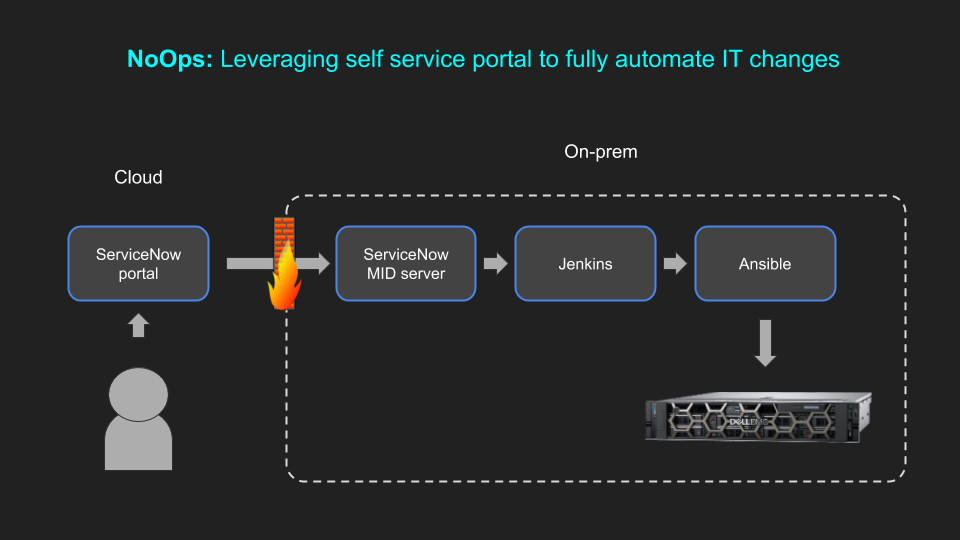
Are you tired of traditional IT operations that involve a lot of manual work and maintenance? Have you heard of the NoOps architecture? If not, you’re in for a treat. In this article, we’ll dive into the world of NoOps and explore what it is, how it works, and why it’s gaining popularity.
What is NoOps?
NoOps is short for “No Operations.” It’s an approach to software development and deployment that eliminates the need for IT operations to manage and maintain infrastructure. Instead, the responsibility of infrastructure management is shifted to the development team.
How does NoOps work?
NoOps works by automating the entire software development and deployment process. It relies heavily on DevOps practices such as continuous integration and continuous delivery (CI/CD), infrastructure as code (IaC), and automated testing.
With NoOps, the development team is responsible for writing code, testing it, and deploying it to production. The infrastructure that the code runs on is automatically provisioned and managed by the cloud provider or a third-party tool.
Why is NoOps gaining popularity?
NoOps is gaining popularity for several reasons. First, it eliminates the need for IT operations, which can be costly and time-consuming. Second, it allows for faster and more efficient software development and deployment. Third, it improves the overall quality of the software by automating testing and deployment.
NoOps vs. DevOps
NoOps and DevOps are often used interchangeably, but they are not the same thing. DevOps is a methodology that focuses on collaboration between development and IT operations teams. NoOps, on the other hand, eliminates the need for IT operations altogether.
Challenges of NoOps
While NoOps has many benefits, it also comes with its own set of challenges. One of the biggest challenges is the need for skilled developers who can handle infrastructure management. Another challenge is the potential for security and compliance issues if the development team is not properly trained.
Conclusion
NoOps is a new approach to software development and deployment that eliminates the need for IT operations. It relies heavily on automation and DevOps practices to streamline the entire process. While it has many benefits, it also comes with its own set of challenges. As technology continues to evolve, it will be interesting to see how NoOps continues to develop and shape the future of software development.

👤 About the Author
Ashwani is passionate about DevOps, DevSecOps, SRE, MLOps, and AiOps, with a strong drive to simplify and scale modern IT operations. Through continuous learning and sharing, Ashwani helps organizations and engineers adopt best practices for automation, security, reliability, and AI-driven operations.
🌐 Connect & Follow:
Website: WizBrand.com
Facebook: facebook.com/DevOpsSchool
X (Twitter): x.com/DevOpsSchools
LinkedIn: linkedin.com/company/devopsschool
YouTube: youtube.com/@TheDevOpsSchool
Instagram: instagram.com/devopsschool
Quora: devopsschool.quora.com
Email– contact@devopsschool.com
Find Trusted Cardiac Hospitals
Compare heart hospitals by city and services — all in one place.
Explore Hospitals




