
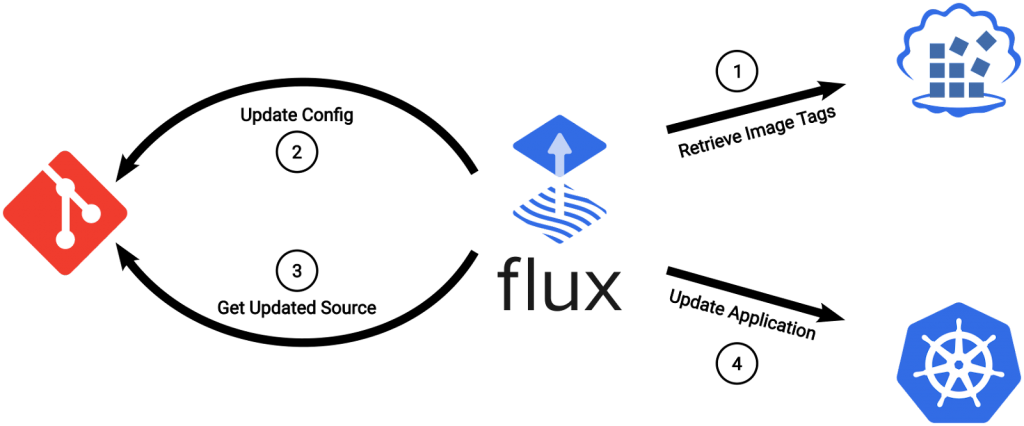
Have you ever heard of GitOps? If not, don’t worry, this article will explain everything you need to know about it. GitOps is an approach to Continuous Deployment that uses Git as a single source of truth for declarative infrastructure and applications. It’s a way to manage infrastructure and applications as code, and it’s gaining popularity among DevOps teams.
In this article, we will explore how to implement GitOps using Flux. Flux is a tool that automates the deployment of Kubernetes resources by using a Git repository as the source of truth. By the end of this article, you will have a clear understanding of how to use Flux to implement GitOps.
Introduction to GitOps
GitOps is a way of managing infrastructure and applications using Git as the source of truth. It’s a declarative way to manage your infrastructure and applications as code. GitOps allows you to manage the entire lifecycle of your infrastructure and applications from a single Git repository. With GitOps, you can version control your infrastructure and applications, and you can automate the deployment process.
Introduction to Flux
Flux is a tool that automates the deployment of Kubernetes resources. It uses a Git repository as the source of truth for your Kubernetes resources, which makes it easy to manage your infrastructure and applications as code. Flux is designed to work with Kubernetes, but it can be used with other platforms as well.
How to implement GitOps using Flux
Implementing GitOps using Flux is a straightforward process. Here are the steps you need to follow:
Step 1: Set up a Git repository
The first step is to set up a Git repository where you will store your Kubernetes manifests. This repository will be the source of truth for your infrastructure and applications. You can use any Git hosting service, such as GitHub, GitLab, or Bitbucket.
Step 2: Install Flux
The next step is to install Flux on your Kubernetes cluster. Flux is available as a Kubernetes operator, which means that you can install it using a YAML manifest. You can find the installation instructions on the Flux website.
Step 3: Configure Flux
Once you have installed Flux, you need to configure it to use your Git repository as the source of truth. You can do this by creating a YAML manifest that specifies the URL of your Git repository and the branch that Flux should use.
Step 4: Deploy your Kubernetes resources
Now that you have set up your Git repository and configured Flux, you can start deploying your Kubernetes resources. You can do this by creating Kubernetes manifests in your Git repository. When you push changes to your Git repository, Flux will automatically deploy the changes to your Kubernetes cluster.
Benefits of using GitOps with Flux
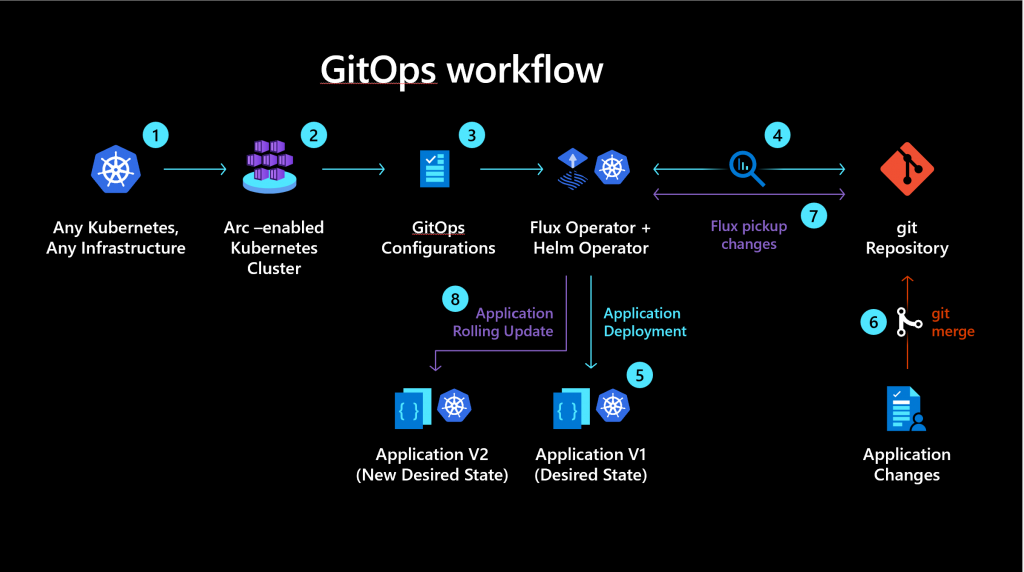
There are several benefits to using GitOps with Flux:
- Version control: With GitOps, you can version control your infrastructure and applications, which makes it easy to roll back changes if something goes wrong.
- Automation: GitOps automates the deployment process, which saves time and reduces the risk of human error.
- Declarative: GitOps is a declarative way to manage your infrastructure and applications, which means that you can define the desired state of your infrastructure and applications, and Flux will ensure that the actual state matches the desired state.
- Scalability: GitOps scales well, which means that it can be used with large-scale infrastructure and applications.
Conclusion
In conclusion, implementing GitOps using Flux is a powerful way to manage your infrastructure and applications. It allows you to version control your infrastructure and applications, automate the deployment process, and manage your infrastructure and applications as code. By following the steps outlined in this article, you can easily implement GitOps using Flux.

👤 About the Author
Ashwani is passionate about DevOps, DevSecOps, SRE, MLOps, and AiOps, with a strong drive to simplify and scale modern IT operations. Through continuous learning and sharing, Ashwani helps organizations and engineers adopt best practices for automation, security, reliability, and AI-driven operations.
🌐 Connect & Follow:
Website: WizBrand.com
Facebook: facebook.com/DevOpsSchool
X (Twitter): x.com/DevOpsSchools
LinkedIn: linkedin.com/company/devopsschool
YouTube: youtube.com/@TheDevOpsSchool
Instagram: instagram.com/devopsschool
Quora: devopsschool.quora.com
Email– contact@devopsschool.com
Find Trusted Cardiac Hospitals
Compare heart hospitals by city and services — all in one place.
Explore Hospitals





When implementing GitOps with Flux in real production environments, one important challenge that is often overlooked is how quickly a seemingly simple Git-based deployment setup turns into a complex operational system that requires strong discipline around repository design, environment management, and secrets handling (such as SOPS or Sealed Secrets). Without a clear structure, Kustomize overlays across dev, staging, and production can become difficult to maintain and reason about over time. Another key concern is controlling deployment blast radius—since Flux continuously reconciles state from Git, a change in a shared base configuration can unintentionally affect multiple clusters unless a proper promotion strategy or environment isolation model is in place. Additionally, the operational model shifts from CI pipeline visibility to reconciliation-based visibility, which means troubleshooting often moves from build logs to inspecting cluster state and controller behavior. Without strong observability around sync status, drift detection, and reconciliation failures, issues can remain hidden even when Git shows everything as successful. In mature implementations, Flux works best when combined with a well-defined promotion and rollout strategy, rather than being used as a direct sync mechanism, to ensure safer deployments and better governance across environments.