
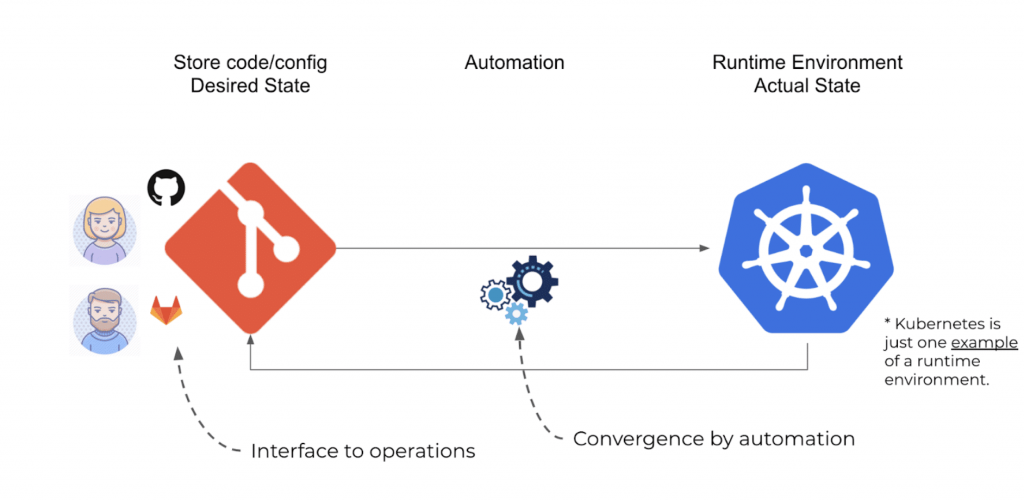
Are you tired of manually deploying your serverless applications every time you make a change? Are you looking for a more efficient and automated way to manage your serverless infrastructure? Look no further than GitOps!
GitOps is a modern approach to continuous deployment that uses Git as a single source of truth for infrastructure and application code. By combining GitOps with serverless computing, you can achieve a highly automated and scalable infrastructure that reduces deployment times and increases reliability.
In this article, we’ll explore the various use cases of GitOps for serverless computing and how it can benefit your development workflow.
Use Case 1: Infrastructure as Code
Serverless computing relies heavily on infrastructure as code (IaC) to define and manage resources. With GitOps, you can use Git to version control your IaC and ensure that all changes are tracked and auditable.
By using GitOps, you can also enforce best practices for your serverless infrastructure. For example, you can set up pre-commit hooks that prevent developers from committing code that doesn’t conform to certain standards. This ensures that your infrastructure is always in a consistent and predictable state.
Use Case 2: Continuous Delivery
With GitOps, continuous delivery becomes a breeze. Every time you push a change to Git, your serverless infrastructure is automatically updated to reflect those changes.
This means that you can deploy new features and fixes to your application with ease, without worrying about the underlying infrastructure. GitOps takes care of all the heavy lifting for you, allowing you to focus on building great applications.
Use Case 3: Scalability
Serverless computing is all about scalability. With GitOps, you can easily scale your infrastructure up or down based on demand.
For example, you can use GitOps to automatically provision new resources when traffic spikes, and then deprovision them when traffic returns to normal. This ensures that you only pay for the resources you use, and that your application can handle any amount of traffic without breaking a sweat.
Use Case 4: Disaster Recovery
Disaster recovery is a critical component of any serverless infrastructure. With GitOps, you can ensure that your infrastructure is always backed up and recoverable in case of a disaster.
By version controlling your IaC in Git, you can easily roll back to a previous version in case of a catastrophic failure. You can also use GitOps to automatically deploy your infrastructure to a new region if your primary region experiences an outage.
Conclusion
In conclusion, GitOps is a powerful tool for managing serverless infrastructure. It provides a single source of truth for your IaC, automates continuous delivery, enables scalability, and ensures disaster recovery.
By incorporating GitOps into your development workflow, you can streamline your serverless infrastructure and focus on building great applications. So why wait? Start using GitOps for serverless today!

👤 About the Author
Ashwani is passionate about DevOps, DevSecOps, SRE, MLOps, and AiOps, with a strong drive to simplify and scale modern IT operations. Through continuous learning and sharing, Ashwani helps organizations and engineers adopt best practices for automation, security, reliability, and AI-driven operations.
🌐 Connect & Follow:
Website: WizBrand.com
Facebook: facebook.com/DevOpsSchool
X (Twitter): x.com/DevOpsSchools
LinkedIn: linkedin.com/company/devopsschool
YouTube: youtube.com/@TheDevOpsSchool
Instagram: instagram.com/devopsschool
Quora: devopsschool.quora.com
Email– contact@devopsschool.com
Find Trusted Cardiac Hospitals
Compare heart hospitals by city and services — all in one place.
Explore Hospitals




