
Are you tired of getting lost or stuck in traffic on your daily commute? Look no further than these top 11 apps for maps and navigation. From real-time traffic updates to offline maps, these apps have got you covered.
1. Google Maps
Google Maps is the most popular navigation app and for good reason. It offers real-time traffic updates, turn-by-turn directions, and even includes public transportation options. Plus, with its street view feature, you can preview your destination before you even get there.
2. Waze
If you’re looking for a community-driven navigation app, Waze is the one for you. With Waze, users can report accidents, traffic, and even police activity in real-time. It also offers turn-by-turn directions and voice-guided navigation.
3. Apple Maps
For Apple users, Apple Maps is a solid choice. It offers turn-by-turn directions, real-time traffic updates, and even includes indoor maps for malls and airports. Plus, it integrates seamlessly with other Apple apps like Siri and Apple Watch.
4. MapQuest
MapQuest may not be as well-known as some of the other apps on this list, but it’s still a great option. It offers turn-by-turn directions, real-time traffic updates, and even includes gas prices along your route.
5. HERE WeGo
HERE WeGo offers both online and offline maps, making it a great option for travelers. It also includes public transportation options and even bike routes. Plus, it’s completely free to use.
6. Sygic

Sygic is another great navigation app that offers offline maps. It also includes real-time traffic updates, speed camera warnings, and voice-guided navigation. Plus, it offers a premium version with even more features.
7. CoPilot
CoPilot is a great option for those who frequently travel internationally. It includes offline maps for over 150 countries and offers turn-by-turn directions and real-time traffic updates. Plus, it’s available in over 30 languages.
8. Citymapper
Citymapper is the go-to app for urban commuters. It includes real-time transit updates for trains, buses, and even bike-sharing services. Plus, it offers step-by-step directions and even tells you the best place to stand on the train for your destination.
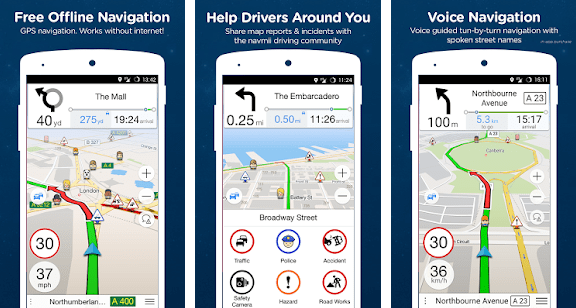
9. Navmii
Navmii is another app that offers both online and offline maps. It includes turn-by-turn directions, real-time traffic updates, and even includes parking suggestions. Plus, it’s completely free to use.
10. TomTom GO Mobile
TomTom GO Mobile is a great option for those looking for a premium navigation app. It offers offline maps, real-time traffic updates, and even includes speed camera warnings. Plus, it offers a 30-day free trial for new users.
11. MapFactor
Last but not least, MapFactor is a great option for those looking for a free navigation app. It offers offline maps, turn-by-turn directions, and even includes speed camera warnings. Plus, it’s ad-free.
In conclusion, there are plenty of great options for maps and navigation apps. Whether you’re looking for real-time traffic updates or offline maps, these apps have got you covered. So, download one (or a few) and never get lost again.

👤 About the Author
Ashwani is passionate about DevOps, DevSecOps, SRE, MLOps, and AiOps, with a strong drive to simplify and scale modern IT operations. Through continuous learning and sharing, Ashwani helps organizations and engineers adopt best practices for automation, security, reliability, and AI-driven operations.
🌐 Connect & Follow:
Website: WizBrand.com
Facebook: facebook.com/DevOpsSchool
X (Twitter): x.com/DevOpsSchools
LinkedIn: linkedin.com/company/devopsschool
YouTube: youtube.com/@TheDevOpsSchool
Instagram: instagram.com/devopsschool
Quora: devopsschool.quora.com
Email– contact@devopsschool.com
Find Trusted Cardiac Hospitals
Compare heart hospitals by city and services — all in one place.
Explore Hospitals




