

What is Hortonworks?
Hortonworks is an open-source software company that provides a data platform based on Apache Hadoop. It was founded in 2011 and is headquartered in Santa Clara, California. The company offers a range of products and services that help organizations manage and analyze large amounts of data.
Top 10 use cases of Hortonworks
- Data warehousing
- Fraud detection
- Predictive analytics
- Customer analytics
- Risk management
- Supply chain optimization
- Internet of Things (IoT) data processing
- Social media analytics
- Healthcare analytics
- Energy management
What are the features of Hortonworks?
Hortonworks offers a number of features that make it a popular choice for organizations looking to manage and analyze big data. These features include:
- Scalability
- Security
- Flexibility
- Reliability
- High performance
- Low cost
How Hortonworks Works and Architecture?
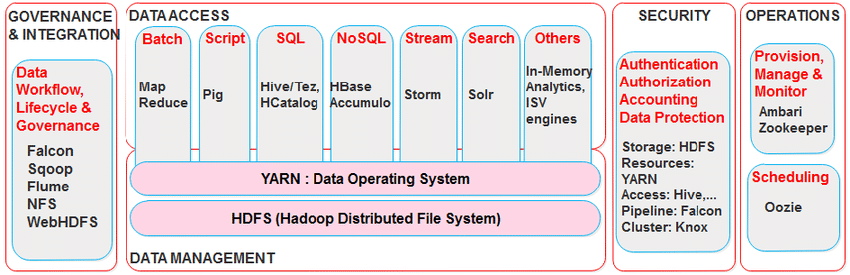
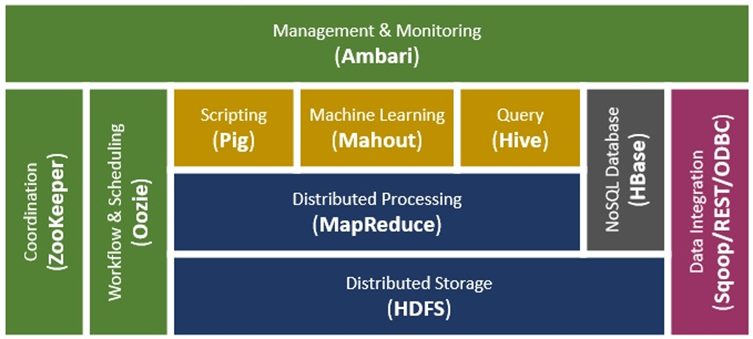
Hortonworks’ architecture was based on the principles of Apache Hadoop’s distributed computing model. Key components included:
- Hadoop Distributed File System (HDFS): HDFS stored and managed data across the cluster, providing fault tolerance and scalability.
- YARN (Yet Another Resource Negotiator): YARN managed cluster resources and scheduled jobs for processing.
- Data Processing Engines: Hortonworks supported various data processing engines like Apache Spark, Apache Hive, Apache HBase, and more.
- Data Ingestion: It facilitated data ingestion from different sources, such as logs, databases, and streams.
- Real-Time Streaming: Hortonworks supported real-time data streaming and processing using Apache Kafka and Apache Storm.
- Security and Governance: Hortonworks provided features for data security, authentication, authorization, and data governance.
How to Install Hortonworks?
Installing Hortonworks can be done in a few simple steps:

- Download the Hortonworks Data Platform (HDP) from the Hortonworks website.
- Follow the installation wizard to install HDP on your system.
- Configure HDP to meet your specific needs.
- Start using HDP to manage and analyze your data.
Basic Tutorials of Hortonworks: Getting Started
Getting started with Hortonworks is easy with these basic tutorials:
Installing Hortonworks
- Download the Hortonworks Sandbox installer from the Hortonworks website.
- After downloading run the installer and precisely follow the on-screen instructions.
- Once the installer is finished, you will have a working Hortonworks Sandbox environment.
Creating a Hadoop Cluster
- Log in to the Hortonworks Sandbox web console.
- Click on the “Hadoop” tab.
- Click on the “Create Cluster” button.
- Enter a name for your cluster and select the number of nodes you want to create.
- Click on the “Create” button.
Loading Data into Hadoop
- Create a directory in HDFS to store your data.
- Copy your data files into the directory you created.
- Use the Hadoop CLI to load the data into HDFS.
Running MapReduce Jobs
- Write a MapReduce program.
- Compile the MapReduce program.
- Submit the MapReduce job to Hadoop.
Exploring the Hortonworks Sandbox
- Log in to the Hortonworks Sandbox web console.
- Click on the “Explore” tab.
- Click on the “Hadoop” tab.
- You can explore the Hadoop cluster, including the HDFS filesystem, the YARN resource manager, and the MapReduce jobs.
These are just a few basic tutorials of Hortonworks. For more information, please visit the Hortonworks website.
Additional Resources
- Hortonworks Documentation: https://docs.hortonworks.com/
- Hortonworks Community: https://community.hortonworks.com/
- Hortonworks Training: https://training.hortonworks.com/
Overall, Hortonworks provides a comprehensive platform for organizations looking to manage and analyze big data. Its range of features and ease of use make it a popular choice for many organizations. By following these basic tutorials, you can get started with Hortonworks and begin harnessing the power of big data for your organization.

👤 About the Author
Ashwani is passionate about DevOps, DevSecOps, SRE, MLOps, and AiOps, with a strong drive to simplify and scale modern IT operations. Through continuous learning and sharing, Ashwani helps organizations and engineers adopt best practices for automation, security, reliability, and AI-driven operations.
🌐 Connect & Follow:
Website: WizBrand.com
Facebook: facebook.com/DevOpsSchool
X (Twitter): x.com/DevOpsSchools
LinkedIn: linkedin.com/company/devopsschool
YouTube: youtube.com/@TheDevOpsSchool
Instagram: instagram.com/devopsschool
Quora: devopsschool.quora.com
Email– contact@devopsschool.com
Find Trusted Cardiac Hospitals
Compare heart hospitals by city and services — all in one place.
Explore Hospitals




