
What are Data Cleaning Tools?
Data Cleaning Tools, also known as Data Cleansing Tools or Data Quality Tools, are software applications or platforms that automate the process of detecting and correcting errors, inconsistencies, and inaccuracies in datasets. Data cleaning is a critical step in the data preparation process, ensuring that data is accurate, reliable, and ready for analysis or use in various applications. These tools help improve data quality, eliminate duplicate records, handle missing values, and standardize data formats.
Top 10 use cases of Data Cleaning Tools:
- Duplicate Removal: Identifying and removing duplicate records from datasets to avoid redundant information.
- Missing Value Handling: Handling missing or null values in datasets by imputation or deletion.
- Outlier Detection: Identifying and handling outliers that can distort analysis results.
- Data Standardization: Standardizing data formats, units, and naming conventions for consistency.
- Data Validation: Verifying data against predefined rules or constraints to ensure accuracy.
- Address Validation: Validating and correcting addresses to improve data quality.
- Data Deduplication: Merging records with similar attributes to create a single, accurate record.
- Data Transformation: Converting data into a suitable format for analysis or downstream processes.
- Data Profiling: Analyzing and summarizing data to understand its quality and characteristics.
- Data Integration: Integrating data from multiple sources while resolving inconsistencies.
What are the feature of Data Cleaning Tools?
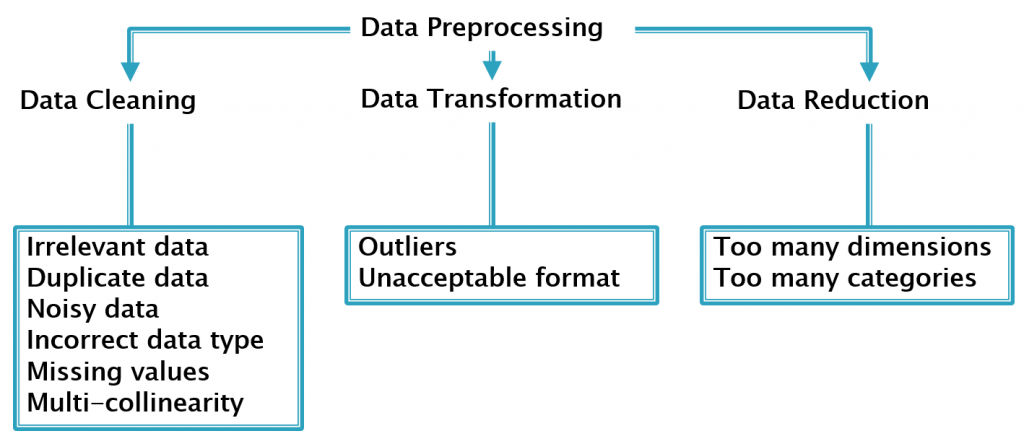
- Data Exploration: Data cleaning tools allow users to explore and understand the data’s quality and structure.
- Data Parsing: Tools can parse data to extract meaningful information from unstructured formats.
- Duplicate Detection: They can detect and eliminate duplicate records based on specified criteria.
- Missing Value Handling: Data cleaning tools provide options to impute, delete, or flag missing values.
- Outlier Detection: They can identify and handle outliers using statistical methods.
- Data Standardization: Tools can standardize data formats, units, and naming conventions.
- Data Transformation: They allow data transformation and conversion to different formats.
- Data Validation: Tools can validate data against predefined rules or constraints.
- Data Deduplication: They facilitate data deduplication by identifying similar records.
- Data Profiling: Data cleaning tools can perform data profiling to assess data quality.
How Data Cleaning Tools Work and Architecture?
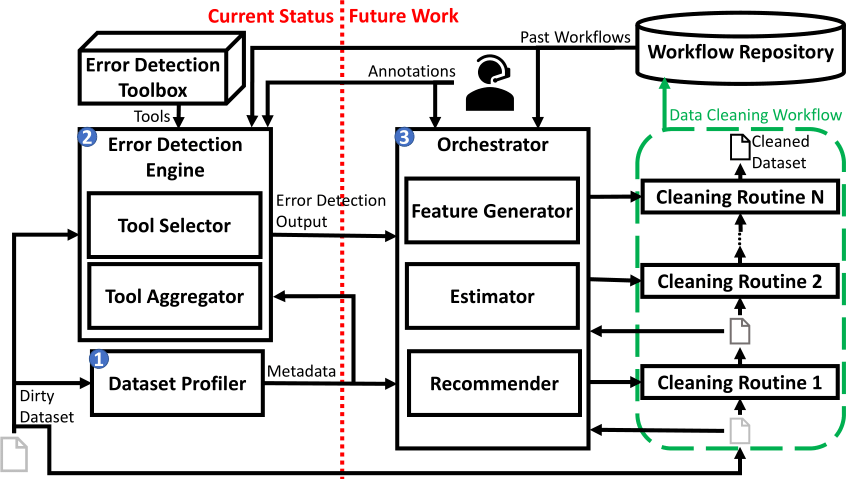
The architecture of data cleaning tools can vary based on the specific tool and its functionalities. Generally, they involve the following steps:
- Data Ingestion: Data is ingested from various sources and loaded into the cleaning tool.
- Data Exploration and Profiling: The tool performs data profiling to understand data quality and characteristics.
- Data Cleaning Operations: Based on user-defined rules and configurations, the tool applies various cleaning operations, such as duplicate removal, missing value handling, and outlier detection.
- Data Transformation and Standardization: Tools can perform data transformation and standardization to ensure consistency and uniformity.
- Data Validation: The tool validates data against predefined rules or constraints to identify errors.
- Data Deduplication: Data deduplication is performed to merge similar records and eliminate redundancies.
- Data Output: The cleaned data is then saved or exported to be used for analysis or downstream processes.
How to Install Data Cleaning Tools?
The installation process for data cleaning tools depends on the specific tool you want to use. Many data cleaning tools are available as standalone applications or cloud-based platforms. Some popular data cleaning tools include:
- OpenRefine: Download the OpenRefine installer from the OpenRefine website and follow the installation instructions.
- Trifacta Wrangler: Trifacta Wrangler is available as a web-based tool accessible through a web browser.
- DataWrangler: DataWrangler is available as a web-based tool accessible through a web browser.
Please visit the official websites of the data cleaning tools you wish to install for detailed and up-to-date installation instructions specific to each tool.
Basic Tutorials of Data Cleaning Tools: Getting Started
Sure! Here are step-by-step basic tutorials for getting started with two popular Data Cleaning Tools: OpenRefine and Trifacta Wrangler.
Data Cleaning Tool: OpenRefine
- Installing OpenRefine:
- Download the OpenRefine installer from the OpenRefine website (openrefine.org).
- Run the installer and apply the given screen instructions to accomplish the installation.
2. Loading and Exploring Data:
- Launch OpenRefine and import your dataset (CSV, TSV, Excel, etc.) by clicking “Create Project” and selecting the file.
- Explore the data using facets and filters to identify potential data quality issues.
3. Data Cleaning Operations:
- Perform basic data cleaning operations like removing duplicates, changing cases, trimming spaces, and removing blank cells.
4. Handling Missing Values:
- Use facets to identify missing values and apply transformations to handle them (e.g., replace with default values or impute).
5. Data Transformation:
- Use GREL (General Refine Expression Language) to perform more complex data transformations and clean-up.
6. Cluster and Merge Similar Values:
- Use clustering to identify similar values and merge them to resolve inconsistencies.
7. Exporting the Cleaned Data:
- Review the changes and export the cleaned data in the desired format.
Data Cleaning Tool: Trifacta Wrangler
- Accessing Trifacta Wrangler:
- Trifacta Wrangler is available as a web-based tool accessible through a web browser.
- Visit the Trifacta website (trifacta.com) and sign up for a free account or use the trial version.
2. Loading and Exploring Data:
- Upload your dataset (CSV, Excel, JSON, etc.) by clicking “Import Data” in Trifacta Wrangler.
- Explore the data using data profiling and automatic data quality checks.
3. Data Cleaning Operations:
- Use the built-in data cleaning suggestions or create your own cleaning recipes.
- Perform operations like removing duplicates, transforming data types, and handling missing values.
4. Data Transformation:
- Use Trifacta’s intelligent transformations to clean and reshape data easily.
5. Handling Inconsistent Data:
- Use data wrangling to standardize and cleanse inconsistent data formats.
6. Data Validation:
- Validate the data using data quality rules and checks.
7. Exporting the Cleaned Data:
- Review the changes and export the cleaned data in the desired format.
These tutorials will help you get started with these popular data cleaning tools. As you progress, you can explore more advanced features and functionalities to handle more complex data cleaning tasks efficiently.

👤 About the Author
Ashwani is passionate about DevOps, DevSecOps, SRE, MLOps, and AiOps, with a strong drive to simplify and scale modern IT operations. Through continuous learning and sharing, Ashwani helps organizations and engineers adopt best practices for automation, security, reliability, and AI-driven operations.
🌐 Connect & Follow:
Website: WizBrand.com
Facebook: facebook.com/DevOpsSchool
X (Twitter): x.com/DevOpsSchools
LinkedIn: linkedin.com/company/devopsschool
YouTube: youtube.com/@TheDevOpsSchool
Instagram: instagram.com/devopsschool
Quora: devopsschool.quora.com
Email– contact@devopsschool.com
Find Trusted Cardiac Hospitals
Compare heart hospitals by city and services — all in one place.
Explore Hospitals




