
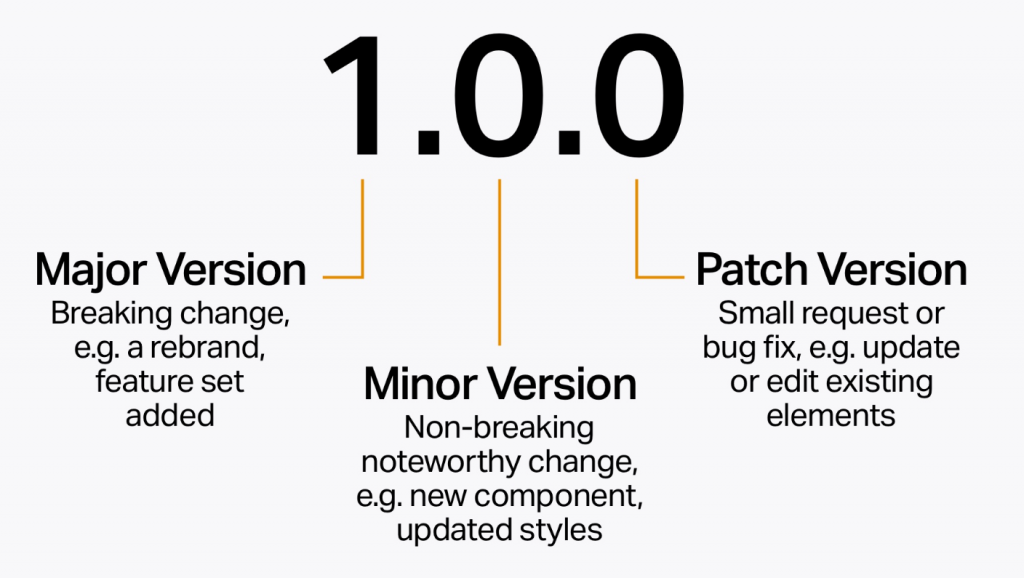
Semantic versioning (SemVer) is a versioning scheme that assigns a 3-part version number (major.minor.patch) to each release of a software project. The meaning of each part of the version number is as follows:
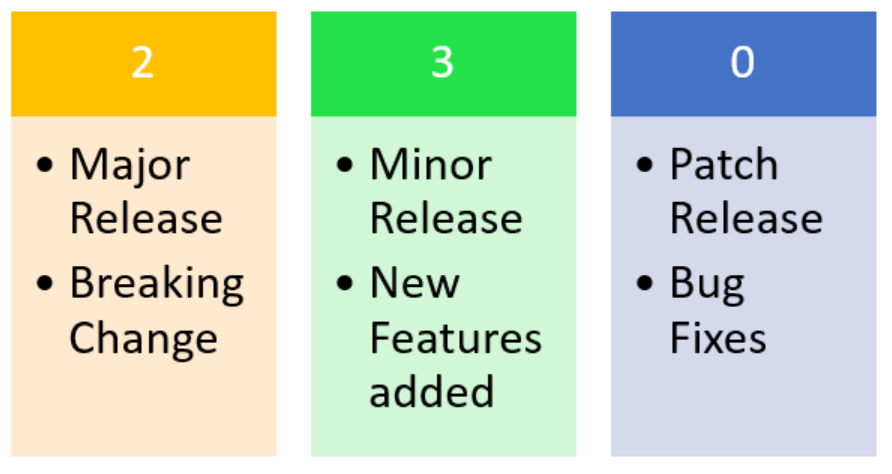
- Major version (X): A change in the major version number indicates a significant change to the software that may not be backward compatible. For example, a major version change might involve a change in the API, a new feature that is not backward compatible, or a significant performance improvement.
- Minor version (Y): A change in the minor version number indicates a new feature or improvement that is backward compatible with previous versions. For example, a minor version change might involve a new bug fix, a performance improvement, or a new feature that does not change the API.
- Patch version (Z): A change in the patch version number indicates a bug fix that is backward compatible with previous versions. For example, a patch version change might involve a fix for a security vulnerability, a crash bug, or a typo.
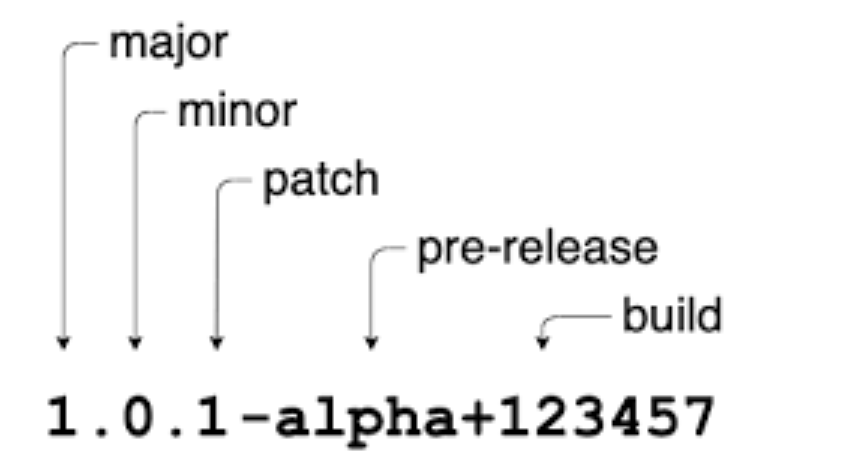
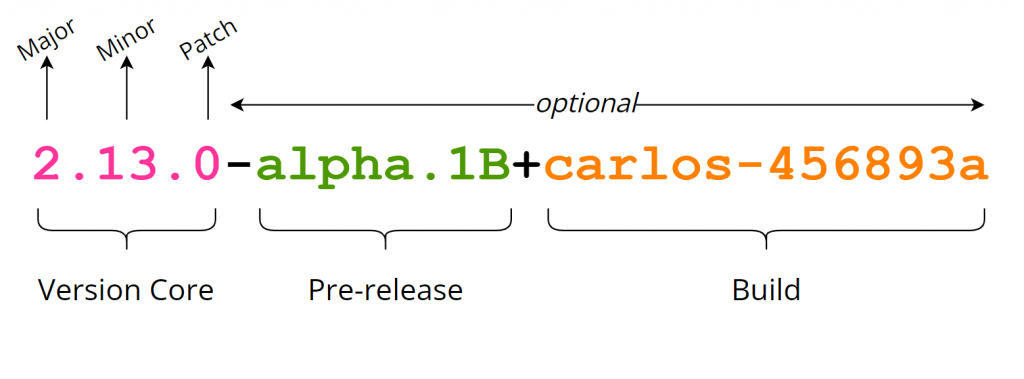
In addition to the three parts of the version number, SemVer also allows for the use of pre-release versions and build metadata. Pre-release versions are indicated by a hyphen followed by a word or phrase that describes the pre-release state, such as “alpha” or “beta”. Build metadata is indicated by a plus sign followed by a string of characters that are used to identify the build, such as the commit hash or the build number.
SemVer is a widely-adopted versioning scheme that is used by many popular software projects, including Node.js, React, and Vue.js. It is a good choice for software projects that need to communicate the meaning of version numbers to users and developers.
Here are some examples of semantic version numbers:
- 1.0.0: This is the first release of the software. It has no breaking changes and only contains bug fixes.
- 1.1.0: This release adds a new feature that is backward compatible with the previous version.
- 2.0.0: This release introduces a breaking change to the API. It is not backward compatible with previous versions.
- 1.2.3-alpha: This is a pre-release version of the software. It is not yet ready for production use.
- 1.2.3+build.1: This is a build of the software with a specific commit hash.
Semantic Versioning (SemVer), often abbreviated as SemVer or Semantic Versioning 2.0, is a versioning scheme and a set of rules for software version numbers that convey meaning about the underlying changes in a software project. It was created to help developers and users understand the impact of updates and upgrades to a piece of software more easily. SemVer follows a format of major.minor.patch (e.g., 1.2.3) and includes additional rules and conventions:
- Major Version (X.0.0):
- Increment the major version when there are incompatible changes that require users to make significant modifications to their code or data structures.
- Examples of incompatible changes include breaking API changes, removing features, or altering data formats.
- Minor Version (X.Y.0):
- Increment the minor version when new features or enhancements are added in a backward-compatible manner. This means that users can adopt the new version without making significant changes to their existing code.
- Backward compatibility should be maintained for existing functionality.
- Patch Version (X.Y.Z):
- Increment the patch version for backward-compatible bug fixes or minor improvements that do not introduce new features or breaking changes.
- These updates should not require users to modify their code or data.
- Pre-release Versions:
- A pre-release version can be indicated with a hyphen and a series of dot-separated identifiers (e.g., 1.0.0-alpha.1).
- Pre-release versions are used for work in progress or testing and should not be considered stable.
- Build Metadata:
- Build metadata can be added with a plus sign and a series of dot-separated identifiers (e.g., 1.0.0+20130313144700).
- Build metadata provides additional information about the build process but does not affect version precedence or compatibility.
The key idea behind SemVer is that users can quickly understand the nature and impact of a version change by simply looking at the version number. For example:
- Going from 1.0.0 to 2.0.0 suggests significant, potentially breaking changes.
- Going from 1.0.0 to 1.1.0 indicates the addition of new features without breaking changes.
- Going from 1.0.0 to 1.0.1 suggests minor bug fixes without new features or breaking changes.
SemVer has become a widely adopted standard in the software development industry, helping developers and users manage software dependencies, make informed upgrade decisions, and ensure compatibility between different components and libraries in a software ecosystem. It promotes clarity and predictability in versioning, making it easier to maintain and evolve software projects.

I’m Rajesh Kumar, a DevOps, SRE, DevSecOps, Cloud, and Platform Engineering expert passionate about sharing practical knowledge, real-world experiences, and industry best practices. I have worked at Cotocus and regularly write about technology, travel, investing, health, product reviews, and digital marketing through my various platforms.
I publish technical articles at DevOps School, travel stories at Holiday Landmark, stock market insights at Stocks Mantra, health and fitness guidance at My Medic Plus, product reviews at TrueReviewNow, and SEO and digital marketing strategies at Wizbrand.
Find Trusted Cardiac Hospitals
Compare heart hospitals by city and services — all in one place.
Explore Hospitals





