
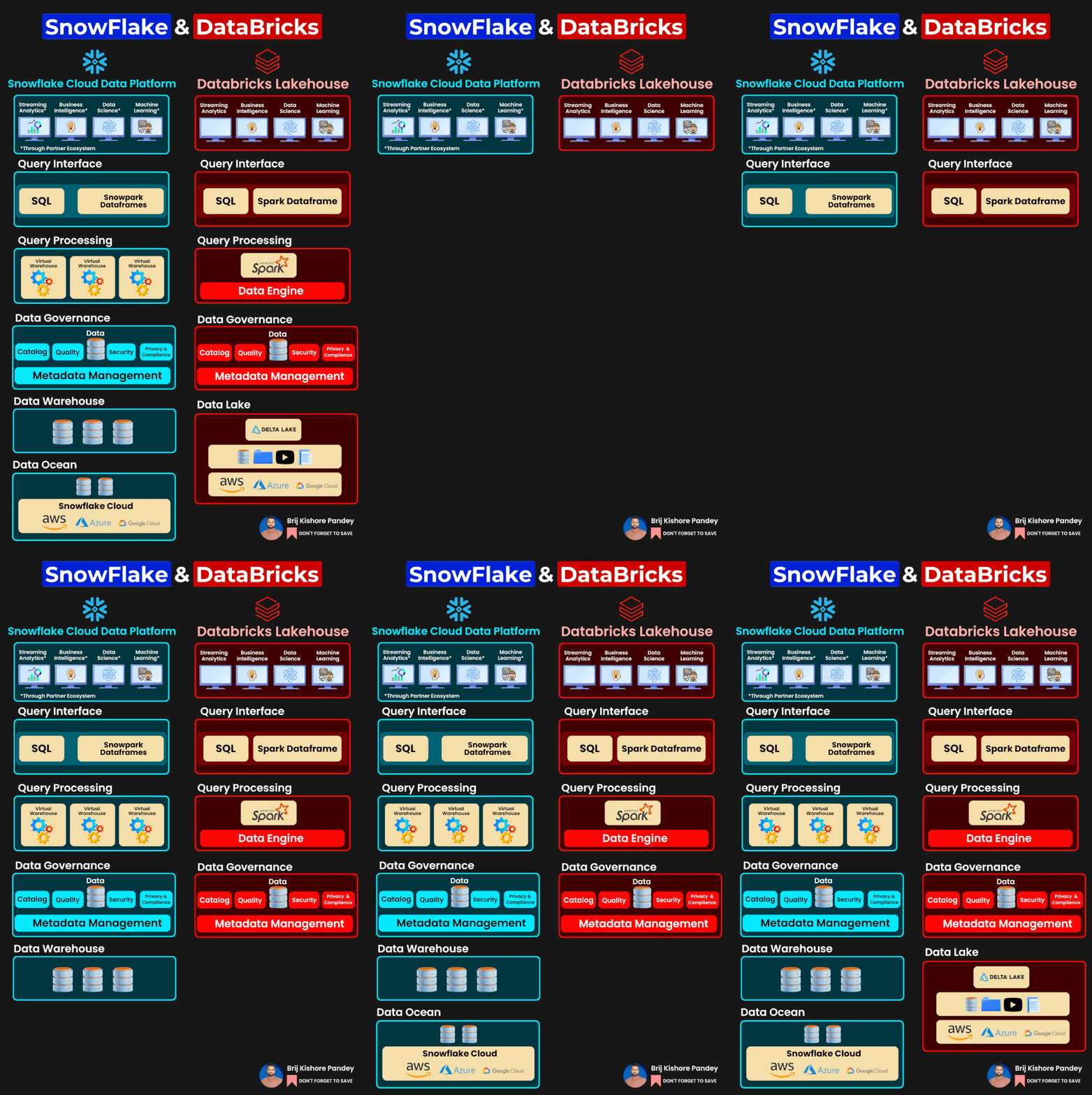
Snowflake and Databricks are two powerful cloud-based platforms, each offering a distinct approach to data processing and analytics. Here’s a comparison highlighting their differences:
- Core Functionality:
- Snowflake: Primarily a cloud data platform providing data warehousing as a service. It’s designed to centralize, store, and run fast SQL queries across large datasets.
- Databricks: A unified analytics platform built around Apache Spark, it provides collaborative notebooks, integrated workflows, and a runtime optimized for the cloud.
- Architecture:
- Snowflake: Uses a unique architecture that separates compute and storage layers. This enables users to scale compute (virtual warehouses) and storage independently, which can lead to cost savings.
- Databricks: Built on Apache Spark, it inherently leverages Spark’s in-memory processing capabilities, distributed computing, and its wide array of supported data processing tasks (batch, real-time, machine learning, etc.).
- Data Integration:
- Snowflake: Provides native connectors for various ETL tools and integrates with popular BI tools. Snowflake can ingest structured and semi-structured data (like JSON).
- Databricks: Offers a broader set of connectors due to its Spark foundation, supporting various data sources, including but not limited to Hadoop HDFS, Delta Lake, Kafka, and more.
- Performance:
- Snowflake: Achieves fast performance with features like automatic clustering, materialized views, and the separation of compute and storage.
- Databricks: Boosts performance using an optimized version of Apache Spark. Databricks also introduced Delta Lake, which brings ACID transactions to data lakes and improves read and write operations’ speed.
- Pricing:
- Snowflake: You’re primarily charged for the amount of compute (virtual warehouses) you use and the storage consumed.
- Databricks: Charges are generally based on the virtual machines you use for computations and any additional premium features or support levels.
- Usability:
- Snowflake: SQL-based interface makes it friendly for those familiar with SQL. The web interface allows for easy management and query execution.
- Databricks: Offers collaborative notebooks, making it easier for teams to work together on analytics and machine learning tasks.
- Machine Learning:
- Snowflake: Not inherently a machine learning platform, but it integrates with various ML platforms and tools.
- Databricks: Has built-in capabilities for machine learning. The collaborative notebooks support multiple languages, including Python, which allows the easy use of libraries like TensorFlow and PyTorch.
- Ecosystem & Community:
- Snowflake: Growing rapidly and has strong integrations with major cloud providers and various tech partners.
- Databricks: Rooted in the Apache Spark community, it has a vast ecosystem. Moreover, its initiatives like Delta Lake are further expanding its community reach.
- Security:
- Snowflake: Provides features like end-to-end encryption, multi-factor authentication, and role-based access control.
- Databricks: Offers encryption at rest and in transit, role-based access control, and integration with enterprise security tools.

I’m Rajesh Kumar, a DevOps, SRE, DevSecOps, Cloud, and Platform Engineering expert passionate about sharing practical knowledge, real-world experiences, and industry best practices. I have worked at Cotocus and regularly write about technology, travel, investing, health, product reviews, and digital marketing through my various platforms.
I publish technical articles at DevOps School, travel stories at Holiday Landmark, stock market insights at Stocks Mantra, health and fitness guidance at My Medic Plus, product reviews at TrueReviewNow, and SEO and digital marketing strategies at Wizbrand.
Find Trusted Cardiac Hospitals
Compare heart hospitals by city and services — all in one place.
Explore Hospitals





