
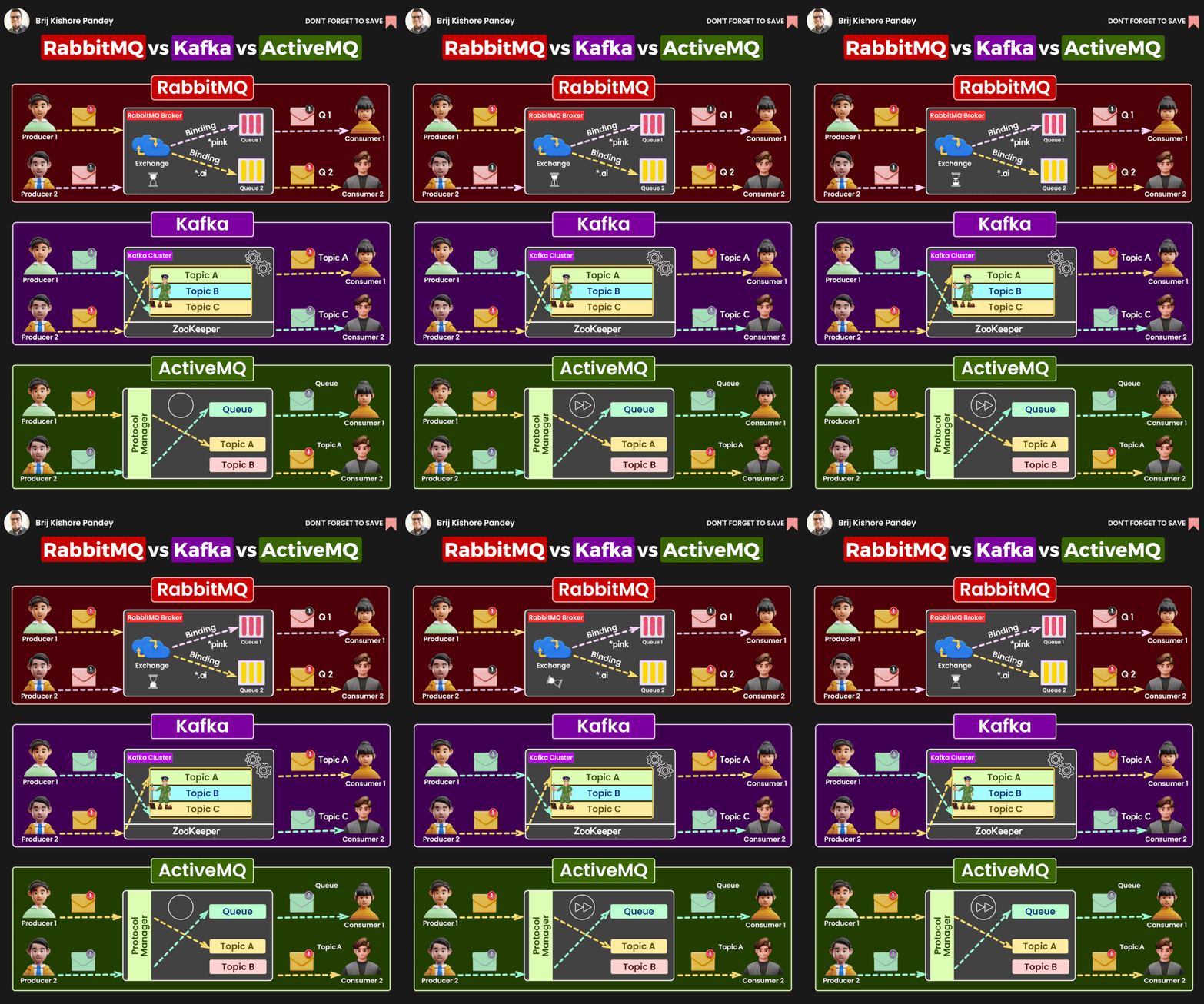
RabbitMQ, Kafka, and ActiveMQ are all popular messaging brokers, but they have different strengths and weaknesses.
RabbitMQ is a message queue that is known for its flexibility and performance. It is a good choice for applications that need to be able to handle a high volume of messages with low latency. RabbitMQ also supports a variety of messaging protocols, which makes it easy to integrate with different applications.
Kafka is a distributed streaming platform that is designed to handle high volumes of data in real time. It is a good choice for applications that need to be able to process data streams in real time, such as fraud detection and social media monitoring. Kafka is also highly scalable and can be used to build large-scale distributed applications.
ActiveMQ is a messaging broker that is known for its reliability and ease of use. It is a good choice for applications that need to be able to deliver messages reliably, even if there are failures in the system. ActiveMQ also supports a variety of messaging protocols and can be integrated with different applications.
RabbitMQ, Kafka, and ActiveMQ are three popular message broker systems used for managing and transmitting messages between distributed applications and services. Each of these technologies has its own strengths and weaknesses, making them suitable for different use cases. Let’s compare RabbitMQ, Kafka, and ActiveMQ based on various criteria:
- Messaging Model:
- RabbitMQ: RabbitMQ is a message broker that primarily follows the Advanced Message Queuing Protocol (AMQP). It supports multiple messaging patterns, including publish-subscribe, request-reply, and work queues.
- Kafka: Kafka is more of a distributed event streaming platform. It follows the publish-subscribe model and is optimized for handling large volumes of data streams in real-time.
- ActiveMQ: ActiveMQ supports various messaging patterns, including point-to-point (queue-based) and publish-subscribe (topic-based).
- Use Cases:
- RabbitMQ: Suitable for scenarios where you need reliable and asynchronous communication between applications. It’s commonly used for task distribution and job queuing.
- Kafka: Ideal for scenarios involving real-time event streaming, data pipelines, log aggregation, and building scalable, fault-tolerant data processing systems.
- ActiveMQ: Suited for traditional messaging applications, enterprise integration, and systems requiring JMS (Java Message Service) support.
- Scalability:
- RabbitMQ: Can be deployed in a clustered setup for high availability and some degree of scalability. However, it may not scale as seamlessly as Kafka for extremely high message throughput.
- Kafka: Kafka is designed for horizontal scalability and can handle very high message throughput. It is often used in big data and event-driven architectures.
- ActiveMQ: Supports clustering for scalability and high availability, but it may require more manual configuration compared to Kafka.
- Durability and Persistence:
- RabbitMQ: Supports message persistence and durability, making it reliable for scenarios where data loss is not acceptable.
- Kafka: Kafka is highly durable and persists messages to disk by default, making it suitable for use cases requiring data retention.
- ActiveMQ: Offers message persistence, ensuring that messages are not lost even in the event of broker failures.
- Message Retention:
- RabbitMQ: RabbitMQ is not designed for long-term message retention; it focuses on immediate message processing.
- Kafka: Kafka is excellent for storing and retaining large volumes of event data for longer periods.
- ActiveMQ: ActiveMQ supports message retention but may not be as optimized for long-term storage as Kafka.
- Ease of Use:
- RabbitMQ: Known for its ease of setup and configuration. It has a simple and straightforward API.
- Kafka: Kafka’s configuration can be more complex due to its focus on distributed streaming. It might require more expertise to set up correctly.
- ActiveMQ: ActiveMQ has a user-friendly interface and supports a variety of protocols, making it relatively easy to use.
- Community and Ecosystem:
- RabbitMQ: Has a large and active community with extensive documentation and a wide range of client libraries.
- Kafka: Kafka has gained significant popularity, especially in the big data and real-time data processing communities. It has a growing ecosystem of tools and connectors.
- ActiveMQ: ActiveMQ has a well-established community and supports multiple protocols, including JMS.

I’m Rajesh Kumar, a DevOps, SRE, DevSecOps, Cloud, and Platform Engineering expert passionate about sharing practical knowledge, real-world experiences, and industry best practices. I have worked at Cotocus and regularly write about technology, travel, investing, health, product reviews, and digital marketing through my various platforms.
I publish technical articles at DevOps School, travel stories at Holiday Landmark, stock market insights at Stocks Mantra, health and fitness guidance at My Medic Plus, product reviews at TrueReviewNow, and SEO and digital marketing strategies at Wizbrand.
Find Trusted Cardiac Hospitals
Compare heart hospitals by city and services — all in one place.
Explore Hospitals






Very useful comparison! I liked how RabbitMQ, Kafka, and ActiveMQ are explained with clear differences and real‑world use cases. This made it much easier to understand which messaging system fits different scenarios. Thanks for the helpful guide!