
What is Swimlane?
Swimlane is a security orchestration, automation, and response (SOAR) platform designed to help organizations streamline and automate their security operations and incident response processes. It provides a range of features and capabilities to enhance security incident management and response.
Top 10 use cases of Swimlane:
Here are the top 10 use cases of Swimlane:
- Incident Triage and Enrichment: Swimlane collects and centralizes security alerts and incidents from multiple sources, enriching them with contextual information to provide a more comprehensive view of each incident.
- Playbook Automation: Users can create customized playbooks that define automated workflows for incident response. Playbooks help automate repetitive tasks and guide analysts through the incident resolution process.
- Incident Workflow Management: Swimlane offers a centralized platform for tracking, managing, and prioritizing security incidents, ensuring that critical issues are addressed promptly.
- Alert Management: The platform consolidates alerts from various security tools and sources, reducing alert fatigue and enabling security teams to focus on high-priority incidents.
- Orchestration of Security Tools: Swimlane orchestrates actions and responses across a wide range of security tools, technologies, and systems, helping organizations achieve better coordination and efficiency in incident response.
- Threat Intelligence Integration: Swimlane integrates with threat intelligence feeds and platforms to automatically correlate and enrich incident data with relevant threat context, indicators of compromise (IOCs), and known attack patterns.
- Automated Response: The platform automates incident response actions, allowing predefined tasks and workflows to be executed in response to security incidents.
- Custom Integrations: Users can create custom integrations and connectors to integrate with their specific security tools and systems, ensuring compatibility with their existing infrastructure.
- Machine Learning and AI: Swimlane incorporates machine learning and artificial intelligence capabilities to assist with threat detection, decision-making, and anomaly detection within incident response workflows.
- Incident Reporting and Documentation: Swimlane provides incident reporting and documentation features to create detailed incident reports for compliance, analysis, and post-incident review.
- Case Management: It offers case management capabilities to group related incidents, track investigation progress, and maintain detailed incident records.
- User and Entity Behavior Analytics (UEBA) Integration: Swimlane can integrate with UEBA solutions to monitor and detect anomalous user and entity behaviors.
What are the feature of Swimlane?
Swimlane is a security orchestration, automation, and response (SOAR) platform with a range of features and capabilities to enhance security incident management and response. Here are the key features of Swimlane:
- Incident Management: Swimlane provides a centralized platform for collecting, managing, and tracking security incidents and alerts from various sources.
- Alert Triage and Enrichment: The platform triages incoming alerts and incidents, enriching them with contextual information from internal and external sources to provide a more comprehensive view of each incident.
- Playbook Automation: Users can create custom playbooks to define automated workflows for incident response. Playbooks guide analysts through the response process and automate repetitive tasks.
- Orchestration of Security Tools: Swimlane orchestrates actions across a wide range of security tools, systems, and technologies, ensuring coordinated and efficient incident response.
- Alert Aggregation: Swimlane centralizes alerts from multiple security tools and sources, reducing alert fatigue and enabling security teams to focus on critical incidents.
- Custom Integration Framework: Users can create custom integrations and connectors to connect Swimlane with their specific security tools and systems, making it highly adaptable to their existing infrastructure.
- Threat Intelligence Integration: Swimlane integrates with threat intelligence feeds and platforms to enrich incident data with relevant threat context, indicators of compromise (IOCs), and known attack patterns.
- Automated Response Actions: The platform automates incident response actions, allowing predefined tasks and workflows to be executed in response to security incidents.
- Machine Learning and AI: Swimlane incorporates machine learning and artificial intelligence capabilities to assist with threat detection, decision-making, and anomaly detection within incident response workflows.
- Custom Dashboards and Reporting: Swimlane offers customizable dashboards and reporting capabilities for creating detailed incident reports, tracking incident metrics, and visualizing incident data.
- Case Management: It provides case management features for grouping related incidents, tracking investigation progress, and maintaining detailed incident records.
- User and Entity Behavior Analytics (UEBA) Integration: Swimlane can integrate with UEBA solutions to monitor and detect anomalous user and entity behaviors.
How Swimlane works and Architecture?
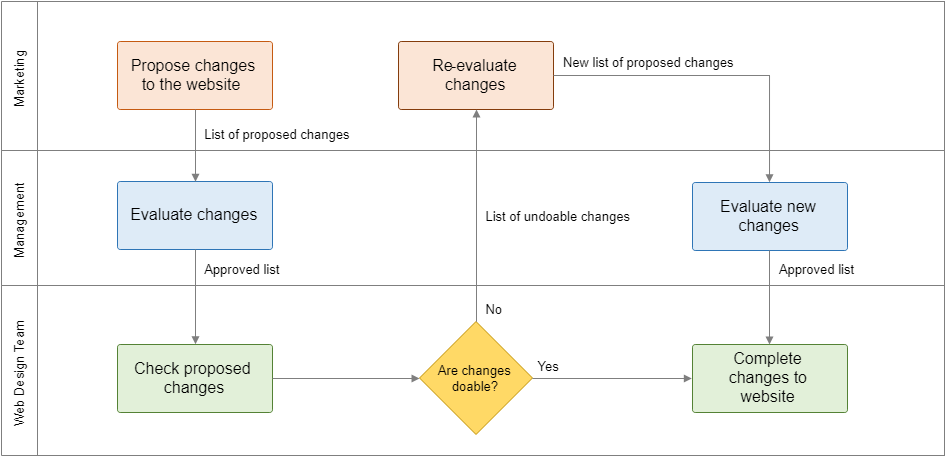
Swimlane’s architecture and workflow can be summarized as follows:
Components:
- Swimlane Core: This is the central component of the platform that manages playbooks, integrations, and incident data.
- Connectors: Connectors are pre-built integrations with various security tools, technologies, and services, allowing users to connect Swimlane with their existing security infrastructure.
- Playbooks: Playbooks define the workflows and actions to be taken in response to security incidents. Users can create and customize playbooks based on their specific use cases and needs.
Workflow:
- Alert Ingestion: Swimlane ingests alerts and incidents from multiple sources, creating incident records in its central platform.
- Playbook Execution: Playbooks are executed in response to incidents, automating actions and orchestrating responses across connected security tools and systems.
- Automation: Automated tasks within playbooks help triage, investigate, and respond to incidents, reducing manual effort.
- Human Decision Points: Playbooks can include human decision points where analysts can make critical decisions or provide additional input.
- Reporting and Documentation: Swimlane offers reporting and documentation features to create detailed incident reports and maintain a historical record of incidents.
- Integration: Swimlane integrates seamlessly with security tools, threat intelligence feeds, and external data sources to enrich and automate incident response.
Swimlane’s architecture and features are designed to enhance incident response capabilities by automating repetitive tasks, improving the coordination of actions across security tools, and providing a unified platform for incident management and collaboration.
How to Install Swimlane?
There are two ways to install Swimlane:
- Install Swimlane as a Kubernetes cluster. This is the recommended installation method for production environments.
- Install Swimlane as a Docker Compose application. This is a good option for development and testing environments.
To install Swimlane as a Kubernetes cluster:
- Install Docker and Kubernetes on your servers.
- Download the Swimlane Platform Installer (SPI).
- Extract the SPI archive and navigate to the SPI directory.
- Run the following command to install Swimlane:
“
sh install.sh
“
- Follow the on-screen instructions to complete the installation.
To install Swimlane as a Docker Compose application:
- Install Docker Compose on your machine.
- Download the Swimlane Docker Compose example.
- Extract the Docker Compose example archive and navigate to the Docker Compose example directory.
- Run the following command to start Swimlane:
“
docker-compose up -d
“
- Swimlane will be available on port 8080.
Once Swimlane is installed, you can access the Swimlane UI at http://localhost:8080.
Additional tips:
- If you are installing Swimlane in a cloud environment, such as AWS or Azure, you can use the Swimlane managed service.
- You can also install Swimlane on-premises or in a hybrid environment.
Basic Tutorials of Swimlane: Getting Started

The following steps are the Basic Tutorials of Swimlane:
1. Create a Swimlane diagram
- Open the Swimlane UI and click on the “New Diagram” button.
- Enter a name for your diagram and click on the “Create” button.
- Swimlane will create a new empty diagram.
2. Add swimlanes
- To add a swimlane, click on the “Add Swimlane” button.
- Enter a name for your swimlane and click on the “Add” button.
- You can repeat this process to add as many swimlanes as you need.
3. Add steps to a swimlane
- To add a step to a swimlane, click on the “Add Step” button.
- Select the type of step you want to add from the list of options.
- Enter a name for your step and click on the “Add” button.
- You can drag and drop steps within a swimlane to rearrange them.
4. Connect steps
- To connect two steps, click on the first step and drag the arrow to the second step.
- You can change the type of connection by clicking on the connection and selecting the desired type from the list of options.
5. Edit steps and connections
- To edit a step or connection, double-click on it.
- You can change the name, type, and other properties of the step or connection.
6. Save your diagram
- Once you have finished creating your diagram, you can save it by clicking on the “Save” button.
- You can also export your diagram to a variety of formats, such as PNG, JPEG, and PDF.
7. View your diagram
- To view your diagram, click on the “View Diagram” button.
- You can zoom in and out of your diagram and pan around using the mouse.
Example use case: Modeling a software development process
You can use a swimlane diagram to model a software development process, such as the agile development process. The swimlanes would represent the different teams involved in the process, such as development, testing, and deployment. The steps in the process would be added to the appropriate swimlanes. The connections between the steps would show the flow of the process.
Once you have created the swimlane diagram, you can use it to communicate the software development process to stakeholders, such as team members, customers, and management. You can also use the swimlane diagram to identify areas where the process can be improved.
Some additional tips for using Swimlane:
- Use swimlane diagrams to model a variety of processes, such as business processes, software development processes, and manufacturing processes.
- Swimlane diagrams can be used to communicate and document processes to stakeholders.
- Swimlane diagrams can be used to analyze and improve processes.
- Swimlane offers a variety of features to help you create and manage swimlane diagrams, such as templates, swimlane libraries, and collaboration tools.

👤 About the Author
Ashwani is passionate about DevOps, DevSecOps, SRE, MLOps, and AiOps, with a strong drive to simplify and scale modern IT operations. Through continuous learning and sharing, Ashwani helps organizations and engineers adopt best practices for automation, security, reliability, and AI-driven operations.
🌐 Connect & Follow:
Website: WizBrand.com
Facebook: facebook.com/DevOpsSchool
X (Twitter): x.com/DevOpsSchools
LinkedIn: linkedin.com/company/devopsschool
YouTube: youtube.com/@TheDevOpsSchool
Instagram: instagram.com/devopsschool
Quora: devopsschool.quora.com
Email– contact@devopsschool.com
Find Trusted Cardiac Hospitals
Compare heart hospitals by city and services — all in one place.
Explore Hospitals
I liked how you explained what Swimlane is and shared real use cases in a clear and easy‑to‑understand way. The examples helped me see how it can be used in security automation. Thanks for the helpful information!