
The templateFiles section of the Helm chart custom values file is used to define template files that are to be generated in addition to the template files that are included in the Helm chart. This can be useful for customizing the Helm chart or for generating additional Kubernetes resources that are not included in the chart by default.
Each template file in the templateFiles section is defined as an object with the following properties:
name: The name of the template file.envName: The name of the environment variable that will contain the path to the generated template file.content: The contents of the template file.
The content field can be a string or a YAML object. If the content field is a string, it will be rendered as a literal string in the generated template file. If the content field is a YAML object, it will be rendered as a YAML object in the generated template file.
Here is an example of a templateFiles section in a custom values file:
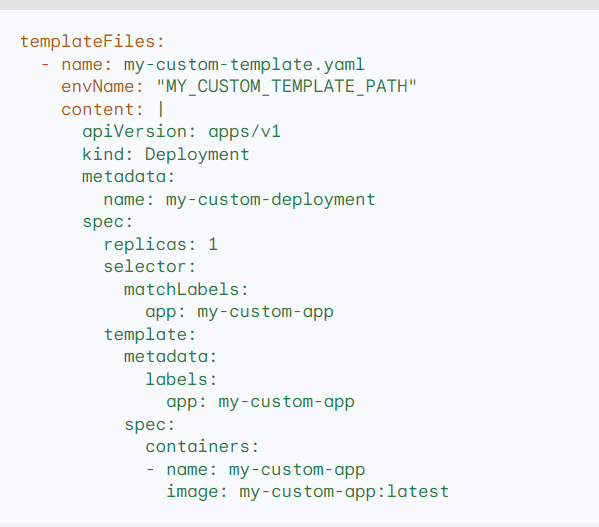
This templateFiles section defines a single template file called my-custom-template.yaml. The template file will be generated as a Deployment with the name my-custom-deployment.
When the Helm chart is installed, Helm will render the my-custom-template.yaml template file and generate a Deployment with the name my-custom-deployment.
The templateFiles section of the custom values file can be used to generate any type of Kubernetes resource, including Deployments, Services, ConfigMaps, Secrets, and PersistentVolumeClaims. It can also be used to generate custom resources that are created by Custom Resource Definitions (CRDs).
Usage
To use the templateFiles section of the custom values file, you would pass it to the Helm install command using the --values flag. For example:
helm install my-chart ./my-chart --values custom-values.yaml
This would install the Helm chart with the name my-chart and the custom values defined in the custom-values.yaml file.
Benefits
Using the templateFiles section of the custom values file has a number of benefits, including:
- It allows you to customize the Helm chart for your specific needs.
- It allows you to generate additional Kubernetes resources that are not included in the chart by default.
- It allows you to keep your custom templates in a separate file, which makes it easier to manage and update them.

I’m Rajesh Kumar, a DevOps, SRE, DevSecOps, Cloud, and Platform Engineering expert passionate about sharing practical knowledge, real-world experiences, and industry best practices. I have worked at Cotocus and regularly write about technology, travel, investing, health, product reviews, and digital marketing through my various platforms.
I publish technical articles at DevOps School, travel stories at Holiday Landmark, stock market insights at Stocks Mantra, health and fitness guidance at My Medic Plus, product reviews at TrueReviewNow, and SEO and digital marketing strategies at Wizbrand.
Find Trusted Cardiac Hospitals
Compare heart hospitals by city and services — all in one place.
Explore Hospitals





