
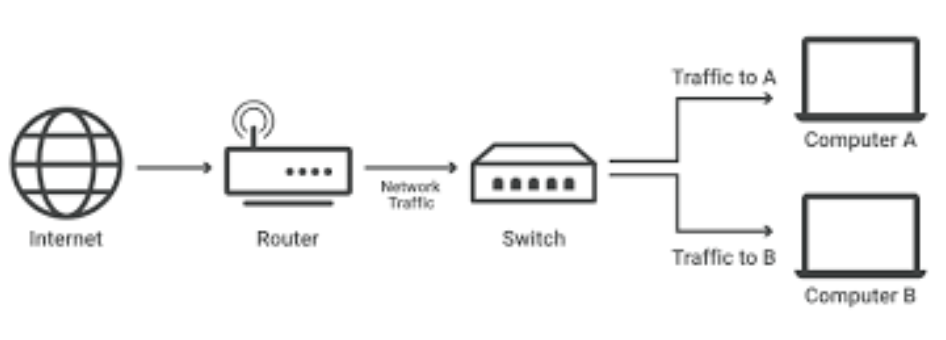
A network switch is a piece of hardware that sits at the heart of a computer network. Imagine it as a central hub that allows different devices on the network to talk to each other. Here’s a breakdown of how they work:
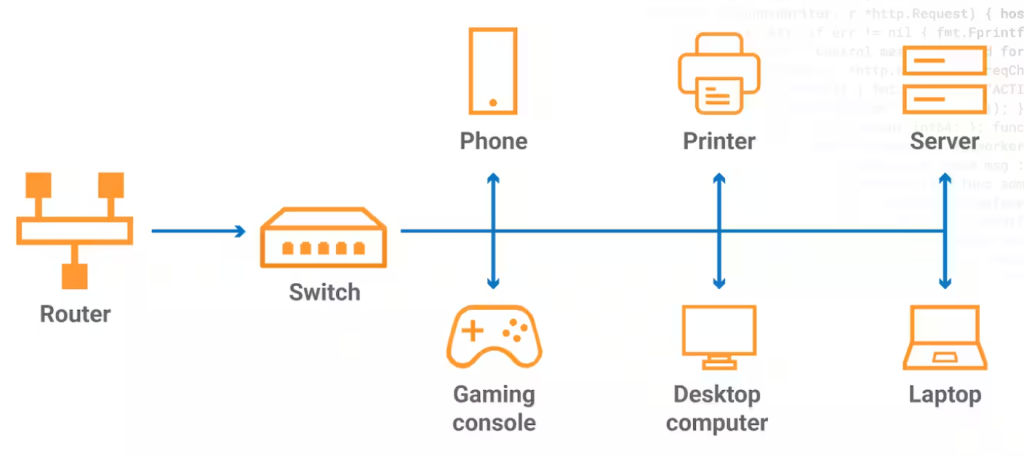
- Connections: Switches have multiple ports that devices can connect to using cables. These devices can be computers, printers, servers, or even other switches.
- Traffic Director: When a device sends data over the network, the data is broken down into smaller packets. The switch receives these packets and reads the destination address, which is like a zip code for the data.
- Smart Delivery: Using a special address called a Media Access Control (MAC) address, the switch identifies which port the destination device is connected to. It then forwards the data packet only to that specific port, avoiding unnecessary traffic on other parts of the network.
- Efficiency Booster: By intelligently directing data, switches improve network efficiency. This is especially crucial as more and more devices connect to the network.
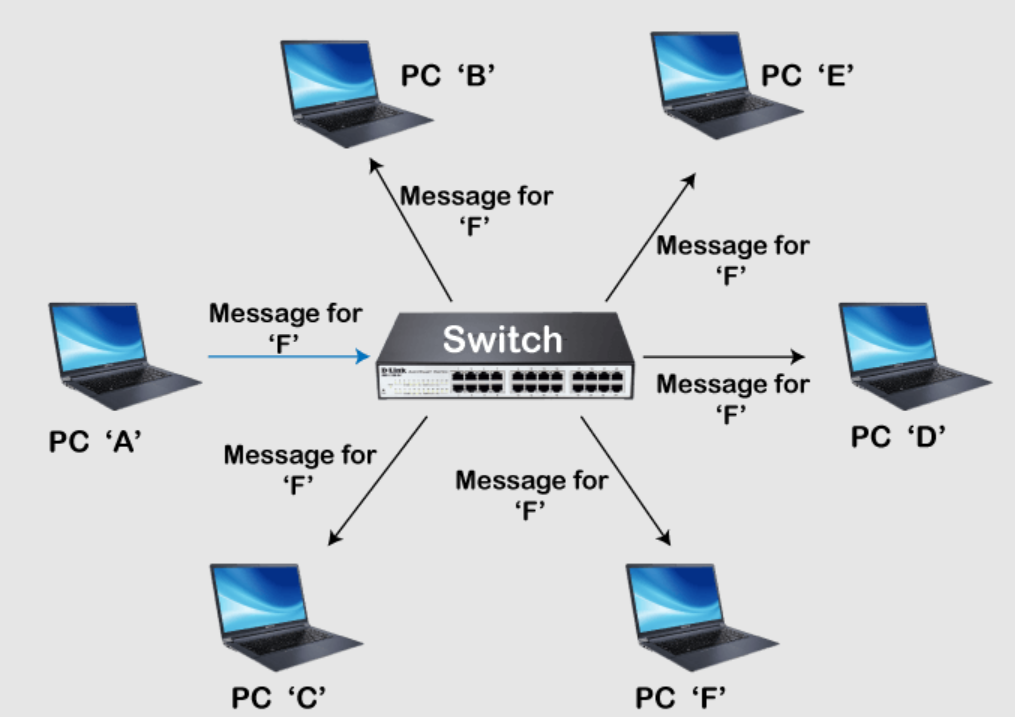
Think of a traditional mail room where mail gets sorted based on zip codes before going out for delivery. Network switches perform a similar function, but for data packets on a computer network.
Here are some additional points to remember about network switches:
- They operate at layer 2 of the OSI model, which is the data link layer.
- They are distinct from routers, which connect different networks and use IP addresses for routing.
- Switches come in various configurations with different numbers of ports and speeds to suit different network needs.
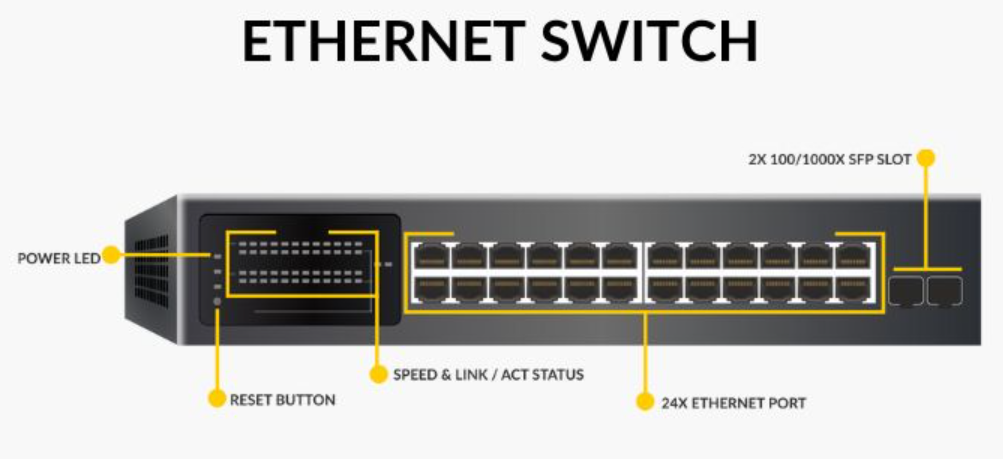
Network switches are fundamental devices in computer networking, playing a critical role in connecting multiple devices together within a Local Area Network (LAN). They serve as the central hub through which computers, printers, servers, and other network-enabled devices communicate with each other. Unlike a simple hub that broadcasts incoming data packets to all ports, a switch smartly routes data packets to the specific device(s) that it’s intended for, significantly improving network efficiency and security. Here are the key points about network switches:
- Packet Switching: Network switches use packet switching to receive, process, and forward data to the destination device. They inspect data packets and determine the destination device based on MAC (Media Access Control) addresses, ensuring that data is sent only to the intended recipient.
- Collision Domains: Switches divide network segments into separate collision domains. In a shared network medium, data packets can collide if two devices send data simultaneously. By segmenting the network, switches reduce the chances of collisions, ensuring smoother data transmission.
- Types of Switches:
- Unmanaged Switches: These are plug-and-play devices with no configuration needed. They are typically used in small networks or where minimal management is sufficient.
- Managed Switches: These switches offer advanced features such as VLANs (Virtual Local Area Networks), QoS (Quality of Service) prioritization, and remote management capabilities. They are suitable for larger networks requiring fine-tuned control over traffic and security.
- Smart Switches: Offering a middle ground between managed and unmanaged switches, smart switches provide some management features at a lower cost, though with less flexibility than fully managed switches.
- Performance Metrics: Switches are characterized by various performance metrics, including their data transfer rate (measured in Mbps or Gbps), the number of ports, support for PoE (Power over Ethernet), and the ability to support different network standards (e.g., Ethernet, Fast Ethernet, Gigabit Ethernet).
- VLAN Support: Managed and smart switches often support VLANs, allowing network administrators to segment network traffic logically without requiring separate physical networks. This improves security and traffic management within the network.
- Quality of Service (QoS): Many switches also support QoS features, which prioritize network traffic to ensure that high-priority services (like VoIP or streaming) receive the bandwidth they need for optimal performance.

I’m Rajesh Kumar, a DevOps, SRE, DevSecOps, Cloud, and Platform Engineering expert passionate about sharing practical knowledge, real-world experiences, and industry best practices. I have worked at Cotocus and regularly write about technology, travel, investing, health, product reviews, and digital marketing through my various platforms.
I publish technical articles at DevOps School, travel stories at Holiday Landmark, stock market insights at Stocks Mantra, health and fitness guidance at My Medic Plus, product reviews at TrueReviewNow, and SEO and digital marketing strategies at Wizbrand.
Find Trusted Cardiac Hospitals
Compare heart hospitals by city and services — all in one place.
Explore Hospitals





