
The var.credentials_file_path is a Terraform variable that holds the file path to your Google Cloud Platform (GCP) service account credentials JSON file. This file is used by Terraform to authenticate with GCP and perform actions such as creating and managing resources.
How to Get the credentials_file_path
To get the credentials_file_path, you need to follow these steps:
1. Create a Service Account
- Go to the Google Cloud Console.
- Navigate to IAM & Admin > Service Accounts.
- Click on Create Service Account.
- Provide a name for the service account and an optional description, then click Create.
- In the next step, assign the appropriate roles to the service account, such as Compute Admin for managing compute instances.
- Click Done to create the service account.
2. Create and Download the JSON Key File
- After creating the service account, you will see it listed under IAM & Admin > Service Accounts.
- Click on the service account you just created.
- Navigate to the Keys tab.
- Click on Add Key > Create New Key.
- Select JSON as the key type, and click Create.
- A JSON file containing your credentials will be downloaded to your computer. This is your credentials file.
3. Specify the File Path
- The
credentials_file_pathis the path to the JSON file you just downloaded. For example, if the file is in yourDownloadsdirectory, the path might look like this:
Replace /home/your-username/Downloads/your-service-account-key.json with the actual path to your file in the Terraform code.
- In the Google Cloud console, go to the Service accounts page.Go to Service accountsThe remaining steps appear in the Google Cloud console.
- Select a project.
- Click the email address of the service account that you want to create a key for.
- Click the Keys tab.
- Click the Add key drop-down menu, then select Create new key.
- Select JSON as the Key type and click Create.
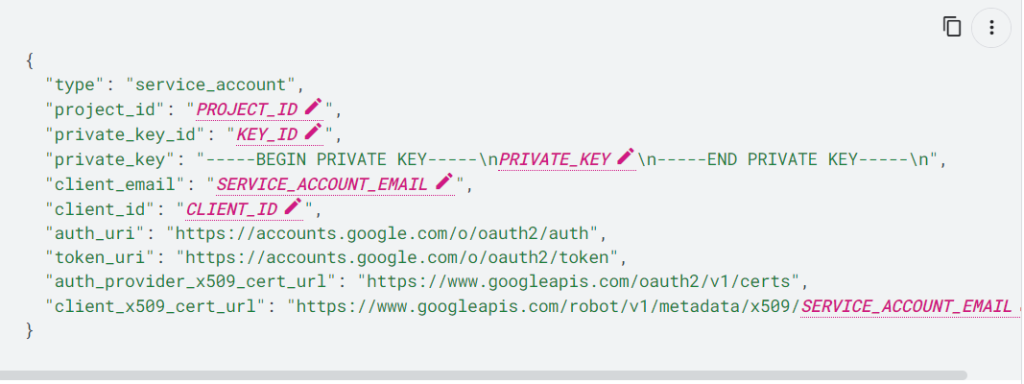
Clicking Create downloads a service account key file. After you download the key file, you cannot download it again.
The downloaded key has the following format, where PRIVATE_KEY is the private portion of the public/private key pair:

I’m Rajesh Kumar, a DevOps, SRE, DevSecOps, Cloud, and Platform Engineering expert passionate about sharing practical knowledge, real-world experiences, and industry best practices. I have worked at Cotocus and regularly write about technology, travel, investing, health, product reviews, and digital marketing through my various platforms.
I publish technical articles at DevOps School, travel stories at Holiday Landmark, stock market insights at Stocks Mantra, health and fitness guidance at My Medic Plus, product reviews at TrueReviewNow, and SEO and digital marketing strategies at Wizbrand.
Find Trusted Cardiac Hospitals
Compare heart hospitals by city and services — all in one place.
Explore Hospitals





