
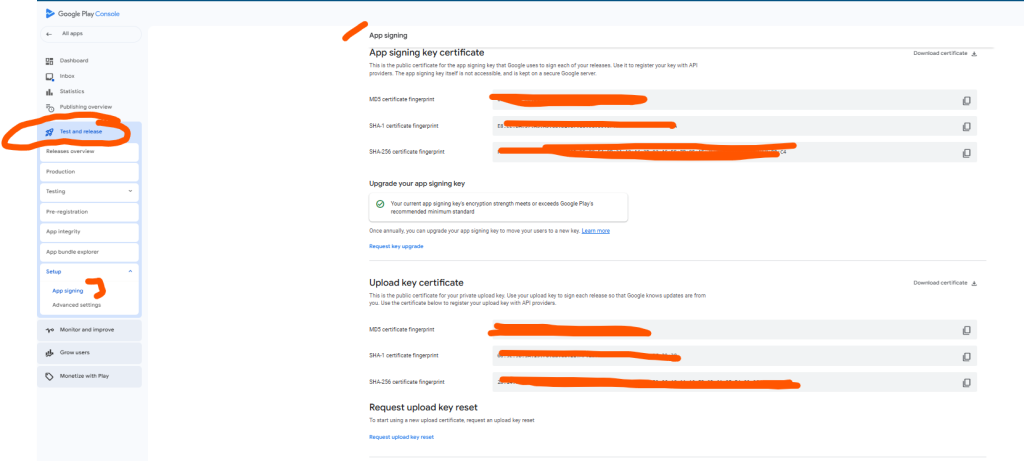
The key certificate is crucial when publishing an app on the Google Play Store as it ensures the app’s authenticity, security, and continuity. It uniquely identifies the app and guarantees that updates come from the original developer, maintaining user trust and preventing malicious modifications. Google requires that all updates are signed with the same key certificate as the original release, ensuring seamless updates and backward compatibility. Using Google Play App Signing enhances security by protecting the App Signing Key while allowing developers to use a resettable Upload Key for added flexibility. Mismanagement of the key can lead to lost updates, compromised security, or even app delisting.
In the Google Play Console, the Upload Key Certificate and the App Signing Key Certificate serve distinct purposes in the app signing process. Here’s a breakdown of their differences and use cases:
1. Upload Key Certificate
Definition:
- The Upload Key Certificate is associated with the key you use to sign your app’s APK or AAB before uploading it to Google Play.
Use Cases:
- Verification during upload: Google uses the Upload Key Certificate to verify that the person uploading the app is authorized.
- Security: Helps ensure that only trusted developers can upload updates to an app.
- Delegation: If you’re working with multiple teams or a third party (like a CI/CD system), you can share the upload key for generating APKs without exposing your App Signing Key.
Key Characteristics:
- You generate and manage this key locally (on your machine or a secure keystore).
- If the Upload Key is compromised, Google can help reset it without affecting the App Signing Key.
2. App Signing Key Certificate
Definition:
- The App Signing Key Certificate is the key used by Google to sign your app before distributing it to users on the Play Store.
Use Cases:
- Distribution: Ensures all APKs or AABs distributed to users are signed with the same key.
- Backward Compatibility: Guarantees that app updates are recognized as coming from the same developer, ensuring smooth upgrades for users.
- Security: The App Signing Key is managed by Google as part of Google Play App Signing (a secure cloud-based service), reducing the risk of key loss or compromise.
Key Characteristics:
- It’s a long-term, immutable key that identifies your app to users.
- It allows Google to re-sign the app when optimizing or serving different formats (e.g., split APKs).
- Cannot be changed after the app is published without disrupting the app’s update process.
Major Differences
| Feature | Upload Key Certificate | App Signing Key Certificate |
|---|---|---|
| Purpose | Used for verifying uploads to Google Play. | Used for signing the app distributed to users. |
| Managed by | Developer. | Google. |
| Changeability | Can be reset if compromised. | Permanent once set. |
| Scope of Use | Internal to Google Play during upload. | Distributed with the app to users. |
| Security Risk Mitigation | Protects the App Signing Key from direct exposure. | Ensures updates and original app integrity. |
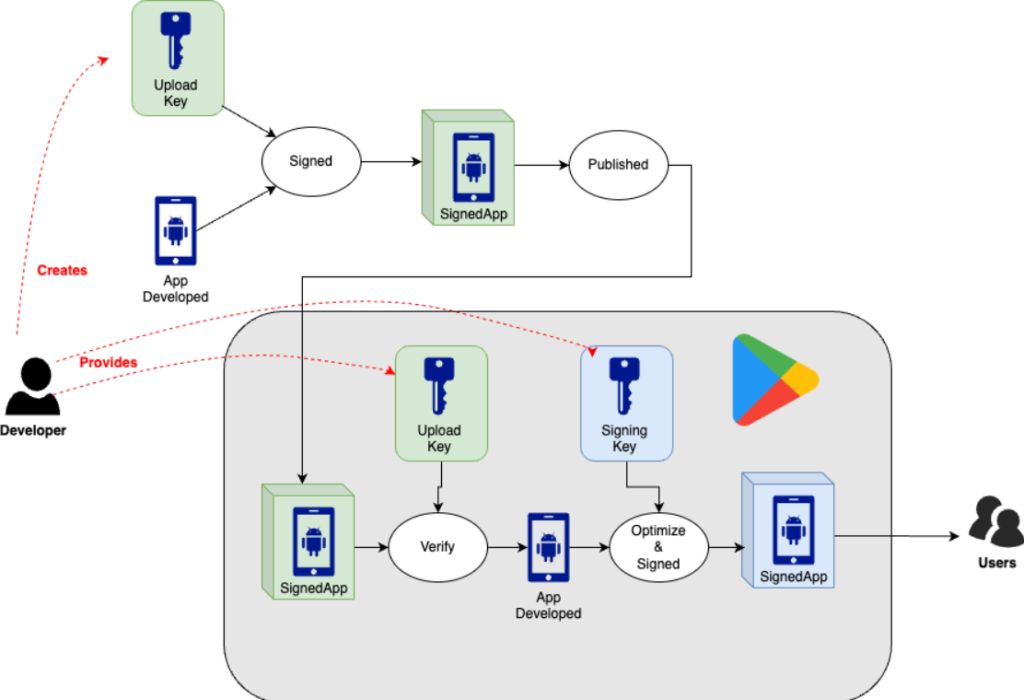
Workflow in Google Play App Signing
- Developer signs APK/AAB with the Upload Key.
- APK/AAB is uploaded to the Play Console.
- Google verifies the Upload Key and re-signs the app with the App Signing Key.
- Google distributes the re-signed app to users.
This separation of keys ensures better security and flexibility for app developers while maintaining a consistent user experience.
How it works?
Best Practices for Managing Key Certificates
- Use Google Play App Signing:
- Let Google manage your App Signing Key to avoid the risk of losing it.
- Use an Upload Key for added security, as this can be reset if compromised.
- Secure Your Private Key:
- If you manage the signing key yourself, store it in a secure keystore and back it up securely (e.g., hardware security module or cloud backup).
- Never Share Your Key:
- The signing key should only be used by the authorized developer(s). Avoid sharing it even with collaborators unless necessary.
- Plan for Long-Term Use:
- Once the app is published, the signing key is permanent. Select a strong and secure key that can remain viable over the app’s lifespan.

I’m Rajesh Kumar, a DevOps, SRE, DevSecOps, Cloud, and Platform Engineering expert passionate about sharing practical knowledge, real-world experiences, and industry best practices. I have worked at Cotocus and regularly write about technology, travel, investing, health, product reviews, and digital marketing through my various platforms.
I publish technical articles at DevOps School, travel stories at Holiday Landmark, stock market insights at Stocks Mantra, health and fitness guidance at My Medic Plus, product reviews at TrueReviewNow, and SEO and digital marketing strategies at Wizbrand.
Find Trusted Cardiac Hospitals
Compare heart hospitals by city and services — all in one place.
Explore Hospitals





