
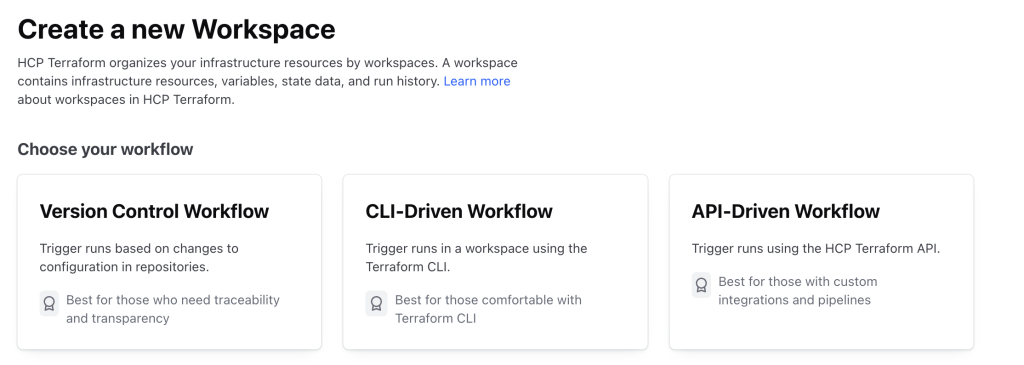
Terraform Cloud (HCP Terraform) provides different workspace workflow types, allowing teams to manage infrastructure efficiently based on their preferred automation and collaboration methods. Below are the primary workspace workflow types available in HCP Terraform.
1. UI/VCS-Driven Workflow
- Description:
This is the most commonly used workflow in HCP Terraform. A workspace is linked to a Version Control System (VCS) repository (such as GitHub, GitLab, Bitbucket, or Azure DevOps), and Terraform automatically triggers a plan when new changes are committed. If a pull request (PR) is created, Terraform executes a speculative plan, helping teams review the impact of changes before merging. - Use Case:
- Best for GitOps workflows, where infrastructure changes are managed through pull requests and code reviews.
- Ideal for teams collaborating on infrastructure-as-code (IaC) using version control.
- Useful for automation, as runs are automatically queued when code changes.
2. API-Driven Workflow
- Description:
This workflow does not require a direct connection to a VCS. Instead, Terraform configurations are uploaded via API from an external system such as a CI/CD pipeline, automation scripts, or custom integrations. Runs are triggered programmatically by pushing configuration files to Terraform Cloud. - Use Case:
- Suitable for organizations using custom automation tools that need Terraform to be part of a larger workflow.
- Ideal when working with unsupported VCS providers or dynamically generated Terraform configurations.
- Useful for event-driven automation, where infrastructure changes are triggered by external workflows.
3. CLI-Driven Workflow
- Description:
The CLI-driven workflow allows users to run Terraform directly from the Terraform CLI while still taking advantage of Terraform Cloud’s features like remote execution, state management, policy enforcement, and private module registries. Instead of running Terraform locally, commands liketerraform planandterraform applyexecute on Terraform Cloud, ensuring consistency and governance. - Use Case:
- Best for teams already using Terraform CLI but want the benefits of centralized collaboration.
- Useful for organizations that want fine-grained control over when and how Terraform runs are executed.
- Ideal for teams that do not use a VCS integration but still want Terraform Cloud’s state management and remote execution features.
Choosing the Right Workflow
The choice of workspace workflow type depends on team size, automation needs, and infrastructure management approach:
| Workflow Type | Best For |
|---|---|
| UI/VCS-Driven | Teams using Git-based workflows and pull request reviews for infrastructure changes. |
| API-Driven | Custom automation pipelines, CI/CD systems, and non-Git-based workflows. |
| CLI-Driven | Teams using Terraform CLI but need remote execution and collaboration features. |
Each workflow provides flexibility in managing infrastructure as code, ensuring efficient automation, collaboration, and governance in Terraform Cloud.

I’m Rajesh Kumar, a DevOps, SRE, DevSecOps, Cloud, and Platform Engineering expert passionate about sharing practical knowledge, real-world experiences, and industry best practices. I have worked at Cotocus and regularly write about technology, travel, investing, health, product reviews, and digital marketing through my various platforms.
I publish technical articles at DevOps School, travel stories at Holiday Landmark, stock market insights at Stocks Mantra, health and fitness guidance at My Medic Plus, product reviews at TrueReviewNow, and SEO and digital marketing strategies at Wizbrand.
Find Trusted Cardiac Hospitals
Compare heart hospitals by city and services — all in one place.
Explore Hospitals





