
Overview
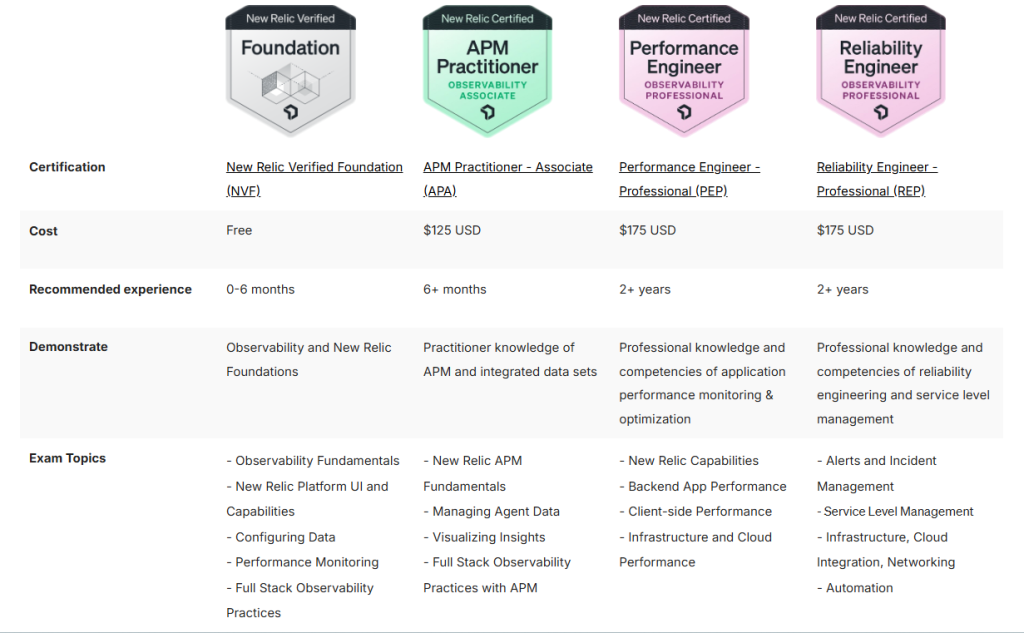
The New Relic Certified Performance Engineer – Professional (PEP) certification is designed for experienced engineers, developers, and operations professionals who are responsible for measuring, analyzing, and optimizing the performance of applications and systems using New Relic. This certification demonstrates the ability to utilize the full range of New Relic’s observability capabilities, including APM, browser monitoring, infrastructure, and synthetics, to deliver high-performing digital experiences.
Performance engineers play a vital role in ensuring customer satisfaction and application resilience. This training prepares individuals to identify performance bottlenecks, diagnose root causes, and implement solutions using New Relic’s powerful performance monitoring tools.
Key Takeaways:
- Measure and analyze application and infrastructure performance
- Use distributed tracing to isolate latency and bottlenecks
- Monitor client-side (browser and mobile) performance
- Integrate infrastructure and cloud performance metrics
- Optimize the digital user experience using full-stack observability
Topics & Agenda for 3 Days Training
Day 1: Platform Overview and Backend Performance Monitoring
Session 1: Introduction to New Relic and Observability Concepts
- Observability vs. Monitoring
- Overview of the New Relic One platform
- Capabilities and data ingestion methods
Session 2: APM Deep Dive
- Transactions, errors, throughput, and response time
- Profiling backend services and APIs
- Database performance analysis
Session 3: Distributed Tracing and Bottleneck Analysis
- Understanding distributed tracing fundamentals
- Trace analysis to detect latency and performance issues
- Analyzing call stacks and service dependencies
Lab: Instrument a backend application and perform trace-based analysis
Day 2: Frontend Performance and Synthetic Monitoring
Session 1: Browser Monitoring
- Page load performance metrics
- Real User Monitoring (RUM) setup and interpretation
- Core Web Vitals and performance breakdown
Session 2: Mobile Monitoring (Optional Advanced Segment)
- Mobile agent installation
- Mobile user experience and crash analytics
Session 3: Synthetic Monitoring and Testing
- Creating scripted and ping monitors
- Measuring availability and performance from global locations
- Simulating user flows and SLAs
Lab: Create and configure synthetic monitors for common user paths
Day 3: Infrastructure, Cloud, Dashboards and Optimization
Session 1: Infrastructure and Cloud Observability
- Installing infrastructure agents and monitoring servers
- AWS, Azure, GCP integration
- Monitoring Kubernetes, containers, and services
Session 2: Performance Dashboards and NRQL
- Using NRQL to build custom dashboards
- KPI visualizations and performance baselines
- Reporting on throughput, errors, and latency
Session 3: Optimization and Recommendations
- Correlating data across the stack
- Identifying recurring performance patterns
- Strategies for performance tuning and architectural improvements
Lab: Build an executive dashboard showing key performance KPIs
Audience
This certification is suited for:
- Performance Engineers
- DevOps and Site Reliability Engineers
- Backend Developers
- QA and Test Engineers
- Observability and Monitoring Specialists
Prerequisites:
- Familiarity with application development and architecture
- Prior hands-on experience with New Relic (recommended)
- Basic knowledge of frontend/backend performance concepts
Trainer
Rajesh Kumar
Certified New Relic Instructor and DevOps/Performance Expert
Website: https://www.rajeshkumar.xyz/
Rajesh Kumar is a veteran performance engineering and DevOps trainer with over 20 years of experience. He specializes in helping organizations achieve peak application and infrastructure performance using tools like New Relic, AppDynamics, Grafana, and more. His hands-on, use-case-driven approach empowers learners with real-world skills and deep understanding of performance engineering best practices.
Exam Details
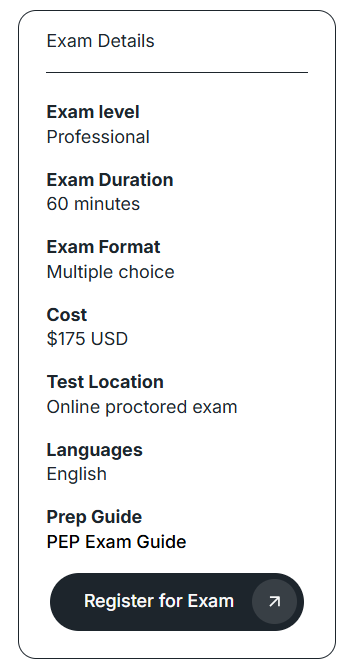
Note: To register for the certification exam and explore official preparation materials, please visit:
https://learn.newrelic.com/page/new-relic-certified-performance-engineer-professional-pep

I’m Rajesh Kumar, a DevOps, SRE, DevSecOps, Cloud, and Platform Engineering expert passionate about sharing practical knowledge, real-world experiences, and industry best practices. I have worked at Cotocus and regularly write about technology, travel, investing, health, product reviews, and digital marketing through my various platforms.
I publish technical articles at DevOps School, travel stories at Holiday Landmark, stock market insights at Stocks Mantra, health and fitness guidance at My Medic Plus, product reviews at TrueReviewNow, and SEO and digital marketing strategies at Wizbrand.
Find Trusted Cardiac Hospitals
Compare heart hospitals by city and services — all in one place.
Explore Hospitals





