
The Rundeck Project SCM Export and SCM Import features are designed to version control your job definitions and project configuration, by integrating Rundeck projects with a source control management system (SCM), typically Git.
🧠 Why SCM Integration Matters in Rundeck
When you’re managing automation jobs in production, it’s crucial to:
- Version your job definitions
- Audit who changed what and when
- Sync changes across environments (dev → staging → prod)
- Enable team collaboration
- Backup and restore project configuration
🔁 Rundown of SCM Import vs. Export
| Feature | Purpose | Typical Use |
|---|---|---|
| SCM Import | Pulls job definitions from a Git repo into Rundeck | Manage Rundeck from source control |
| SCM Export | Pushes job changes in Rundeck to a Git repo | Let Rundeck act as the source of truth |
🔽 SCM Import Plugin (Git → Rundeck)
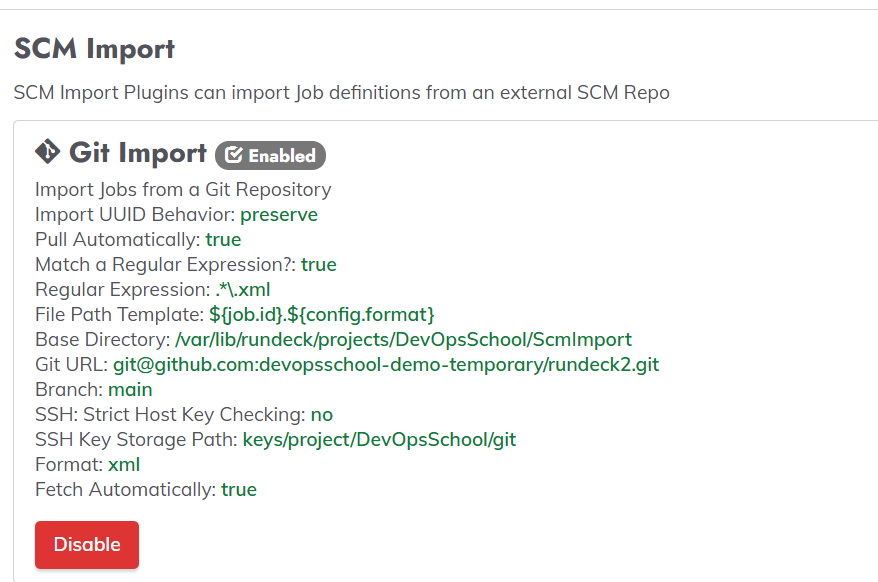
✅ Use Case
- You store Rundeck jobs in Git
- Rundeck automatically imports the latest changes from the repository
- Useful in CI/CD pipelines or for managing jobs as code
🔧 Behavior
- When jobs are added/updated in Git → Rundeck pulls and reflects those changes
- Can be set to auto-import or manual pull
- Requires correct YAML/XML format in the repo
🔼 SCM Export Plugin (Rundeck → Git)
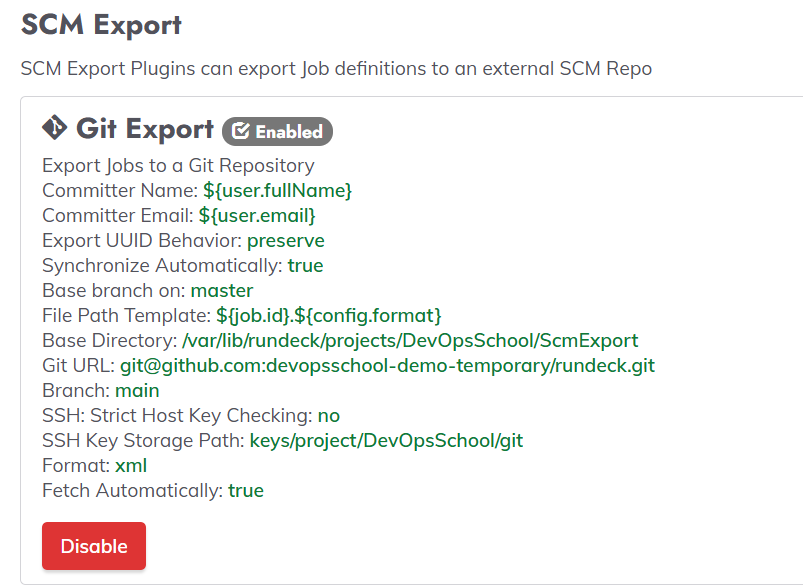
✅ Use Case
- You create or modify jobs within Rundeck GUI
- You want those changes committed to Git for versioning
- Useful for auditing, backups, and collaboration
🔧 Behavior
- Rundeck tracks changes to jobs
- Changes can be auto-committed or reviewed before commit
- Commit messages and author info can be customized
🔁 Typical Workflow in a Team
- Developer edits a job in the Rundeck GUI
- SCM Export pushes that change to Git (like
jobs/web-server.yaml) - Another team member updates the same file in Git (e.g., via PR)
- SCM Import detects the change and pulls it back into Rundeck
This ensures bi-directional sync between Git and Rundeck.
🔧 How to Enable
- Go to:
Project Settings → SCM → Export/Import - Choose:
- SCM Type:
Git - Storage: local Git repo or SSH/HTTPS remote
- SCM Type:
- Configure:
- Repo URL
- Branch
- File format: YAML, XML
- Auto-import/export options
📦 File Structure in Git Repo
A typical exported repo looks like:
jobs/
├── job-1.yaml
├── job-2.yaml
scm-status.json
- Each job gets its own file
- Metadata like UUID and project name are retained
✅ Benefits
| Benefit | Description |
|---|---|
| 🕓 Versioning | Track every change to a job with Git history |
| 👥 Team collaboration | Manage jobs via pull requests and reviews |
| ♻️ Sync across environments | Use Git to promote jobs across dev → prod |
| 🔐 Auditability | Know who changed what and when |
| 📦 Backup & Restore | Git becomes a resilient backup of job configs |
⚠️ Things to Keep in Mind
- Jobs must have unique UUIDs to prevent duplication
- Conflicts between Git and GUI may occur (manual resolution needed)
- You may need to ignore
scm-status.jsonin.gitignore - Secure Git access (SSH keys or HTTPS tokens) must be configured properly

I’m Rajesh Kumar, a DevOps, SRE, DevSecOps, Cloud, and Platform Engineering expert passionate about sharing practical knowledge, real-world experiences, and industry best practices. I have worked at Cotocus and regularly write about technology, travel, investing, health, product reviews, and digital marketing through my various platforms.
I publish technical articles at DevOps School, travel stories at Holiday Landmark, stock market insights at Stocks Mantra, health and fitness guidance at My Medic Plus, product reviews at TrueReviewNow, and SEO and digital marketing strategies at Wizbrand.
Find Trusted Cardiac Hospitals
Compare heart hospitals by city and services — all in one place.
Explore Hospitals





