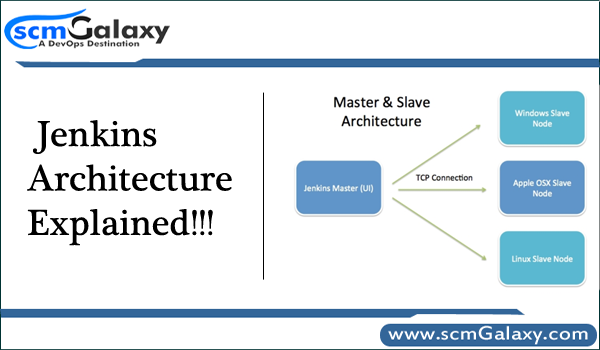
Jenkins is continuous integration tools which help to integrate other tools to automate the software development activity and repetitive tasks. Jenkins has 2 releases. One, Community version which open source and free and another one is Jenkins Enterprise which is from Cloud bees for enterprise. Jenkins is extremely powerful with vast amount of plug-in supported. Jenkins is one of the most active open source projects so learning and finding the information is easily available on the internet. Jenkins uses master/slave architecture to manage distributed builds.
Jenkins Architecture
Jenkins Architecture is based on the distributed. This has 2 components.
- Jenkins Server
- Jenkins Node/Slave/Build Server
Jenkins server is a web dashboard which is nothing but powered from a war file, default run on 8080 ports. Using Dashboard, You can configure the Jobs/Projects but the build takes place in Nodes/Slave. By default one Nodes/Slave is configured and running in Jenkins Server. You can add more Nodes/Slave as well using IP address, user name, Password using the ssh/jnlp/webstart methods.
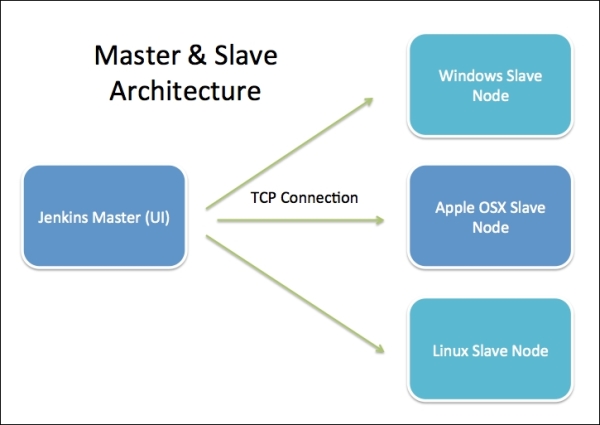
Your main Jenkins server is the master. In short, the master’s job is to handle scheduling build jobs, dispatching builds to the slaves for the actual execution, monitor the slaves (possibly taking them online and offline as required) and recording and presenting the build results. Even in a distributed architecture, a master instance of Jenkins can also execute build jobs directly.
The job of the slaves is to do as they are configured in the Jenkins Server, which involves executing build jobs dispatched by the master. You can configure a project to always run on a particular slave machine or a particular type of slave machine, or simply let Jenkins pick the next available slave.
Jenkins is developed using Java and Java is platform-independent thus Jenkins servers and nodes/slaves can be configured in any servers including Windows, Linux, and Mac.

I’m Rajesh Kumar, a DevOps, SRE, DevSecOps, Cloud, and Platform Engineering expert passionate about sharing practical knowledge, real-world experiences, and industry best practices. I have worked at Cotocus and regularly write about technology, travel, investing, health, product reviews, and digital marketing through my various platforms.
I publish technical articles at DevOps School, travel stories at Holiday Landmark, stock market insights at Stocks Mantra, health and fitness guidance at My Medic Plus, product reviews at TrueReviewNow, and SEO and digital marketing strategies at Wizbrand.
Find Trusted Cardiac Hospitals
Compare heart hospitals by city and services — all in one place.
Explore Hospitals