
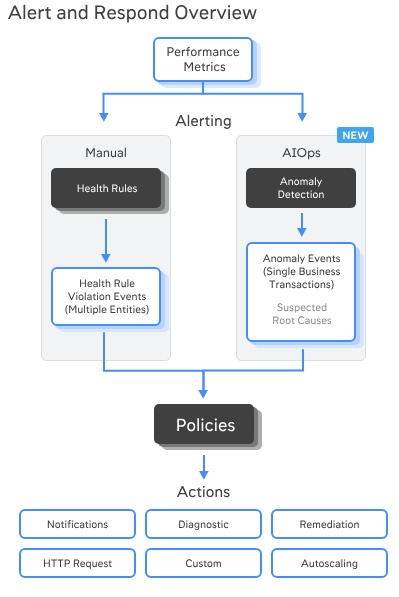
Step-by-step guide to set up and work with alerts in AppDynamics (the screen you shared is the Alert & Respond → Policies page).
0) How AppDynamics alerts are wired
- Health Rules: “what to watch” (e.g., CPU > 85% for 5 min).
- Policies: “when/where to notify” (tie events like Health Rule Violation – Opens/Closes to actions).
- Actions: “how to notify/run something” (email, HTTP webhook for Slack/PagerDuty/Jira, diagnostic dump, script).
- (Optional) Anomaly Detection: AppD’s ML events you can also alert on.
- Templates & Digests: re-usable message bodies and scheduled summary emails.
You’ll usually create Actions → Health Rules → Policies (in that order).
1) Prepare notifications
1.1 Configure email/SMS (once)
Alert & Respond → Email / SMS Configuration
- Add SMTP server (host, port, auth, From address).
- (Optional) Add SMS provider if you’ll send SMS.
1.2 Create actions you’ll reuse
Alert & Respond → Actions → Create
- Email Action: Name “Email—SRE On-Call”, add recipients (team list), subject like
[AppD][${severity}] ${application} ${eventType}: ${summary}and use variables in the body (pick from UI). - HTTP Request Action (for Slack/PagerDuty/Jira): paste webhook URL, set method/headers, payload JSON using event variables (e.g.,
${eventMessage},${nodeName},${healthRuleName}). - Diagnostic/Remediation Actions (optional): thread dump, heap dump, start CPU profiling, or run script (requires Machine Agent with permissions).
Tip: keep action names generic (Email—SRE, Webhook—Slack-#prod-alerts) so many policies can reuse them.
2) Define what “bad” looks like (Health Rules)
Alert & Respond → Health Rules → Create
- Scope: pick the application (e.g., motoshare), then the entity type:
- Applications / Tiers & Nodes / Business Transactions / Databases / Servers / Containers, etc.
- Affects: choose All or a subset (tags/tiers/BTs).
- Conditions:
- Choose metric (Browse or paste Metric Path).
- Set Critical and optionally Warning thresholds.
- Evaluation: “X of last Y minutes” (e.g., 5 of last 5).
- Static thresholds or dynamic/baseline (e.g., “> 3× baseline, min 50 req/min”).
- Rolling up: “All” vs “Any” affected entities trigger.
- Re-arm: add a wait time (e.g., 10–15 min) to avoid flapping.
- Save.
Fast starters (create a few common rules)
- CPU Hot (Tiers & Nodes): Hardware Resources|CPU|%Busy > 85% for 5 of 5 min (Critical), > 75% (Warning).
- Memory Pressure: Hardware Resources|Memory|%Used > 90% for 10 of 10 min.
- BT Slow (Business Transactions): Average Response Time > baseline + 3σ, min load ≥ 30 cpm, for 5 of 10 min.
- BT Errors: Errors per Minute > baseline + 2σ and Error % > 5% for 5 of 10 min.
- Container Restarts (if Server/Container visibility enabled): restarts > 0 in 10 min.
Keep rules separate for infrastructure vs. application to route to the right teams.
3) (Optional) Enable Anomaly Detection
Alert & Respond → Anomaly Detection
- Turn on for your application/tiers/BTs.
- Choose sensitivity and minimum traffic.
- These generate “Anomaly Detected” events you can target in policies (useful when you don’t want to hand-tune thresholds).
4) Tie events to notifications (Policies)
You can use the Policy Setup Wizard (shown on your screen) or build manually.
4.1 Quick path: Policy Setup Wizard
Alert & Respond → Policies → Policy Setup Wizard
- Pick Event Types:
- Health Rule Violation – Opens (and later add a second policy for Closes).
- (Optional) Anomaly Detected.
- Scope: select Application = motoshare (and narrow to tiers/BTs if needed).
- Action: attach “Email—SRE On-Call”, “Webhook—Slack-#prod-alerts”, etc.
- Execution Settings:
- “Trigger only on Critical” (optional) to reduce noise.
- Add re-notification/cool-down (e.g., re-notify every 60 min while still violating).
- Review → Create.
4.2 Manual path (more control)
Alert & Respond → Policies → Create Policy Manually
- Section 1: Events to Match
Add:- Health Rule Violation – Opens (filter to your exact Health Rules if you want).
- (Optional) Health Rule Violation – Closes in a separate “Recovery” policy.
- (Optional) Anomaly Detected / Server Crash / Resource Pool Limit Reached, etc.
- Section 2: Evaluation Scope
Application = motoshare, restrict entities if needed. - Section 3: Actions
Add your email/webhook/diagnostic actions.
Set Do not execute more than once every N minutes and wait times to control noise. - Section 4: Schedule/Suppression
Exclude maintenance windows or allow “policy is disabled during deploys”. - Save.
Best practice: create two policies per health rule family—Alert (Opens) and Recovery (Closes)—so teams know when things clear.
5) Test end-to-end
- Pick a rule that’s easy to trigger (e.g., lower CPU threshold on a dev tier temporarily).
- Use Alert & Respond → Policies → (policy) → Test/Preview if available, or apply load to trigger a BT rule.
- Confirm: event appears in Alert & Respond → Events and notifications arrive in email/Slack/Jira.
6) Reduce noise and keep signals strong
- Prefer baselines for BT latency/error rules; add minimum load guards.
- Use “X of last Y minutes” and re-arm times to avoid flapping.
- Route infra vs app alerts to different actions/recipients.
- Add maintenance windows for deploys.
- Use Email Digests for daily/weekly rollups; keep real-time policies for actionable issues.
- Review Top Talkers (which rules/policies fire the most) and tune monthly.
7) Example: three core policies you can add now
- App – BT Slow (Critical) → Slack + Email
Event: Health Rule Violation – BT Slow (Critical) Opens → Actions: Slack + Email. - Infra – Node CPU (Critical) → Email only
Event: Health Rule Violation – CPU Hot Opens → Action: Email—SRE. - Recoveries – All Critical Closes → “green” message
Event: Health Rule Violation – Closes (filter to the two rules above) → Actions: Slack “recovered” + Email.
8) Nice-to-have add-ons
- HTTP Request Templates & Alerting Templates: standardize payloads/messages once, reuse everywhere.
- Mutual TLS Configuration: if your webhook target (e.g., internal gateway) requires client certs.
- Runbook links: include a URL in email/webhook pointing to a wiki playbook per alert.
- Auto-diagnostics: attach a thread dump or snapshot action to severe BT rules.
AppDynamics Health Rules + Policies (Starter Kit for motoshare)
1) Health Rules
🔹 Node CPU Hot
- Scope: Tiers & Nodes → All nodes in
motoshare - Critical: CPU % Busy > 85% for 5 of last 5 min
- Warning: CPU % Busy > 75% for 5 of last 5 min
- Re-arm: 10 min
🔹 Node Memory Pressure
- Scope: Tiers & Nodes → All nodes in
motoshare - Critical: Memory % Used > 90% for 10 of last 10 min
- Warning: Memory % Used > 80%
- Re-arm: 15 min
🔹 Business Transaction – Slow
- Scope: Business Transactions → All BTs in
motoshare - Critical: Avg Response Time > Baseline + 3σ for ≥ 30 cpm traffic, 5 of 10 min
- Warning: Avg Response Time > Baseline + 2σ
- Re-arm: 10 min
🔹 Business Transaction – Errors
- Scope: Business Transactions → All BTs in
motoshare - Critical: Error % > 5% AND Errors/min > 30, for 5 of 10 min
- Warning: Error % > 2%
- Re-arm: 10 min
🔹 Container Restarts (if Server/Container visibility enabled)
- Scope: Containers in
motoshare - Critical: Restart Count > 0 in 10 min
- Re-arm: 20 min
2) Actions
Create these once under Alert & Respond → Actions:
- Email—SRE On-Call
- To: sre-team@motoshare.com
- Subject:
[AppD][${severity}] ${application} ${eventType}: ${summary} - Body: include
${healthRuleName},${nodeName},${eventMessage},${incidentID}
- Slack—#alerts
- Type: HTTP Request Action
- URL: Slack Webhook
- JSON payload:
{ "text": "*[AppDynamics Alert]*nApp: ${application}nEvent: ${eventType}nRule: ${healthRuleName}nNode: ${nodeName}nMessage: ${eventMessage}nLink: ${eventLink}" }
3) Policies
🔹 Policy 1: Infra – Node CPU Critical
- Event: Health Rule Violation Opens → “Node CPU Hot”
- Action: Email—SRE On-Call
- Rate Limit: Once every 15 min
🔹 Policy 2: Infra – Node Memory Critical
- Event: Health Rule Violation Opens → “Node Memory Pressure”
- Action: Email—SRE On-Call
- Rate Limit: Once every 20 min
🔹 Policy 3: App – BT Slow
- Event: Health Rule Violation Opens → “BT Slow”
- Action: Slack—#alerts + Email—SRE On-Call
- Rate Limit: Once every 30 min
🔹 Policy 4: App – BT Errors
- Event: Health Rule Violation Opens → “BT Errors”
- Action: Slack—#alerts + Email—SRE On-Call
- Rate Limit: Once every 30 min
🔹 Policy 5: Recoveries
- Event: Health Rule Violation Closes (all above rules)
- Action: Slack—#alerts (Recovery message)
- Rate Limit: Once every 15 min
4) Testing & Validation
- Temporarily lower thresholds (e.g., CPU > 5%) to trigger an alert.
- Check Alert & Respond → Events for policy hits.
- Confirm notifications in Slack and email.
- Reset thresholds back to production values.
✅ With this pack:
- Infra alerts (CPU, memory, container restarts) go to Email—SRE.
- App-level issues (BT slow, BT errors) go to Slack + Email.
- Recovery events let the team know when it’s safe.

I’m Rajesh Kumar, a DevOps, SRE, DevSecOps, Cloud, and Platform Engineering expert passionate about sharing practical knowledge, real-world experiences, and industry best practices. I have worked at Cotocus and regularly write about technology, travel, investing, health, product reviews, and digital marketing through my various platforms.
I publish technical articles at DevOps School, travel stories at Holiday Landmark, stock market insights at Stocks Mantra, health and fitness guidance at My Medic Plus, product reviews at TrueReviewNow, and SEO and digital marketing strategies at Wizbrand.
Find Trusted Cardiac Hospitals
Compare heart hospitals by city and services — all in one place.
Explore Hospitals