
This revised guide turns a legacy Git training announcement into a practical learning plan for DevOps engineers, SCM/build-release engineers, and developers. You will learn what to teach, how to sequence hands-on labs, and which Git commands to emphasize for daily collaboration.
Originally published on 2014-07-10; fully revised and updated.
What this Git training curriculum should cover
For teams that want consistent Git practices, a strong course should move from fundamentals to collaboration in small, testable steps. The original post targeted practical, job-oriented learning for configuration management and build/release roles, with hands-on delivery.
- Git fundamentals: version control, distributed model, repository structure, and HEAD.
- Installation and setup: Git on macOS, Windows, Linux, plus identity configuration and help usage.
- Daily workflow: add, commit, diff, log, rename, delete, and inspect staged vs unstaged changes.
- Undo strategies: restore, reset modes, revert, and cleanup of untracked files.
- Branching and merging: branch lifecycle, fast-forward vs non-fast-forward merge, and conflict handling.
- Remotes and teamwork: clone, fetch, pull, push, branch tracking, and collaboration workflow.
Recommended hands-on workflow for learners
Use a repeatable branch-based workflow in labs so learners connect commands to real collaboration. Keep each exercise short: edit, commit, sync, review, merge.
flowchart LR
    A[Install and configure Git] --> B[Create or clone repository]
    B --> C[Create feature branch]
    C --> D[Edit files and run tests]
    D --> E[Stage and commit changes]
    E --> F[Push branch to remote]
    F --> G[Open merge request]
    G --> H{Review approved}
    H -- No --> D
    H -- Yes --> I[Merge to main]
    I --> J[Pull latest main]
Core command labs
Lab 1: Setup and first commit
git --version
git config --global user.name 'Your Name'
git config --global user.email 'you@example.com'

mkdir git-lab && cd git-lab
git init
echo '# Git Lab' > README.md
git add README.md
git commit -m 'Initial commit'Code language: PHP (php)
Lab 2: Inspect history and working changes
git status
git diff
git add README.md
git diff --staged
git log --oneline --decorate --graph --allCode language: CSS (css)
Lab 3: Branch, merge, and sync with remote
git switch -c feature/auth
# edit files
git add .
git commit -m 'Implement auth flow'

git push -u origin feature/auth
git fetch origin
git switch main
git pull --ff-only
git merge --no-ff feature/auth
git push origin mainCode language: PHP (php)
Undo operations: when to use each command
| Command | Best use case | Changes commit history | Safer on shared branches |
|---|---|---|---|
| git restore FILE | Discard local unstaged edits to a file | No | Yes |
| git reset –mixed HEAD~1 | Undo most recent local commit but keep file changes | Yes | No |
| git reset –hard HEAD~1 | Remove recent commit and local changes | Yes | No |
| git revert COMMIT_SHA | Create a new commit that reverses an earlier change | No rewrite | Yes |
Training format options for teams
The original listing described intensive 1-day and 2-day workshops and on-site delivery. The table below helps map those formats to learning outcomes.
| Format | Typical duration | Best for | Focus |
|---|---|---|---|
| Foundations workshop | 1 day | New Git users | Core commands, commit hygiene, basic branching |
| Applied workflow workshop | 2 days | Delivery teams | Merge strategies, conflict resolution, remote collaboration |
| On-site tailored session | Custom | Organizations with existing SDLC standards | Team conventions, release flow, role-specific labs |
Legacy links and contact from the original listing
These links are preserved from the original post for historical reference.
- Training registration form
- Upcoming training dates (legacy link)
- Historic city/course page (legacy link)
- info@scmGalaxy.com
- Original permalink
Common pitfalls when rolling out Git training
- Teaching commands without a team workflow (learners forget quickly).
- Skipping undo labs; teams then misuse reset and rewrite shared history.
- No branch naming and commit message standards.
- Ignoring conflict drills until production pressure appears.
- Treating training as one-time instead of reinforcing via code reviews and pairing.

I’m Rajesh Kumar, a DevOps, SRE, DevSecOps, Cloud, and Platform Engineering expert passionate about sharing practical knowledge, real-world experiences, and industry best practices. I have worked at Cotocus and regularly write about technology, travel, investing, health, product reviews, and digital marketing through my various platforms.
I publish technical articles at DevOps School, travel stories at Holiday Landmark, stock market insights at Stocks Mantra, health and fitness guidance at My Medic Plus, product reviews at TrueReviewNow, and SEO and digital marketing strategies at Wizbrand.
Find Trusted Cardiac Hospitals
Compare heart hospitals by city and services — all in one place.
Explore Hospitals

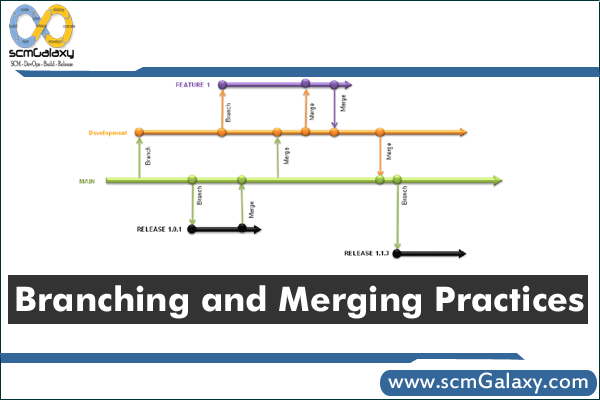
Git training is most valuable when learners practice a shared workflow, not just individual commands. Create branches for small changes, commit often, and write messages that explain why each change matters. Practicing merge conflicts in a test repository helps build confidence before working on shared projects. It is also important to understand when to use merge or rebase and how to recover safely from mistakes. These habits make teamwork smoother and project history easier to follow.
As development teams grow, maintaining a clean and understandable Git history becomes increasingly important. Poorly written commit messages, branches that remain open for too long, and repeated merge conflicts can slow down reviews and make bugs harder to trace. Using consistent commit guidelines, enforcing branch protection, and running automated validation before merging can improve code quality and teamwork. It is also wise to prepare for accidental changes or deleted branches and keep sensitive credentials and generated files out of version control to avoid future security and maintenance issues.