
A Git branch is a lightweight, movable pointer to a commit. It lets you work on a feature, fix or experiment without touching the main line of code. A branching strategy decides how branches are created, named, reviewed, merged and cleaned up, and it shapes how a team releases software.
The posts cover both the Git commands and the team practices. Gitflow is explained in depth: feature, release and hotfix branches, naming conventions, merge rules, CI/CD considerations and commands for installing the git-flow extension on Windows, macOS, Ubuntu and CentOS. Practical guides show how to bring an outdated feature branch up to date with merge, rebase or cherry-pick. Another guide explains how DevOps teams keep branches short-lived and merge only after review and passing CI. Platform guides cover protected branches and branch rules in GitLab, GitHub repository settings including the default branch, and linking issues, commits, branches and pull requests across repositories.
For hands-on practice, there is a Git training roadmap, lab exercises on merging and resolving merge conflicts, and a set of version control interview questions. The material helps developers who are new to team workflows, leads who are choosing a branching model and repository admins who enforce branch policies.
Start here
- What is Git and use cases of Git? – Covers the Git basics, workflow and architecture to know before working with branches.
- Git Branching and Merging Best Practices for DevOps Teams – Practical rules for choosing a branching model, keeping branches short-lived and merging after CI passes.
- Gitflow Branching Model: Practical Guide to Feature, Release, and Hotfix Branches – Explains Gitflow's feature, release and hotfix branches, with the commands for each lifecycle step.
- Git: How to update your outdated branch? – Shows three ways to update a stale feature branch: merge, rebase and cherry-pick.
- Gitflow Master Tutorial – A complete Gitflow reference with naming conventions, CI/CD integration and governance for planned releases.
- GitLab Code – Protected Git Branches – Tutorial Guide – Shows how to protect main in GitLab by blocking force pushes and restricting merges.
- Git Exercise & Assignment – Hands-on exercises for practicing commits, merges and merge conflict resolution.
Latest Git Branching articles
Git Lab Exercise & Assignment: Git cherry-pick: Part – 12
git cherry-pick copies one or more existing commits from another branch and applies them as new commits on your current branch. This lab corrects and completes the…
Git Lab Exercise & Assignment: Git remote branching and github: Part – 7
In this paired lab exercise, two people share changes through GitHub. One creates a repository, the other forks it, and each one fetches, compares and merges the…
Git Lab Exercise & Assignment: Branching & Merging & Conflicts: Part – 4
This lab has you create a merge conflict on purpose: two branches change the same line of one file, and you then inspect the conflict, look at…
Git Lab Exercise & Assignment: Working with Local Branch: Part – 3
This lab shows the local branch lifecycle in Git: create a branch, commit on it, commit separately on master so the two diverge, try to delete the…
Build and Release Management in the SDLC: SCM Concepts, Workflow, and Practical Examples
This guide explains how build and release management fits into the software development lifecycle and how SCM keeps delivery reproducible. It covers core concepts, a practical workflow, and example Git and CI pipeline patterns.

Git, GitHub, and GitLab Interview Questions: Practical Answers and Command Guide
A practical interview-prep guide covering core Git concepts, essential commands, and common GitHub/GitLab questions. Includes workflow diagrams, comparisons, and troubleshooting checklists.
Git Training Roadmap: Practical Curriculum, Labs, and Team Workflow
A modern, hands-on Git training blueprint for DevOps and engineering teams. Use this curriculum, workflow, and command labs to build real-world Git skills quickly.

How to Choose the Right Version Control System for Your Organization
Choosing a version control product is a process decision, not just a tooling decision. Use this practical framework to evaluate requirements, compare models, run pilots, and select confidently.
Gitflow Branching Model: Practical Guide to Feature, Release, and Hotfix Branches
Learn how the classic Gitflow model organizes development with long-lived and short-lived branches. This guide covers branch rules, workflow, and production-ready Git command examples.
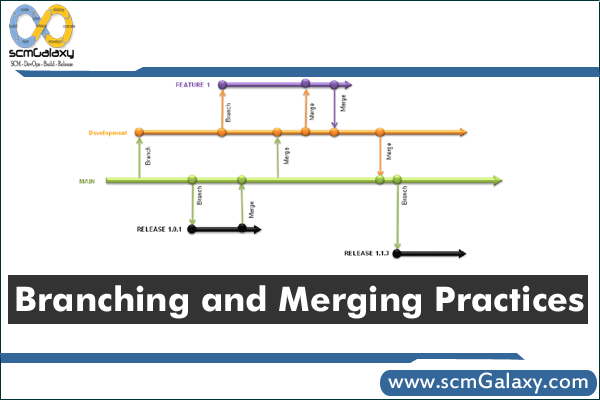
Git Branching and Merging Best Practices for DevOps Teams
This guide explains how DevOps teams can use Git branching and merging patterns to ship safely without slowing delivery. It includes a workflow diagram, model comparisons, and practical commands you can standardize.

SCM Process in DevOps: Practical Workflow and a Change-Aware smartBuild Pattern
This revised guide explains how to run an effective SCM process and apply a smart build approach that only builds and tests impacted components. It also preserves the original slide and attribution while adding practical DevOps implementation guidance.
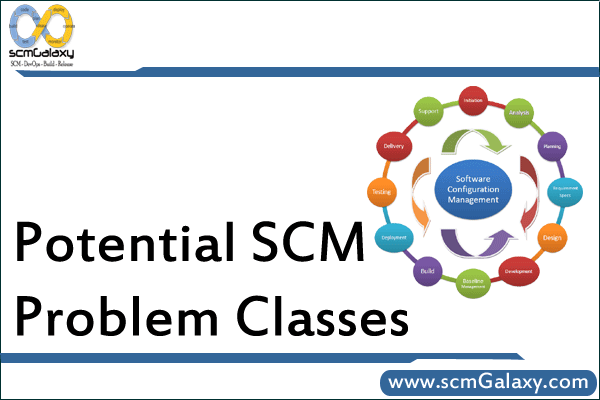
8 Software Configuration Management Problem Classes and How to Control Them
SCM problems usually appear as coordination, release, and traceability failures long before they are named. This guide maps eight common SCM problem classes to practical controls, including CCB flow, staffing responsibilities, and Git-based examples.
GitHub Repository Settings Essentials — 2-Hour Tutorial
Last Verified: September 2026Based on: GitHub Repository Settings — Complete Reference Guide & TutorialDuration: 2 hoursPlatform: GitHub.com / GitHub Enterprise Cloud unless stated otherwiseAudience: Developers, DevOps/platform engineers, repository administrators, security engineers, team…
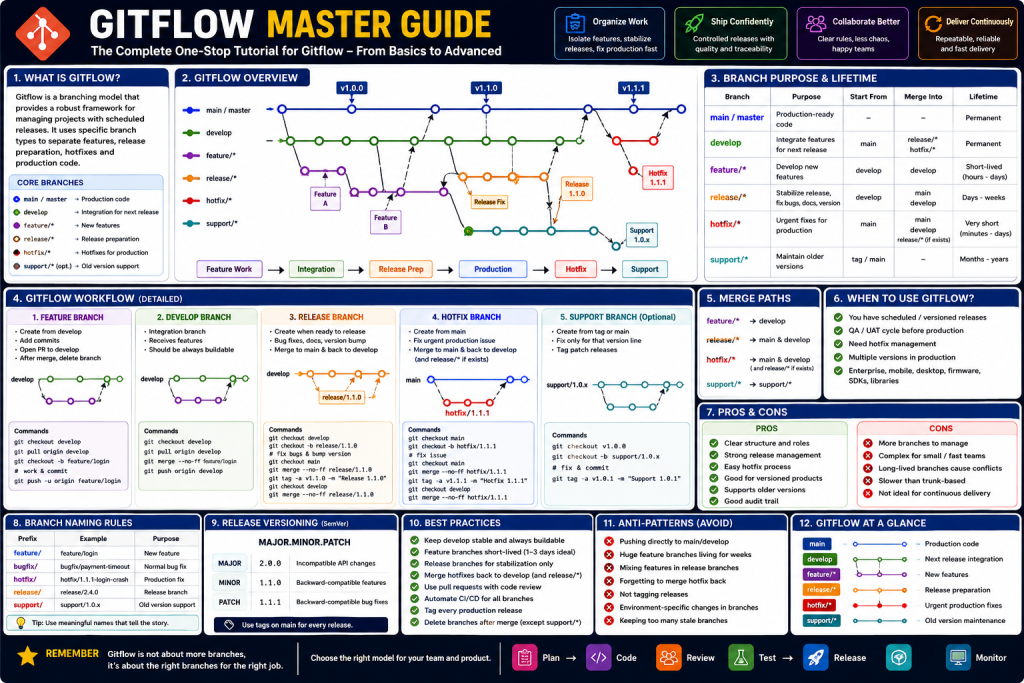
Gitflow Master Tutorial
From Basic to Advanced: A Complete One-Stop Guide to Gitflow Branching, Releases, Hotfixes, CI/CD, and Governance 1. What is Gitflow? Gitflow is a structured Git branching model…
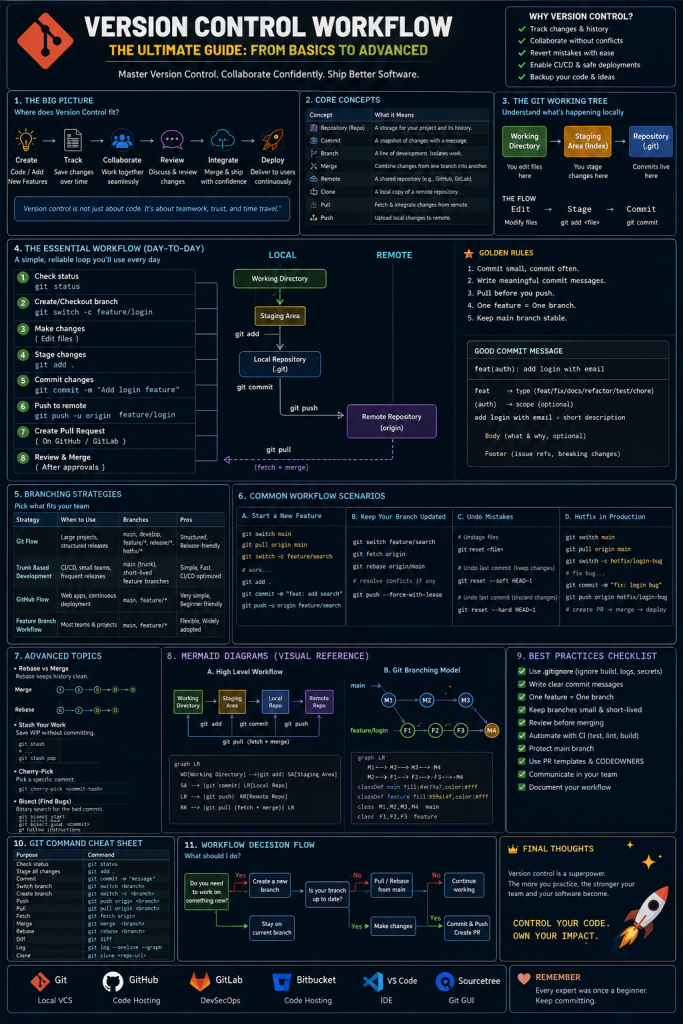
Branching Strategy Master Tutorial
From Beginner to Advanced: A Complete One-Stop Guide to Choosing, Designing, and Governing Branches 1. What is a branching strategy? A branching strategy is a team’s rulebook…
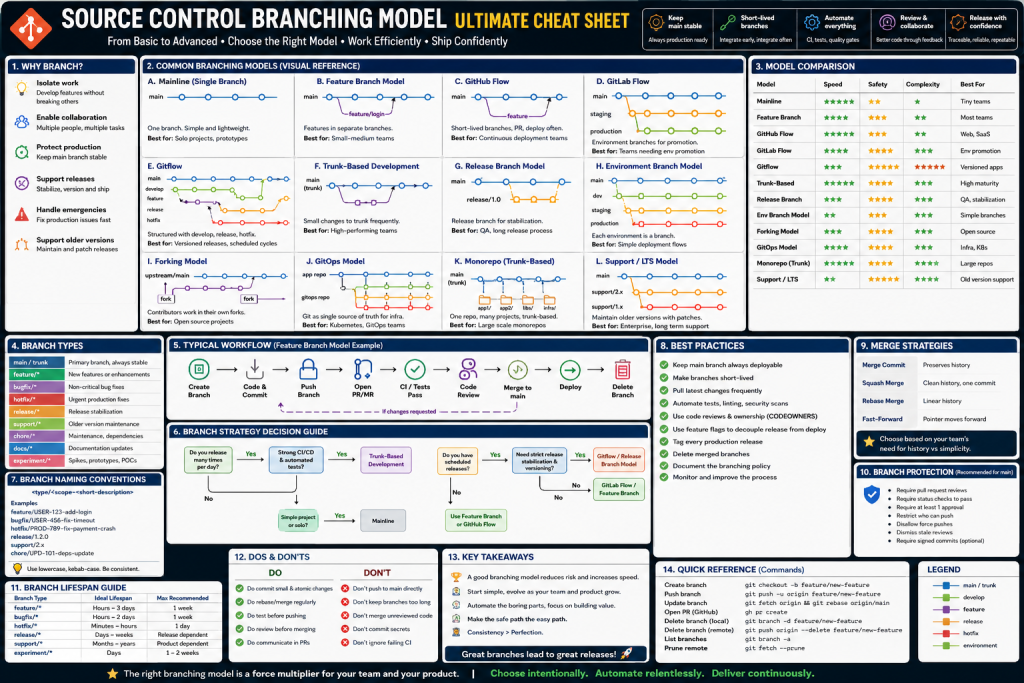
Source Control Branching Model Master Tutorial
From Beginner to Advanced: A Complete One-Stop Guide for Designing Branching Strategies 1. What is a source control branching model? A source control branching model is the…
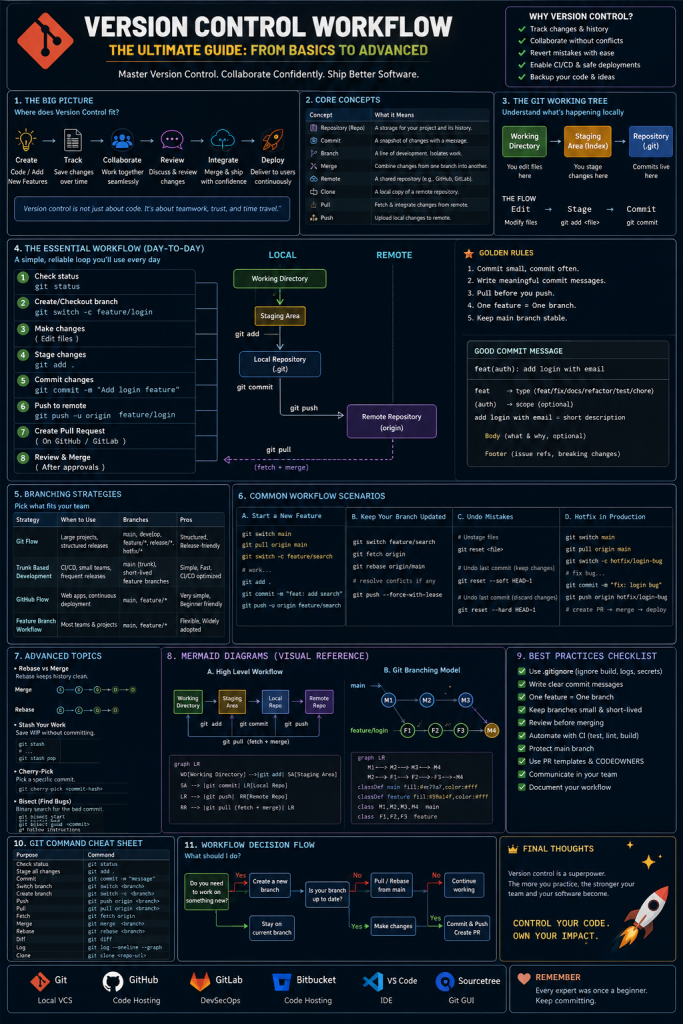
Version Control Workflow Master Tutorial
A Complete One-Stop Guide from Beginner to Enterprise Architecture 1. What is a version control workflow? A version control workflow is the complete process a team follows…
Master Guide: How to Link GitHub Issues, Commits, Branches, and Pull Requests — Same Repo and Cross-Repo Workflow
1. Introduction In many teams, GitHub Issues, commits, branches, and pull requests are created in the same repository. That is the simple case. But your setup is…
GitLab Code – Protected Git Branches – Tutorial Guide
Here is a comprehensive tutorial for understanding and configuring Protected Branches in GitLab 18.0, based on the image you’ve provided and the latest official documentation. 🔐 GitLab…
What is Git and use cases of Git?
What is Git? Git is a distributed version control system (DVCS) planned to track changes in source code during software development. It was developed by Linus Torvalds…
Git: How to update your outdated branch?
I have 2 branch. develop and feature/KUB-23446. feature/KUB-23446 is created from develop but develop have many more changes commited from another branches. How can i update feature/KUB-23446…
Git Exercise & Assignment
Git Assignment # 1 Write a 1 Post on Debug.School which would Answer following question… Git Assignment # 2 Write a 1 Post on Debug.School which would…
Git Lab Exercise & Assignment & Project: Part – 10
Write a 5 separate post for each question as below on BestDevOps.com. Code must be published on Gist and linked to Post. How to publish Answer to…
Git Tutorial: Git References
Branches, remote-tracking branches, and tags are all references to commits. All references are named with a slash-separated path name starting with “refs”; the names we’ve been using…
Git Lab Exercise & Assignment: Git Branching and Merging: Part – 8
These exercises aim to give you some practice with using the Git version control system. Each exercise comes in two parts: a main task that most, if…
Git Lab Exercise & Assignment: Local Branches with Rebasing: Part – 6
In this lab you create a fork in the history on purpose and then remove it with git rebase, so that merging back into master becomes a…
Jenkns FAQ Questions and Answer
How can I make Jenkins CI with git trigger on pushes to master? How to schedule jobs in Jenkins How to move Jenkins from one PC to…
Top Git interview questions and answers
What is Git fork? Forking is a git clone operation executed on a server copy of a project’s repo. A Forking Workflow is often used in conjunction with…
How to download and install gitflow?
Download and install gitflow in windows Download and install gitflow in Mac Download and install gitflow in Ubuntu Download and install gitflow in Centos/Rhel Rajesh KumarI’m Rajesh…
Interview Questions & Answers Sets on Version Control
What is Version Control? Version control is the sytem of tracking and managing changes to software code.It helps software teams to manage changes to source code over…
Git Branching: frequently asked questions
What is the difference between git merge and git rebase?
Merge combines two branches and keeps both histories, usually adding a merge commit. Rebase replays your commits on top of another branch to produce a linear history. Because rebase rewrites commits, avoid rebasing branches that other people already use.
What is Gitflow, and when should I use it?
Gitflow uses long-lived main and develop branches, plus short-lived feature, release and hotfix branches. It suits teams with planned, versioned releases. Teams that deploy continuously often prefer simpler trunk-based development.
How do I create and switch to a new branch?
Run git switch -c feature/name, or the older git checkout -b feature/name. Either command creates the branch from your current commit and switches to it.
How do I delete a Git branch locally and on the remote?
Run git branch -d name to delete a merged local branch, or use -D to force-delete it. Run git push origin --delete name to remove the branch from the remote.