
MYHOSPITALNOW.COM

Find Trusted Doctors & Hospitals

Discover healthcare providers, compare hospitals, and explore treatment options worldwide.

Free Treatment Quotes • Doctor Search • Hospital Comparison

Find Healthcare Options

www.myhospitalnow.com

How to merge two or multiple tables to each other in the Laravel PHP Framework? (Part-2)

How to merge two or multiple tables to each other in the Laravel PHP Framework?

Part-1 Part-3

Step 1. Go to app/Country.php. Now, we need to list all the properties we need in the $fillable array.

Step 2. Go to app/Http/Controllers/CountryController.php file.

Step 3. Then, go to routes/web.php file and define all these routes.

Route::resource('country','CountryController');
Route::any('/search', 'CountryController@search');Code language: PHP (php)

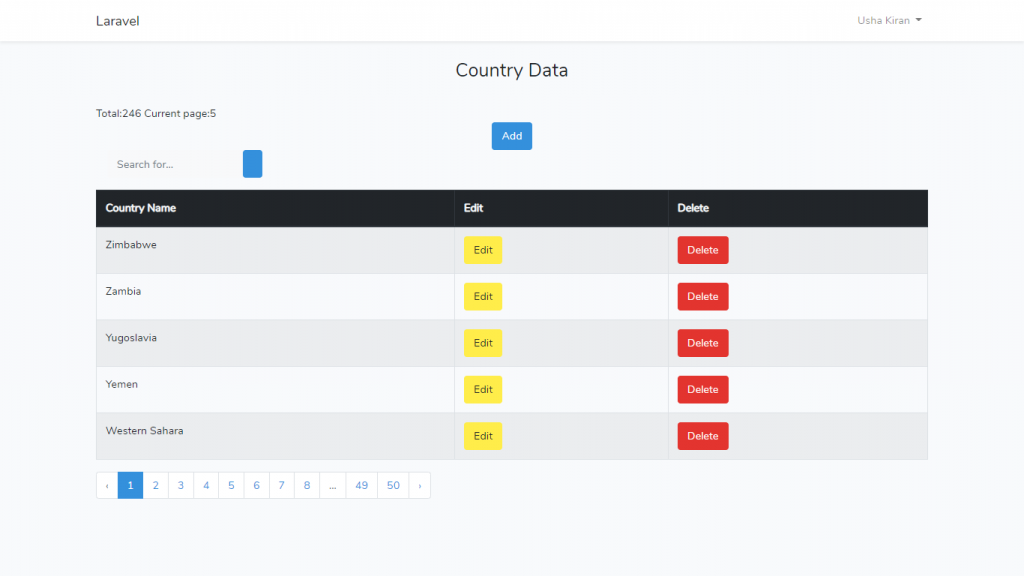
Run URL
This image has an empty alt attribute; its file name is image-7-1024x576.png

Thanks

Find Trusted Cardiac Hospitals

Compare heart hospitals by city and services — all in one place.

Explore Hospitals
With MotoShare.in, you can book a bike instantly, enjoy doorstep delivery, and ride without worries. Perfect for travelers, professionals, and adventure enthusiasts looking for a seamless mobility solution.

Related Posts

How to Delete Multiple Records using Checkbox in Laravel?

It’s almost need to give feature for remove multiple records using checkbox, if you are developing e-commerce application or any big web application then you must give…

Read More

CRUD Operations in Laravel PHP Framework

Step 1 – Download Laravel 5.8 In first step you have to download Laravel 5.8 version. For this you have to go to command prompt, in which…

Read More

How to merge two or multiple tables to each other in the Laravel PHP Framework? (Part-3)

Part-1 Part-2 Now, we’ll create the 2nd table State to merge with the Country table. Step 1. Create child file resources/views/State folder with name create.blade.php. Step 2. Create edit.blade.php file. In this…

Read More

CRUD Operation Using Model in Laravel.

Inserting data in Database through Model. (Click to Open) Read, Update, and Delete data through Model. (Click to Open) Sushant Kumar With MotoShare.in, you can book a…

Read More

How to use Search Functionality in Laravel?

How to use Search Functionality in Laravel? Step 1. Create a new Project in Laravel, so open git bash. Write down the following command:- Step 2. Now, Move to project directory on git Bash,…

Read More

Read, Update, and Delete data through Model.

Read Data from Database through Model First, we have to connect our model and database in our controller. For that we use below code in our controller:-…

Read More