
Step:1
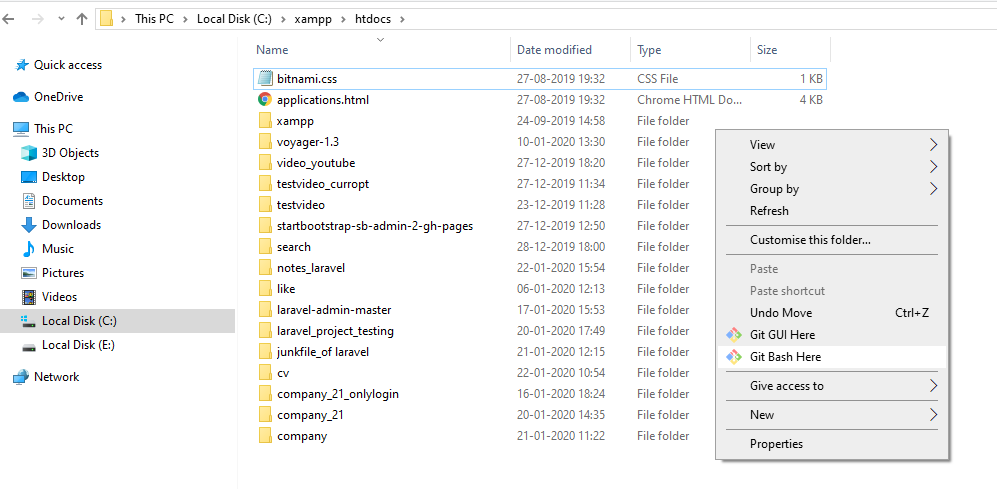
Step:2- click on Git base Here.
It will look like this

Step:3- you have to crate own project and put here

Step:4- Press Enter than project will be run, it will be take time to install.
Step:5- after install your project then go to inside your folder whatever project name. see the pic
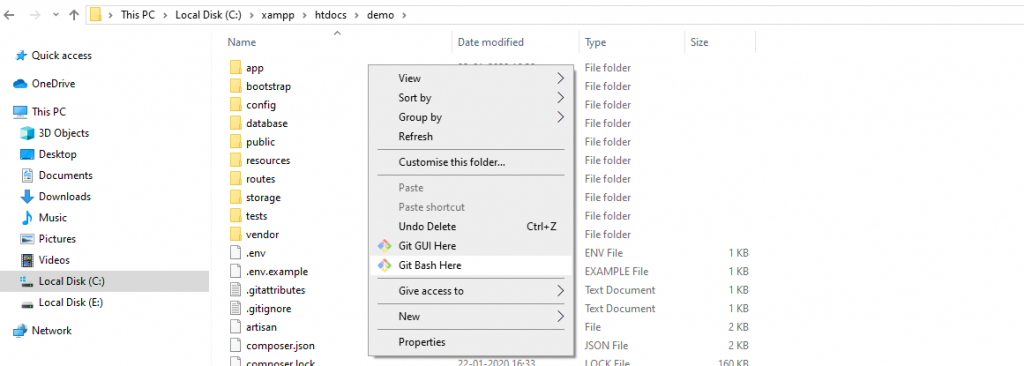
Step:6– click again Git Base Here and write the syntax. php artisan serve press Enter this to check your project in URL: http://127.0.0.1:8000/ .

Now configure database in .env file
Step:7-
DB_CONNECTION=mysql
DB_HOST=127.0.0.1
DB_PORT=3306
DB_DATABASE=laravel_multi
DB_USERNAME=root
DB_PASSWORD=root@123
Step:8- Create migration for admins.

Now the database/migrations directory open the admins migrations file and replace up function.

Step:9- database/migrations/_create_bloggers_table.php
Step:10- we have defined our tables, run migrate:
php artisan migrate
Step:11- Admin model
To make the model for the admins, run the following command:
php artisan make:model Admin
Open the Admin model in app/Admin.php and add the following:
Step:12- To make the model for the blogger, run the following command:
php artisan make:model Blogger
Step:13- Open config/auth.php and add the new guards edit as follows:
Step:14- We added two new guards admin and blogger and set their providers.
Step:15- Modify LoginController
Step:16– Now, Modify RegisterController
Step:17- resources/views/auth/login.blade.php
Step:18- // resources/views/auth/register.blade.php
Step:19-/ resources/views/layouts/auth.blade.php
Step:20- // resources/views/admin.blade.php
Step:20- / resources/views/blogger.blade.php
Step:21- // resources/views/home.blade.php
Step:22- routes/web.php
Step:23- // app/Http/Controllers/Middleware/RedirectIfAuthenticated.php

MotoShare.in is your go-to platform for adventure and exploration. Rent premium bikes for epic journeys or simple scooters for your daily errands—all with the MotoShare.in advantage of affordability and ease.
Find Trusted Cardiac Hospitals
Compare heart hospitals by city and services — all in one place.
Explore Hospitals