
If you are preparing for a DevOps interview, this guide turns common Jenkins questions into practical, interview-ready answers with commands and examples you can discuss confidently.
Originally published on August 20, 2014; fully revised and updated.

Core Jenkins interview topics at a glance
Most Jenkins interviews test whether you understand how CI works in practice, not just definitions. You should be ready to explain workflow, setup, plugins, and operational safety.
- Continuous Integration and delivery flow
- Jenkins API and automation capabilities
- Advantages and trade-offs of Jenkins
- System requirements and architecture basics
- Installation on Ubuntu and RHEL-like systems
- Backup, restore, and migration of Jenkins data
- Frequently used plugins and when to use them
What continuous integration means in Jenkins
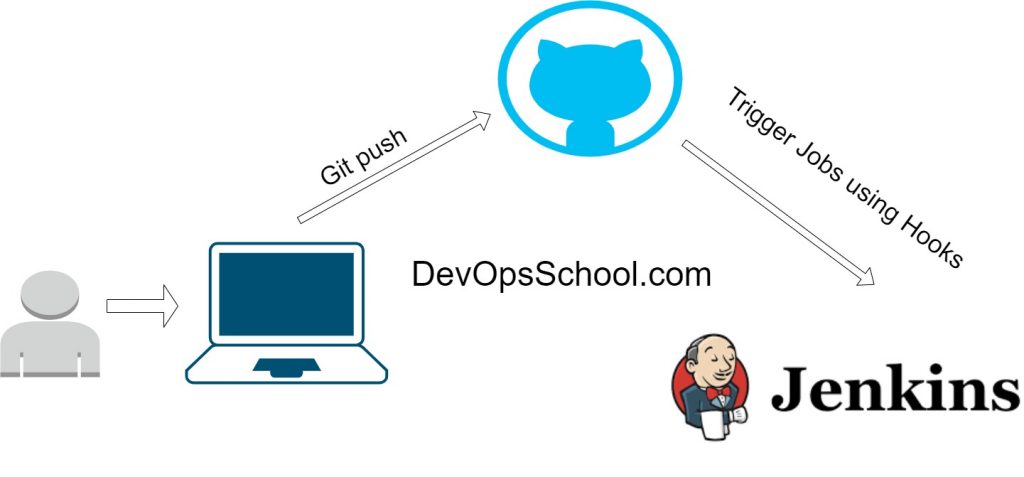
Continuous Integration (CI) means developers merge code frequently, and each change triggers automated build and test steps. In Jenkins, this is typically implemented with webhooks from source control and a Pipeline job.
flowchart LR
    A[Developer commit] --> B[SCM webhook]
    B --> C[Jenkins controller]
    C --> D[Checkout stage]
    D --> E[Build stage]
    E --> F[Test stage]
    F --> G{Quality gate pass}
    G -- No --> H[Fail build and notify]
    G -- Yes --> I[Package artifact]
    I --> J[Deploy to target]
A basic Pipeline-as-Code example:
pipeline {
  agent any

  stages {
    stage('Checkout') {
      steps { checkout scm }
    }
    stage('Build') {
      steps { sh 'mvn -B package' }
    }
    stage('Test') {
      steps { sh 'mvn test' }
    }
  }

  post {
    always {
      junit 'target/surefire-reports/*.xml'
    }
  }
}Code language: JavaScript (javascript)
Jenkins API and automation features interviewers ask about
Jenkins exposes a Remote Access API (JSON/XML), CLI options, and web UI actions. Interviewers often ask how you would trigger builds, fetch status, and integrate external systems.
- Trigger jobs remotely
- Read job/build metadata via API
- Integrate with scripts, release tooling, and chat systems
- Use API token-based authentication for automation
JENKINS_URL=http://jenkins.example.com
USER=interviewer-demo
TOKEN=api_token_here
JOB=sample-pipeline

curl -s -u $USER:$TOKEN $JENKINS_URL/job/$JOB/api/json
CRUMB=$(curl -s -u $USER:$TOKEN $JENKINS_URL/crumbIssuer/api/json | jq -r .crumb)
curl -X POST -u $USER:$TOKEN -H Jenkins-Crumb:$CRUMB $JENKINS_URL/job/$JOB/buildCode language: PHP (php)
Jenkins job types you should compare in interviews
| Job type | Best for | Interview talking point |
|---|---|---|
| Freestyle | Simple, UI-driven automation | Fast to start, harder to standardize at scale |
| Pipeline | Versioned CI/CD as code | Supports review, reuse, and controlled change management |
| Multibranch Pipeline | Repository with many branches/PRs | Automatically discovers branch pipelines and reduces manual job creation |
Requirements for using Jenkins
At minimum, you need a server (or container host), Java runtime, network access to your SCM and build targets, and storage for Jenkins home data.
- Supported OS (Linux is most common in production)
- Java runtime compatible with your Jenkins release
- Persistent storage for
JENKINS_HOME - Service account and access controls
- SCM credentials and webhook connectivity
- Backup destination and restore plan
Installing Jenkins on Ubuntu and RHEL-like systems
Package names and repository keys can change over time, so validate against current Jenkins documentation before production rollout.
| Aspect | Ubuntu or Debian | RHEL, CentOS Stream, Rocky, AlmaLinux |
|---|---|---|
| Package manager | apt | dnf or yum |
| Repo setup | Jenkins Debian repo + keyring | Jenkins RPM repo + imported key |
| Java example | openjdk-17-jre | java-17-openjdk |
| Service control | systemctl | systemctl |
# Ubuntu or Debian example
sudo apt update
sudo apt install -y fontconfig openjdk-17-jre
sudo wget -O /usr/share/keyrings/jenkins-keyring.asc https://pkg.jenkins.io/debian-stable/jenkins.io-2023.key
echo 'deb [signed-by=/usr/share/keyrings/jenkins-keyring.asc] https://pkg.jenkins.io/debian-stable binary/' | sudo tee /etc/apt/sources.list.d/jenkins.list > /dev/null
sudo apt update
sudo apt install -y jenkins
sudo systemctl enable --now jenkins
sudo systemctl status jenkinsCode language: PHP (php)
# RHEL-like example
sudo dnf install -y fontconfig java-17-openjdk
sudo wget -O /etc/yum.repos.d/jenkins.repo https://pkg.jenkins.io/redhat-stable/jenkins.repo
sudo rpm --import https://pkg.jenkins.io/redhat-stable/jenkins.io-2023.key
sudo dnf install -y jenkins
sudo systemctl enable --now jenkins
sudo systemctl status jenkinsCode language: PHP (php)# Get initial admin password after first start
sudo cat /var/lib/jenkins/secrets/initialAdminPasswordCode language: PHP (php)Process to back up Jenkins and copy files safely
For reliable recovery, prioritize backing up JENKINS_HOME (commonly /var/lib/jenkins). This includes job configuration, build history, plugins, and critical secrets.
/var/lib/jenkins/jobs/for job definitions and build metadata/var/lib/jenkins/plugins/for installed plugins/var/lib/jenkins/secrets/and related credential files for encrypted credentials- Global config files in
/var/lib/jenkins/
# Consistent backup example
sudo systemctl stop jenkins
sudo tar -czf /srv/backups/jenkins_home_$(date +%F).tar.gz /var/lib/jenkins
sudo systemctl start jenkins

# Copy backup to another server
rsync -avz /srv/backups/jenkins_home_$(date +%F).tar.gz backup@backuphost:/data/jenkins/Code language: PHP (php)
# Restore example
sudo systemctl stop jenkins
sudo tar -xzf /srv/backups/jenkins_home_YYYY-MM-DD.tar.gz -C /
sudo chown -R jenkins:jenkins /var/lib/jenkins
sudo systemctl start jenkinsCode language: PHP (php)20 commonly used Jenkins plugins and what they are for
| Plugin | Typical use in CI/CD |
|---|---|
| Pipeline | Define CI/CD logic as code |
| Git | Integrate Git repositories with jobs |
| GitHub | GitHub webhooks and metadata integration |
| GitLab | GitLab project and webhook integration |
| Credentials Binding | Inject secrets into build steps safely |
| SSH Agent | Use SSH keys during pipeline execution |
| Docker | Build and publish container images |
| Kubernetes | Dynamic Jenkins agents on Kubernetes |
| Blue Ocean | Visual pipeline interface |
| Job DSL | Create jobs programmatically |
| Configuration as Code | Manage Jenkins configuration declaratively |
| Email Extension | Customizable email notifications |
| Slack Notification | Send build and deployment events to Slack |
| JUnit | Publish and trend unit test reports |
| HTML Publisher | Publish generated HTML reports |
| Warnings Next Generation | Aggregate static analysis warnings |
| SonarQube Scanner | Run code quality scans from Jenkins |
| OWASP Dependency-Check | Dependency vulnerability scanning |
| Artifactory | Publish and consume build artifacts |
| Copy Artifact | Reuse artifacts from upstream jobs |
Best practices for interview answers
- Give concise definitions first, then explain with one real project example.
- Prefer Pipeline-as-Code examples over only UI descriptions.
- Mention security controls: credentials handling, RBAC, and audited changes.
- When discussing backups, always include restore testing, not just backup creation.
- Avoid claiming Jenkins is “best” universally; explain when managed CI may be a better fit.
Reference link retained from the original post: YouTube video.

I’m Rajesh Kumar, a DevOps, SRE, DevSecOps, Cloud, and Platform Engineering expert passionate about sharing practical knowledge, real-world experiences, and industry best practices. I have worked at Cotocus and regularly write about technology, travel, investing, health, product reviews, and digital marketing through my various platforms.
I publish technical articles at DevOps School, travel stories at Holiday Landmark, stock market insights at Stocks Mantra, health and fitness guidance at My Medic Plus, product reviews at TrueReviewNow, and SEO and digital marketing strategies at Wizbrand.
Find Trusted Cardiac Hospitals
Compare heart hospitals by city and services — all in one place.
Explore Hospitals

Jenkins interview preparation is stronger when you can explain how a pipeline handles real failures. Practice connecting source control, running tests, building artifacts, and deploying to a test environment. Learn how to read console logs and identify whether a failure comes from code, configuration, or a plugin. It is also useful to understand credentials management and how to keep secrets out of build logs. Hands-on examples make your answers clearer and more practical.