
UDeploy properties & component properties along with their contexts
Components can have several types of properties. The server keeps track of changes to component properties as property versions. Properties can be set for many different things, including components, environments,…
Read more »
Component Process types of uDeploy explained!!!
In most cases, you run component processes by adding them to application processes. However, you can also run component processes directly. Click an application, and go to the Components tab….
Read more »
What is Agent Pool and selection criteria in uDeploy?
Similar to resource groups, agent pools help you organize and manage agents that are installed in different environments. Agent pools distribute work among all pool members and reduce congestion that…
Read more »How to use PDO to read data from the database?
1) Write the regular select statement and again, instead of values, put named placeholders. For example: [code language=”php”] $sql = "SELECT * FROM users"; [/code] 2) Prepare the query: [code…
Read more »
How to use PDO to insert data into the database?
The SQL code for the users table: [code language=”sql”] CREATE TABLE IF NOT EXISTS users (id int(11) NOT NULL AUTO_INCREMENT, name varchar(60) DEFAULT NULL, phone varchar(12) DEFAULT NULL, city varchar(60)…
Read more »
PDO – PHP database extension
PDO – PHP database extension PDO (PHP Data Objects) is a PHP extension through which we can access and work with databases. Though PDO is similar in many aspects to…
Read more »
Do you know Container Linux (CoreOs) and Tectonic journey towards OpenShift?
The CoreOS corporation was acquired by Red Hat in May 2018 for $250 million; post-acquisition, the main enterprise Container Linux distribution, combined with Red Hat’s similar Project Atomic, has been…
Read more »INCREASE WEBSITE LOADTIME
How to Increase Website loadtime and Page Speed ? Click Here… Click Here …. Some Website to Check Other Website Performance. Click Here…. Click Here….
Read more »Docker Error: JOB FOR DOCKER.SERVICE FAILED BECAUSE THE CONTROL PROCESS EXITED WITH ERROR CODE
[root@localhost ~]# systemctl restart docker Job for docker.service failed because the control process exited with error code. See “systemctl status docker.service” and “journalctl -xe” for details. [root@localhost ~]# [root@localhost ~]#…
Read more »TURN OFF DISPLAY ERROR IN PHP
Method 1 & 2 & 3 https:///…-standards-error-fix Method 4 error_reporting(0); ini_set(‘display_errors’, ‘0’); # don’t show any errors… error_reporting(E_ALL | ~E_STRICT); # …but do log them Few more http:///…-standards-in-joomla…
Read more »HOW TO OPEN ALL FILES IN A FOLDER USING NOTEPAD ++
These are the steps to open a folder using Notepad ++ Step 1: Click on View Menu –> Project –> Project Panel 1 Step 2: Click on Workspace –> Add New…
Read more »Certified Kubernetes Administrator CKA Exam Curriculum
Certified Kubernetes Administrator CKA Exam Curriculum Reference https://www.cncf.io/certification/cka/ https://github.com/certifications-tutorials/kubernetes-curriculum
Read more »
Where can I practice splunk search commands for free?
For newbies Splunk has provided Splunk free online sandbox where you can try splunk and practice on it. Below is link for splunk online sandbox.You need to register on splunk…
Read more »
Login to linux ansible remote server enabled with LDAP using SSH?
Here is the scnario which we tried last week with Pranav Goel in order to login the Ansible remote server which is enlabe with LDAP and become a su to…
Read more »
Ansible Role Project 1
Step 1 – Create a role which has following specification. Install a webserver httpd # use role/vars/ Add cond…httpd should be done only if RHEL. Copy a index.j2 into /var/www/html…
Read more »
Ansible Tower Administration Guide
Ansible Tower Support – If you have paid membership, you can contact the support team at https://access.redhat.com How to understand Ansible Tower Subscription Types Self-Support Enterprise: Standard Enterprise: Premium https://docs.ansible.com/ansible-tower/latest/html/administration/license-support.html#subscription-types…
Read more »
Ansible Variable Lab & Excercise – Part 6
Assigment 1 – Create a playbook and setup a webserver(httpd) and use httpd as a variable decalared in role var file Assigment 2 – Create a playbook and setup a…
Read more »
Ansible Variable Lab & Excercise – Part 5
Assigment 1 – Create a playbook and setup a webserver(httpd) and use httpd as a variable decalared in inventory. Assigment 2 – Create a playbook and setup a webserver(httpd) and…
Read more »
Understanding the difference between AWS Root, Administrator & Power User?
The AWS Account Root User When you first create an Amazon Web Services (AWS) account, you begin with a single sign-in identity that has complete access to all AWS services…
Read more »
Understanding about Amazon EC2 Key Pairs
Amazon EC2 uses public–key cryptography to encrypt and decrypt login information. Amazon EC2 stores the public key only, and you store the private key. The public and private keys are…
Read more »
Limitations of volumes you can attach to one aws ec2 instance?
Linux-Specific Volume Limits – 40 volumes Windows-Specific Volume Limits – AWS PV – 26 Citrix PV – 26 Red Hat PV – 17 Instance Type Limits C5, C5d, M5, M5a,…
Read more »
Terraform Variables and Configuration explained – 5 mins reading!
There are broadly 3 ways to configure/declare variables in Terraform. This section will focus on only on Input variables and Environment variables. Input variables Environment variables Personal Environment and…
Read more »
How to access Ansible remote machine using SSH user and key?
How to access Ansible remote machine using SSH user and key? There are following ways, you can autheticte linux remote server using Ansible. Method 1 – Password Less authentication https://www.tecmint.com/ssh-passwordless-login-using-ssh-keygen-in-5-easy-steps/…
Read more »
Ansible execution connection type
Ansible executes playbooks in the remote server using following connection type. To change the connection type, you need to pass host-specific parameter ansible_connection=<connector>, the connection type can be changed. SSH…
Read more »
How to Autoscale pods based on CPU/Memory in Kubernetes?
CPU Based Scaling With Horizontal Pod Autoscaling, Kubernetes automatically scales the number of pods in a replication controller, deployment or replica set based on observed CPU utilisation. [code]$ kubectl get…
Read more »
What is Gitlab and how its useful in DevOps?
Intially, GitLab was introduced as a web-based Git-repository manager providing hositing solutions for git repo along with Wiki and Issues tracking. Later, GitLab become the single application for the entire…
Read more »
Setup Artifactory pro 6.1.0 using Docker containtainer
Step 1 – Register a free account here. https://bintray.com/ Step 2 – Login and Click on the your “username” right top corner and go to “edit profile” Step 3 –…
Read more »
Copy a files from jenkins server to jenkins node/slave using pipeline plugins
Workarond 1 – Try to use stash/unstash, but it is bad for large files. [code]node(‘master’) {dir(‘/path/on/master/1’) {stash ‘master-stuff’}}node(‘slave’) {dir(‘/path/on/slave/1’) {unstash ‘master-stuff’}dir(‘/path/on/slave/2’) {stash ‘slave-stuff’}}node(‘master’) {dir(‘/path/on/master/2’) {unstash ‘slave-stuff’}} [/code] Read more about…
Read more »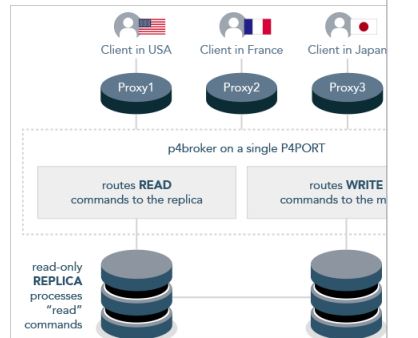
Perforce Broker aka Helix Broker defined!
The Perforce Broker (P4Broker) enables you to restrict the commands that can be executed, or redirect specific commands to alternate (replica or edge) Perforce servers. The Perforce Broker is a…
Read more »