Originally published on 2010-04-16; fully revised and updated.
This guide converts a legacy list of SCM interview prompts into a practical preparation kit for DevOps, build, release, and configuration management roles. You will learn what interviewers usually look for in strong answers, how to explain SCM workflow end to end, and how to compare common tools and branching models.
Original post: General SCM Interview Questions and Answer – SCM Job Interview Kit.
How to use this interview kit
Use this as a speaking framework, not a memorization sheet. For each topic, prepare one concise definition, one real example from your work, and one trade-off or failure mode you have seen.
- Start with core SCM concepts (configuration, change, branching, merging).
- Move to delivery mechanics (build, CI, packaging, deployment, release).
- Be ready with tooling comparisons relevant to your target role.
- Close answers with risk controls such as backups, access control, and reproducible builds.
Core SCM interview topics and what strong answers include
The original post listed many prompts. The sections below group those prompts into interview themes and clarify what a good answer should cover.
Configuration and change management
- What is configuration management? Explain identification, versioning, baselining, and traceability of code, environments, and build artifacts.
- What is change management? Describe controlled change requests, approvals, impact analysis, and auditability.
- Why do teams need both? Configuration management controls what exists; change management controls how it changes.
Branching, merging, and integration
- Why branch? To isolate work and reduce team collisions while preserving a stable integration line.
- Why merge? To integrate isolated changes back into shared history and release branches.
- How do you reduce merge pain? Short-lived branches, frequent rebases or merges, automated tests, and small pull requests.
- What is continuous integration? Frequent integration to a shared branch with automated build and test validation.
Build management, automation, and quality signals
- Build management includes dependency control, deterministic outputs, artifact versioning, and failure visibility.
- Build automation benefits include consistency, speed, reduced manual errors, and faster feedback.
- Daily and nightly builds are scheduling patterns; explain when each is useful and how to monitor failures.
- Code coverage is a quality signal, not a quality guarantee; discuss thresholds with context.
Release management, packaging, and deployment
- Release management should include versioning policy, approval gates, rollback plans, and release notes.
- Packaging should produce immutable artifacts that can be promoted across environments.
- Deployment automation should be idempotent, logged, and environment-aware.
- Multi-environment coordination requires consistent configuration handling across development, test, staging, and production.
Collaboration, multi-site work, and troubleshooting
- Dev and QA coordination improves when build status, test status, and artifact lineage are visible in one place.
- Multi-site projects need clear ownership boundaries, branch strategy discipline, and latency-aware workflows.
- Build server troubleshooting should be systematic: logs, environment drift, dependency changes, and capacity limits.
- Repository server troubleshooting should include permission checks, storage health, replication status, and backup validation.
SCM workflow you can explain in interviews
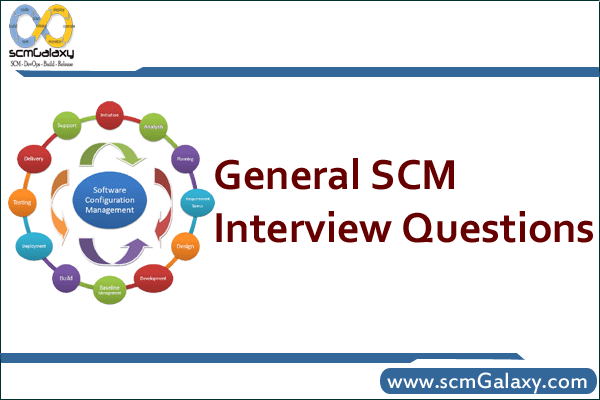
Many interviews ask for an end-to-end lifecycle view. This flow is a concise model you can adapt to your toolchain.
flowchart TD
    A[Change request logged] --> B[Create branch or workspace]
    B --> C[Implement code and config changes]
    C --> D[Run local build and tests]
    D --> E[Commit or submit changes]
    E --> F[CI build and automated tests]
    F --> G{Quality gates pass}
    G -- No --> H[Fix and resubmit]
    G -- Yes --> I[Package artifact]
    I --> J[Deploy to test environment]
    J --> K[Tag or label release]
Branching strategy comparison
The original post asks about branching methodologies. Interviewers usually want trade-offs, not just names.
| Strategy | Best for | Strengths | Trade-offs |
|---|---|---|---|
| Trunk-based development | High CI maturity and frequent releases | Fast integration and low long-lived drift | Requires strong automated testing and disciplined commits |
| GitFlow-style branching | Teams with explicit release cycles | Clear separation of feature, release, and hotfix work | Can become merge-heavy and operationally complex |
| Release branch model | Products supporting multiple maintained versions | Parallel maintenance of current and legacy releases | Patch propagation across branches must be tightly managed |
Common SCM tool comparison points
The original post mentions comparisons such as CVS vs SVN, Perforce vs SVN, and VSS vs TFVC. A practical interview answer compares repository model, operational strengths, and trade-offs.
| Tool | Repository model | Typical strengths | Common trade-offs |
|---|---|---|---|
| Git | Distributed | Cheap branching, local commits, strong ecosystem | History rewrites and workflow inconsistency can confuse teams without standards |
| Subversion (SVN) | Centralized | Straightforward centralized control and linear mental model | Offline workflows and branching ergonomics are less flexible than distributed models |
| Perforce | Centralized workspace model | Strong enterprise controls and common use with large asset repositories | Administration and licensing model may be heavier for smaller teams |
| IBM Rational ClearCase | Centralized enterprise VCS | Used in some regulated or legacy enterprise environments | Operational complexity and legacy footprint concerns |
| TFVC | Centralized | Integrated with Azure DevOps style enterprise workflows | Less common in modern cloud-native greenfield teams than Git-based workflows |
Command examples interviewers often ask about
These examples are intentionally minimal and are useful for whiteboard or live interview discussion.
Git feature workflow and release tagging
git clone git@github.com:example/app.git
cd app
git checkout -b feature/login-audit
# edit files
git add .
git commit -m "Add login audit events"
git push -u origin feature/login-audit

git checkout main
git pull --ff-only
git merge --no-ff feature/login-audit
git tag -a v1.4.0 -m "Release v1.4.0"
git push origin main --tagsCode language: PHP (php)
SVN backup and restore readiness checks
# hot backup copy
svnadmin hotcopy /srv/svn/project /backup/svn/project-$(date +%F)
svnadmin verify /backup/svn/project-$(date +%F)

# dump and load example
svnadmin dump /srv/svn/project > /backup/svn/project.dump
svnadmin create /srv/svn/project-restore
svnadmin load /srv/svn/project-restore < /backup/svn/project.dumpCode language: PHP (php)
Minimal CI pipeline example
name: ci
on: [push, pull_request]

jobs:
  build-test:
    runs-on: ubuntu-latest
    steps:
      - uses: actions/checkout@v4
      - name: Build
        run: ./gradlew clean build
      - name: Test
        run: ./gradlew test
      - name: Archive artifact
        run: mkdir -p out && cp build/libs/*.jar out/Code language: HTTP (http)
Best practices to mention in interviews
- Use a reliable server or managed platform for repositories.
- Back up repositories regularly and test restore procedures.
- Automate builds and tests end to end.
- Treat build and deployment scripts as versioned code.
- Keep repositories clean: naming standards, archival policy, and branch hygiene.
- Apply least-privilege access and audit trails for critical branches.
- Make builds reproducible with pinned dependencies and documented environments.
- Publish clear build and release status for development and QA teams.
Common pitfalls in SCM interview answers
- Giving definitions without explaining operational impact.
- Describing branching strategy without discussing merge risk.
- Equating code coverage percentage with software quality.
- Ignoring backup restore testing while claiming backup maturity.
- Over-indexing on one tool instead of explaining transferable SCM principles.
- Skipping collaboration details between development, QA, and release stakeholders.
If you prepare each topic with one definition, one real project example, and one trade-off, you will be able to answer most SCM interview questions with confidence and depth.

I’m Rajesh Kumar, a DevOps, SRE, DevSecOps, Cloud, and Platform Engineering expert passionate about sharing practical knowledge, real-world experiences, and industry best practices. I have worked at Cotocus and regularly write about technology, travel, investing, health, product reviews, and digital marketing through my various platforms.
I publish technical articles at DevOps School, travel stories at Holiday Landmark, stock market insights at Stocks Mantra, health and fitness guidance at My Medic Plus, product reviews at TrueReviewNow, and SEO and digital marketing strategies at Wizbrand.
Find Trusted Cardiac Hospitals
Compare heart hospitals by city and services — all in one place.
Explore Hospitals