
What is Terraform in DevOps and Its history & origin?
Hi friend, today in this blog I’ll explain about Terraform in DevOps and Its history & origin as well, lets know about Terraform, It is an open-source tool and it is a multi-cloud, infrastructure-as-code solution, developed by Hashicorp, that makes use of the declarative Hashicorp Configuration Language. It helps you manage existing, popular service providers like GCP, AWS, as well as custom in-house solutions. It manages external resources (such as public cloud infrastructure, private cloud infrastructure, network appliances, software as a service, and platform as a service) with “providers”.
These are the some important points about Terraform
- Original author(s) – Mitchell Hashimoto et al.
- Developer(s) – HashiCorp
- Initial release 28 July 2014
- It also supports a Terraform Module Registry, launched in 2017.
- In 2019, Terraform introduced the paid version called Terraform Enterprise for larger organizations.
How does Terraform work?
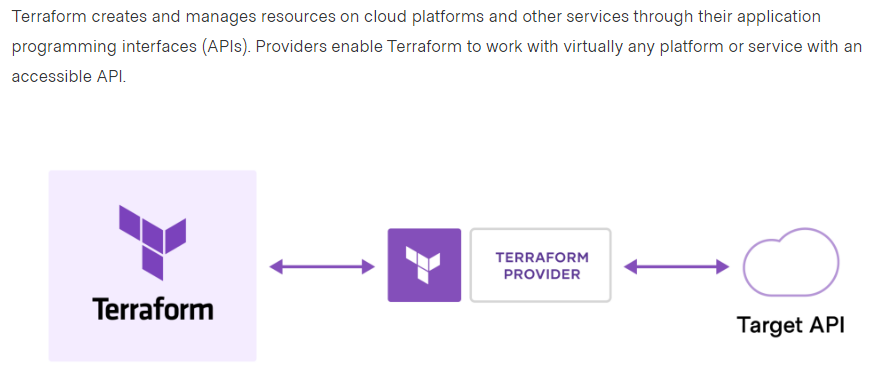
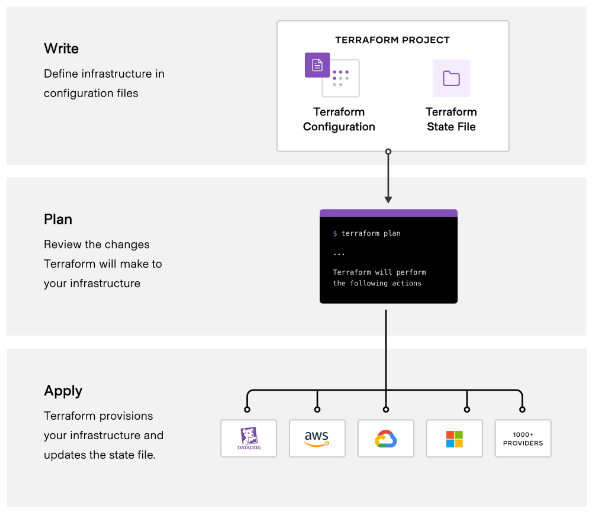
The core Terraform workflow consists of three stages:
Importance of Terraform:-
- The Terraform state file keeps track of all changes in an environment.
- It offers a great way to package and reuse common code in the form of modules.
- Its modules are comparable to functions or methods in scripting or programming languages.
- State files can also serve as a data source that can be imported by other Terraform projects.
These version controls supported by Terraform
The supported version controls are:
- Azure DevOps Services
- Azure DevOps Server
- Bitbucket Server
- Bitbucket Cloud
- Gitlab EE and CE
- Gitlab.com
- GitHub Enterprise
- GitHub.com (OAuth)
- GitHub.com
These are the features of Terraform:-
- Terraform can manage parallel environments.
- It manages external services providers very easily.
- It can manage multiple clouds to increase fault tolerance.
- It follows a Declarative approach for faster developments.
- It helps to display the resulting model in a graphical and easy-to-understand form.
- Its modular code plays a major role in achieving consistency, reusability, and collaboration.
What are the most useful Terraform commands?
These are some of the most useful Terraform commands are:
terraform init – initializes the current directory
terraform refresh – refreshes the state file
terraform output – views Terraform outputs
terraform apply – applies the Terraform code and builds stuff
terraform destroy – destroys what has been built by Terraform
terraform graph – creates a DOT-formatted graph
terraform plan – a dry run to see what Terraform will do
Explain the uses of Terraform CLI and list some basic CLI commands?
The Terraform Command-Line Interface (CLI) is used to manage infrastructure and interact with Terraform state, configuration files, providers, etc.
Here are some basic CLI commands:
terraform init – prepares your working directory for other commands
terraform destroy – destroys the previously-created infrastructure
terraform validate – check whether the configuration is valid
terraform apply – creates or updates the infrastructure
terraform plan – shows changes needed by the current configuration
Prerequisites for Terraform:-
- At least 10GB of disk space on the root volume.
- At least 40GB of disk space for the Docker data directory (defaults to /var/lib/docker )
- At least 8GB of system memory.
If you are planning to prepare for the Hashicorp Terraform certification then I would suggest you DevOpsSchool Institutes name where you can get quality training by experts. If you are planning to learn terraform then watch this tutorial and get all info.

I’m Rajesh Kumar, a DevOps, SRE, DevSecOps, Cloud, and Platform Engineering expert passionate about sharing practical knowledge, real-world experiences, and industry best practices. I have worked at Cotocus and regularly write about technology, travel, investing, health, product reviews, and digital marketing through my various platforms.
I publish technical articles at DevOps School, travel stories at Holiday Landmark, stock market insights at Stocks Mantra, health and fitness guidance at My Medic Plus, product reviews at TrueReviewNow, and SEO and digital marketing strategies at Wizbrand.
Find Trusted Cardiac Hospitals
Compare heart hospitals by city and services — all in one place.
Explore Hospitals





