
System Requirements for Rundeck
Supported Operating Systems:
- Red Hat Enterprise Linux
- Oracle Linux
- CentOS
- Debian
- Ubuntu
- Windows Server
Amazon EC2
- Instance size of m3.medium or larger
- An instance size of m3.xlarge or larger if there are more than 100 hosts
Supported Database.
- Mysql version
- Mariadb version
- Postgres version
- Oracle version
Supported Log store
- File system
- S3 compatible object store
Others Important
- JAVA 8 or 11 Installed.
- 2 CPUs – 2 CPUs per instance
- 4 GB RAM – 4GB for the JVM instance
- 20 GB hard disk
Network access
- 4440 (http) & 4443 (https)
- Port 4440|4443 | netstat -an | egrep ‘4440|4443’
How to Install Rundeck OSS in Ubtunu?
Step 1- Install Java
$ sudo apt update
$ sudo apt install openjdk-17-jdk
$ sudo apt install openjdk-17-jre
$ java –version
Step 2 – Download rundeck Package
Step 3 – Run Installer commands.
$ wget https://packagecloud.io/pagerduty/rundeck/packages/any/any/rundeck_5.12.0.20250512-1_all.deb/download.deb?distro_version_id=35
$ mv 'download.deb?distro_version_id=35' rundeck.deb
$ chmod 755 rundeck.deb
$ dpkg -i rundeck.deb
$ cd /etc/rundeck/
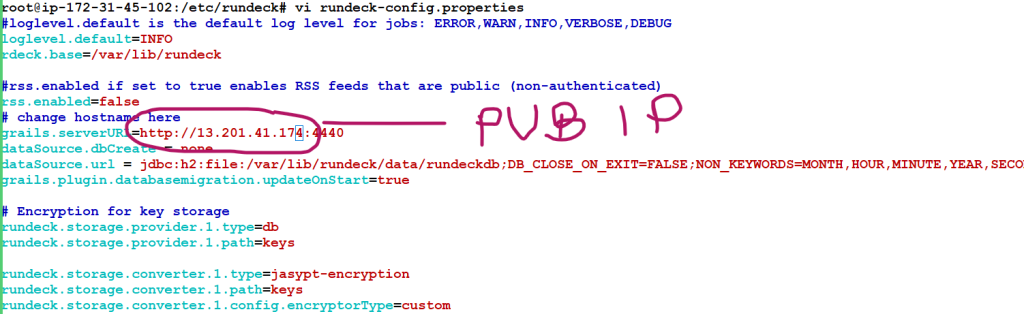
$ vi /etc/rundeck/rundeck-config.properties
# This should be PUBLIC IP of Server - grails.serverURL=http://15.206.169.12:4440
$ cd /var/lib/rundeck/

# How to start the rundeck services

$ service rundeckd status
$ service rundeckd start
$ service rundeckd stop

or
/etc/init.d/rundeckd start
/etc/init.d/rundeckd stop
/etc/init.d/rundeckd statusCode language: PHP (php)
Wait for few mins
and then
http://13.233.140.35:4440/
admin/admin
RUNDECK INSTALL PACKAGE
Install Rundeck Method
Docker
$ docker run --rm -it -p 4440:4440 rundeckpro/enterprise:4.0.1

or

$ docker info
$ docker ps
$ docker run --name rundeck-opensource -d -e RUNDECK_GRAILS_URL=http://3.111.53.239:4440 -e RUNDECK_SERVER_ADDRESS=0.0.0.0 -p 4440:4440 -v data:/home/rundeck/server/data rundeck/rundeck:4.0.1

$ docker run --name rundeck-opensource -d -e RUNDECK_GRAILS_URL=http://43.204.22.177:4440 -e RUNDECK_SERVER_ADDRESS=0.0.0.0 -p 4440:4440 -v data:/home/rundeck/server/data rundeck/rundeck:5.12.0

$ docker run --name rundeck-opensource -d -e RUNDECK_GRAILS_URL=http://43.204.22.177:4440 -e RUNDECK_SERVER_ADDRESS=0.0.0.0 -p 4440:4440 -v /root/data:/home/rundeck/server/data rundeck/rundeck:5.12.


$ docker ps -a
$ ls
# Access - http://3.111.53.239:4440/
with admin/adminCode language: PHP (php)
How to access Rundeck using IP Address
  28  vi rundeck-config.properties
   29  history
   30  sudo systemctl daemon-reload
   31  sudo service rundeckd restart
Code language: CSS (css)
Installing on Ubuntu or Debian Linux distributions
Rundeck pro enterprise in Centos/Redhat
Configure Rundeck
/etc/rundeck/
/var/lib/rundeck/
OR
$RDECK_BASE/etc/
$RDECK_BASE/server/config/
DEB/RPM layout
/etc/rundeck/
├── admin.aclpolicy
├── apitoken.aclpolicy
├── artifact-repositories.yaml
├── framework.properties
├── jaas-loginmodule.conf
├── log4j.properties
├── profile
├── project.properties
├── realm.properties
├── rundeck-config.properties
├── rundeckpro-license.key
├── ssl
│   ├── ssl.properties
│   ├── keystore (not packaged)
│   └── truststore (not packaged)
├── system-job_reader.aclpolicy_template
├── system-job_runner.aclpolicy_template
├── system-job_viewer.aclpolicy_template
├── system-job_writer.aclpolicy_template
└── system-project_admin.aclpolicy_template

/var/lib/rundeck/
├── bootstrap
├── data
├── libext
├── logs
├── projects
├── repository
├── var
└── workCode language: JavaScript (javascript)
Launcher layout
$RDECK_BASE/etc/
├── admin.aclpolicy
├── apitoken.aclpolicy
├── framework.properties
├── preferences.properties
├── profile
├── profile.bat
└── project.properties

$RDECK_BASE/server/config/
├── artifact-repositories.yaml
├── jaas-loginmodule.conf
├── log4j.properties
├── realm.properties
├── rundeck-config.properties
└── ssl.propertiesCode language: PHP (php)
How to install RunDeck in Windows
Step 1 - Download - https://packagecloud.io/pagerduty/rundeck/packages/java/org.rundeck/rundeck-5.12.0-20250512.war/artifacts/rundeck-5.12.0-20250512.war/download?distro_version_id=167

Step 2 - java -jar your-app.war

Step 2 - http://localhost:4440/
admin/adminCode language: JavaScript (javascript)
How to install Enterprise Rundeck
Step 1 - curl https://raw.githubusercontent.com/rundeck/packaging/main/scripts/deb-setup.sh 2> /dev/null | sudo bash -s rundeckpro

Step 2 - sudo apt-get install rundeckpro-enterprise

Step 3 - sudo /etc/init.d/rundeckd startCode language: JavaScript (javascript)
Step 2 – http://IP:4440/
admin/admin

I’m Rajesh Kumar, a DevOps, SRE, DevSecOps, Cloud, and Platform Engineering expert passionate about sharing practical knowledge, real-world experiences, and industry best practices. I have worked at Cotocus and regularly write about technology, travel, investing, health, product reviews, and digital marketing through my various platforms.
I publish technical articles at DevOps School, travel stories at Holiday Landmark, stock market insights at Stocks Mantra, health and fitness guidance at My Medic Plus, product reviews at TrueReviewNow, and SEO and digital marketing strategies at Wizbrand.
Find Trusted Cardiac Hospitals
Compare heart hospitals by city and services — all in one place.
Explore Hospitals





