URL – https://docs.gitlab.com/ee/install/docker.html
Step 1 – Set up the volumes location
$ export GITLAB_HOME=/opt/gitlab
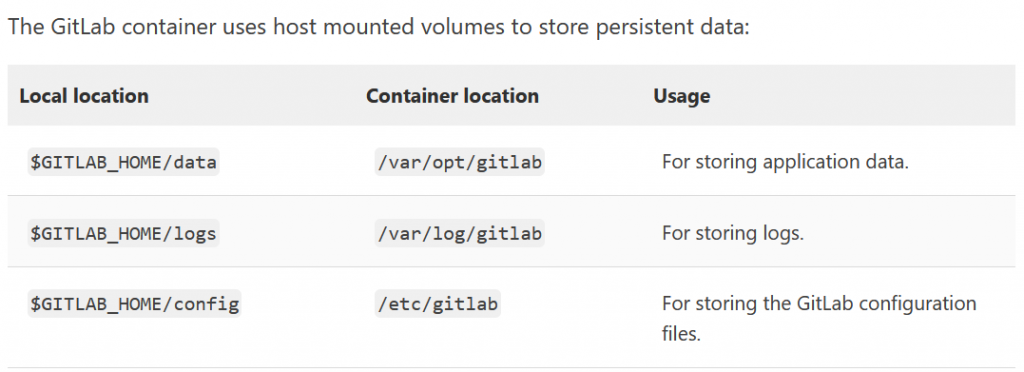
The GitLab container uses host mounted volumes to store persistent data:
Step 2 – Install GitLab using Docker Engine
sudo docker run --detach \
  --hostname gitlab.example.com \
  --publish 443:443 --publish 80:80 --publish 22:22 \
  --name gitlab \
  --restart always \
  --volume $GITLAB_HOME/config:/etc/gitlab \
  --volume $GITLAB_HOME/logs:/var/log/gitlab \
  --volume $GITLAB_HOME/data:/var/opt/gitlab \
  --shm-size 256m \
  gitlab/gitlab-ee:latest

$ sudo docker logs -f gitlabCode language: PHP (php)
Step 3 – Access gitab
After starting a container you can visit gitlab.example.com (or http://192.168.59.103 if you used boot2docker on macOS). It might take a while before the Docker container starts to respond to queries.
Visit the GitLab URL, and log in with username root and the password from the following command:
sudo docker exec -it gitlab grep ‘Password:’ /etc/gitlab/initial_root_password

I’m Rajesh Kumar, a DevOps, SRE, DevSecOps, Cloud, and Platform Engineering expert passionate about sharing practical knowledge, real-world experiences, and industry best practices. I have worked at Cotocus and regularly write about technology, travel, investing, health, product reviews, and digital marketing through my various platforms.
I publish technical articles at DevOps School, travel stories at Holiday Landmark, stock market insights at Stocks Mantra, health and fitness guidance at My Medic Plus, product reviews at TrueReviewNow, and SEO and digital marketing strategies at Wizbrand.
Find Trusted Cardiac Hospitals
Compare heart hospitals by city and services — all in one place.
Explore Hospitals