
Here’s a comprehensive, hands-on tutorial to help you explore and experience all the features listed under the Secure section of GitLab using a sample project.
🔐 Full GitLab Secure Experience Guide (GitLab SaaS – Free or Ultimate Tier)
🧪 Sections Covered:
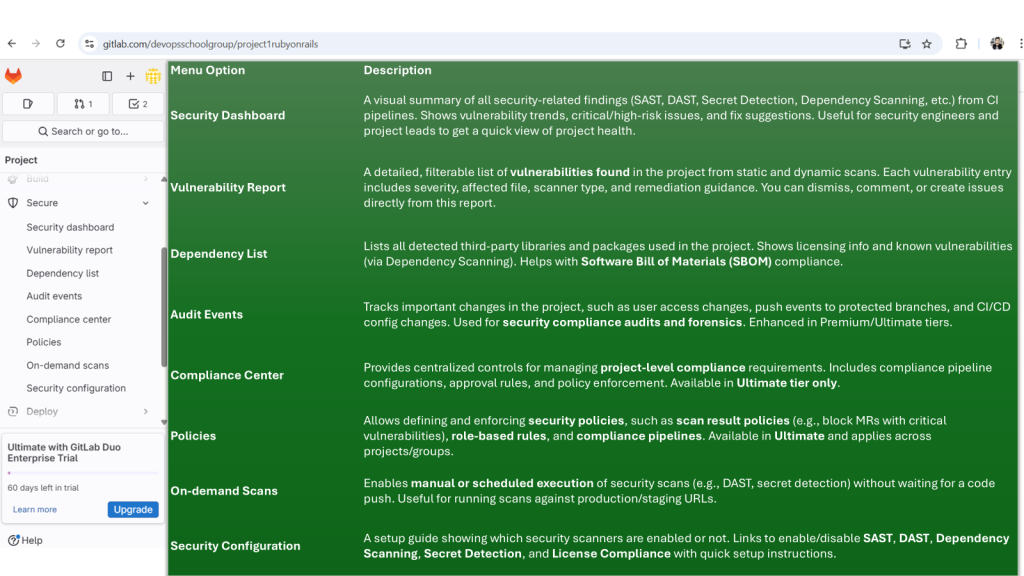
- Security Dashboard
- Vulnerability Report
- Dependency List
- Audit Events
- Compliance Center
- Policies
- On-Demand Scans
- Security Configuration
📦 Sample Repo:
gitlab-examples/security-reports
https://gitlab.com/gitlab-examples/security
✅ You’ll fork and run security pipelines on this to explore all Secure features.
🛠️ Prerequisites
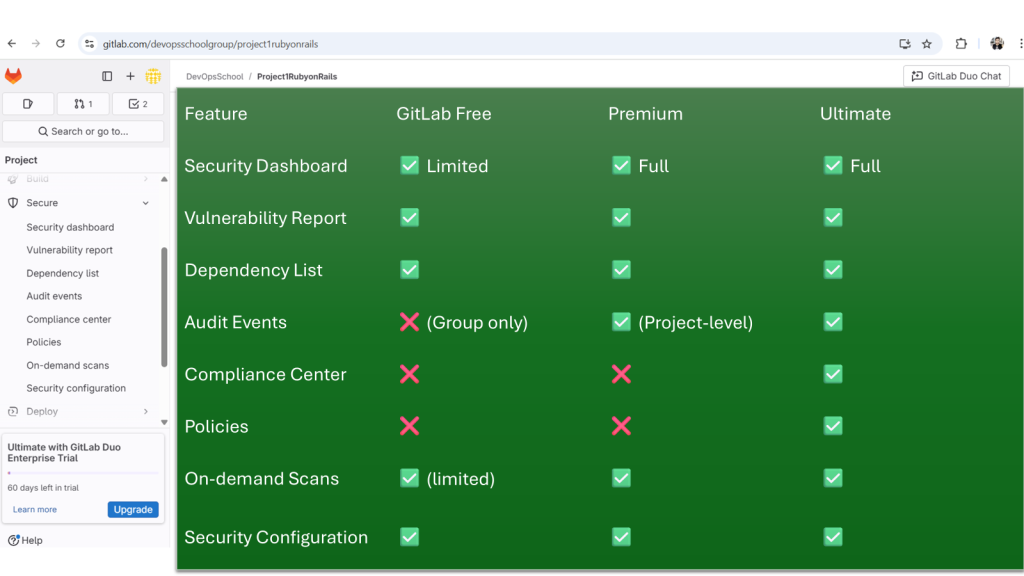
- GitLab account (preferably Ultimate tier for all features)
- Fork access to gitlab-examples/security-reports
- CI/CD runners enabled (shared runners on GitLab.com are fine)
- Enable container registry (if testing container scanning)
✅ Step-by-Step Walkthrough
🔁 STEP 1: Fork the Repo
- Visit gitlab-examples/security-reports
- Click Fork
- Choose your namespace or group
⚙️ STEP 2: Enable Security Features
- Go to Secure → Security Configuration
- Enable each of the following (GitLab creates
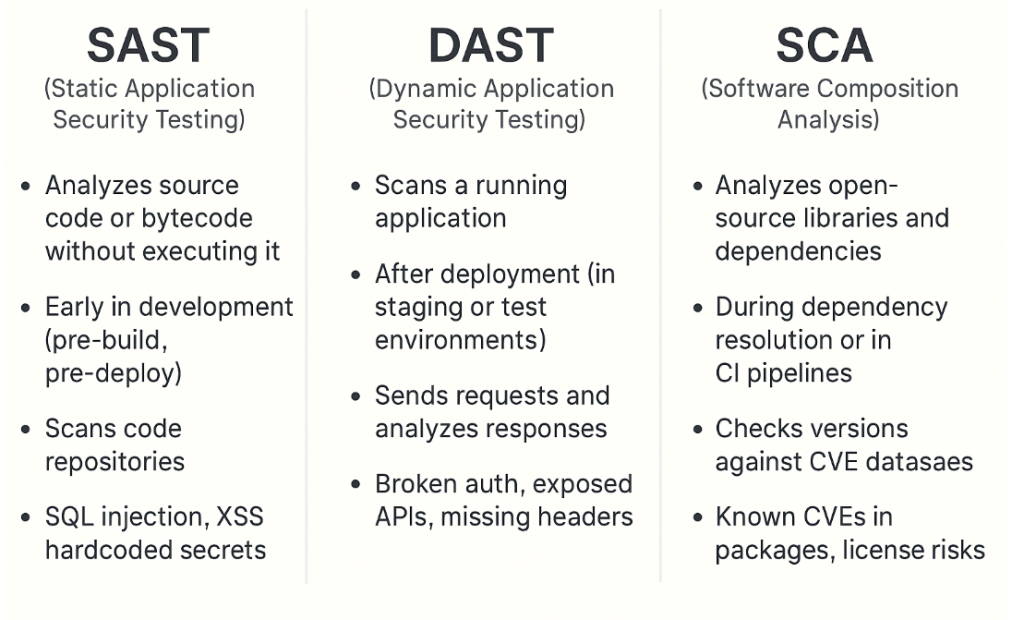
.gitlab-ci.ymlsnippets for you):- ✅ SAST
- ✅ Dependency Scanning
- ✅ Secret Detection
- ✅ DAST (Needs a deployed URL)
- ✅ Container Scanning (Requires Docker image build)
- ✅ License Compliance
- ✅ Coverage Fuzzing
- ✅ API Fuzzing
💡 Tip: Ensure CI/CD → General pipeline settings → Auto DevOps is disabled (to avoid conflicts with .gitlab-ci.yml).
▶️ STEP 3: Trigger the Pipeline
- Push a commit or go to CI/CD > Pipelines and click Run pipeline
- Wait for the full security pipeline to complete
- Each tool (SAST, DAST, etc.) generates artifacts GitLab uses in Secure dashboards
🛡️ STEP 4: Explore Secure Menu Options
✅ 1. Security Dashboard
- Navigate:
Secure > Security Dashboard - See:
- Open vulnerabilities by severity
- Merge requests with unresolved issues
- Projects under your namespace grouped by security posture
✅ 2. Vulnerability Report
- Navigate:
Secure > Vulnerability Report - View all findings from your pipeline:
- SAST, DAST, Container, Dependency scans
- Use filters to sort by:
- Severity
- Scanner type
- Status (detected, dismissed, resolved)
✅ 3. Dependency List
- Navigate:
Secure > Dependency List - Shows a full tree of project dependencies (pulled from your
package.json,pom.xml, etc.) - Any library with known vulnerabilities is flagged
✅ 4. Audit Events
- Navigate:
Secure > Audit Events - Shows:
- Group/project-level permission changes
- Settings changes
- Login attempts, pipeline trigger activity
- Enterprise feature (requires Ultimate Tier)
✅ 5. Compliance Center
- Navigate:
Secure > Compliance Center - Create compliance pipelines (separate from project pipelines)
- Enforce MR approval rules
- View audit compliance reports
- Monitor adherence to internal policies
✅ 6. Policies
- Navigate:
Secure > Policies - Types of policies:
- Scan Execution Policies (e.g., always run secret detection)
- Scan Result Policies (e.g., block merge if high vulnerability)
- Click “New Policy”
- Use GUI to define:
- Trigger condition
- Actions (e.g., approve requirement, MR block)
✅ 7. On-Demand Scans
- Navigate:
Secure > On-Demand Scans - Great for ad hoc DAST/API scans
- Choose:
- Target site URL (for DAST)
- OpenAPI spec (for API fuzzing)
- No CI/CD pipeline required
✅ 8. Security Configuration
- Navigate:
Secure > Security Configuration - All tools toggled here
- Edit variables, scan schedules, timeouts
- Links to pipelines that used each security tool
🔄 OPTIONAL: Enable Advanced Features
- Enable
License Compliance - Build & scan Docker images → View Container Scanning results
- Add intentionally vulnerable code/libraries to test deeper scanning
📊 STEP 5: Automate Reporting (Optional)
You can set up email reports or export results via API:
- GitLab Vulnerability API
- Export JSON → Use in dashboards like Grafana or Google Sheets
📚 Learning Summary
By the end of this guide, you’ve:
✔️ Enabled full suite of GitLab Secure features
✔️ Explored each report and dashboard
✔️ Configured On-Demand scans and Policies
✔️ Seen real security results and recommendations

I’m Rajesh Kumar, a DevOps, SRE, DevSecOps, Cloud, and Platform Engineering expert passionate about sharing practical knowledge, real-world experiences, and industry best practices. I have worked at Cotocus and regularly write about technology, travel, investing, health, product reviews, and digital marketing through my various platforms.
I publish technical articles at DevOps School, travel stories at Holiday Landmark, stock market insights at Stocks Mantra, health and fitness guidance at My Medic Plus, product reviews at TrueReviewNow, and SEO and digital marketing strategies at Wizbrand.
Find Trusted Cardiac Hospitals
Compare heart hospitals by city and services — all in one place.
Explore Hospitals





