Find the Best Cosmetic Hospitals

Explore trusted cosmetic hospitals and make a confident choice for your transformation.

โ€œInvest in yourself โ€” your confidence is always worth it.โ€

Explore Cosmetic Hospitals

Start your journey today โ€” compare options in one place.

Step-by-Step: Install & Run MLflow on Windows

Hereโ€™s a step-by-step guide to install and run MLflow on Windows, covering setup, UI launch, and test tracking. This works on Windows 10/11 with Python โ‰ฅ 3.8.


โœ… Step-by-Step: Install & Run MLflow on Windows


๐Ÿงฐ Step 1: Install Python (if not already installed)

MLflow works best with Python 3.8โ€“3.11.


๐Ÿ’ก Step 2 (Recommended): Create a Virtual Environment

Open Command Prompt or PowerShell and run:

python -m venv mlflow-env
.mlflow-envScriptsactivate
Code language: CSS (css)

This isolates dependencies for MLflow.


๐Ÿ“ฆ Step 3: Upgrade pip

Still inside the virtual environment:

python -m pip install --upgrade pip

๐Ÿš€ Step 4: Install MLflow

Run:

pip install mlflow

Verify it installed:

mlflow --version

You should see something like:

mlflow, version 2.21.3
Code language: CSS (css)

๐ŸŒ Step 5: Launch the MLflow Tracking UI

Run:

mlflow ui
or
start mlflow ui

This will start a local server at:

http://127.0.0.1:5000
Code language: JavaScript (javascript)

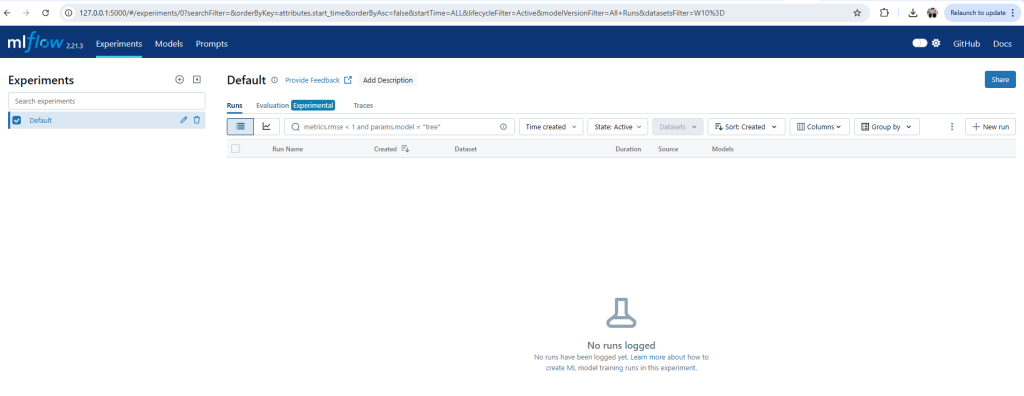
Visit this URL in your browser to access the MLflow UI.


๐Ÿงช Step 6: Run a Test MLflow Tracking Script

Save the following as test_mlflow.py:

import mlflow
import mlflow.sklearn
from sklearn.ensemble import RandomForestRegressor
from sklearn.datasets import load_diabetes
from sklearn.model_selection import train_test_split

# ๐Ÿ”ง Set tracking URI to the running server
mlflow.set_tracking_uri("http://127.0.0.1:5000")

# Load dataset
data = load_diabetes()
X_train, X_test, y_train, y_test = train_test_split(data.data, data.target)

# Enable autologging
mlflow.sklearn.autolog()

# Start tracking
with mlflow.start_run():
    model = RandomForestRegressor()
    model.fit(X_train, y_train)
    score = model.score(X_test, y_test)
    print("Model score:", score)
Code language: PHP (php)

Run the script:

This opens a new command prompt window for the UI, leaving your current terminal free.

Then in the same terminal:

python mlflow_test.py

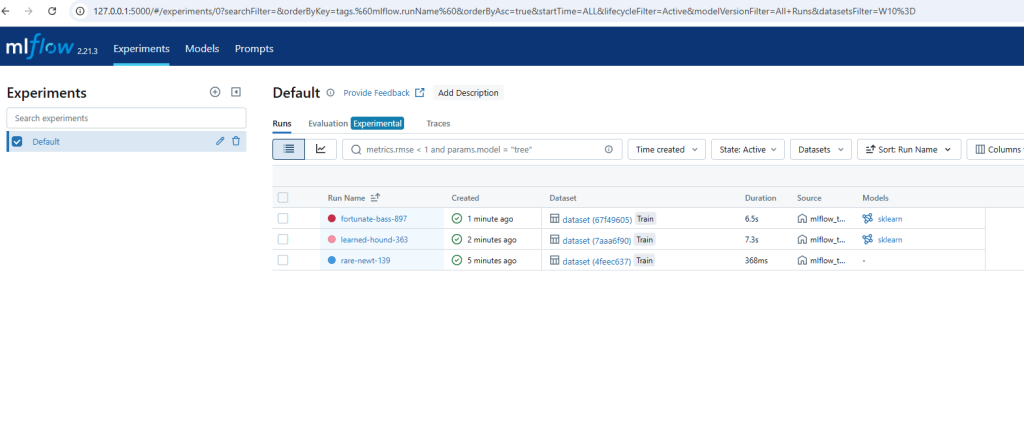
Now go back to your MLflow UI (http://127.0.0.1:5000) and you will see the run logged.

โœ… What Just Happened:

  • โœ… Your ML model trained (RandomForestRegressor)
  • โœ… The modelโ€™s score was printed: 0.3752
  • โœ… The run was logged to MLflow’s tracking server at http://127.0.0.1:5000
  • โœ… A run name like learned-hound-363 was auto-generated
  • โœ… The script output gave you two links:

๐Ÿ“ Step 7: Where is the data saved?

MLflow creates a folder named:

mlruns/

This contains all experiment logs and metrics.


๐Ÿงผ Optional Cleanup

To stop the MLflow UI:

  • Press Ctrl + C in the terminal

To deactivate the virtual environment:

deactivate

๐Ÿ› ๏ธ Troubleshooting Tips

IssueSolution
mlflow: command not foundMake sure you’re in the virtual environment. Activate with .mlflow-envScriptsactivate
Port 5000 busyRun mlflow ui --port 5001
UI not openingUse full URL http://127.0.0.1:5000 in your browser
Python 3.13 issuesDowngrade to Python 3.10 or 3.11 for stability

One Code

import mlflow
import mlflow.sklearn
from sklearn.ensemble import RandomForestRegressor
from sklearn.datasets import load_diabetes
from sklearn.model_selection import train_test_split

# ๐Ÿ”ง Set tracking URI to the running server
mlflow.set_tracking_uri("http://127.0.0.1:5000")
mlflow.set_experiment("MyImprovedExperiment")

# Load dataset
data = load_diabetes()
X_train, X_test, y_train, y_test = train_test_split(data.data, data.target)

# Enable autologging
mlflow.sklearn.autolog()

# Start tracking
with mlflow.start_run():
    model = RandomForestRegressor()
    model.fit(X_train, y_train)
    score = model.score(X_test, y_test)

    print("Model score:", score)

    # Optional: log manually with input example
    input_example = X_train[0:1]
    mlflow.sklearn.log_model(
        sk_model=model,
        artifact_path="model",
        input_example=input_example,
    )

mlflow.log_param("learning_rate", 0.1)
mlflow.log_metric("accuracy", 0.87)
mlflow.sklearn.log_model(model, "my_model")
Code language: PHP (php)

Find Trusted Cardiac Hospitals

Compare heart hospitals by city and services โ€” all in one place.

Explore Hospitals
I'm Rajesh Kumar, a DevOps, SRE, DevSecOps, Cloud, and Platform Engineering expert passionate about sharing practical knowledge, real-world experiences, and industry best practices. I have worked at Cotocus and regularly write about technology, travel, investing, health, product reviews, and digital marketing through my various platforms. I publish technical articles at DevOps School, travel stories at Holiday Landmark, stock market insights at Stocks Mantra, health and fitness guidance at My Medic Plus, product reviews at TrueReviewNow, and SEO and digital marketing strategies at Wizbrand.

Related Posts

Should A Student Use ChatGPT To Learn DevOps Instead Of Courses?

As a student looking to learn DevOps, you might be wondering if ChatGPT is a good alternative to traditional courses. While there are some benefits to using…

Read More

Top 10 Digital Signature Software Tools in 2026: Features, Pros, Cons & Comparison

Introduction In 2026, digital transformation has reshaped the way businesses manage documents, sign agreements, and engage with clients. Digital signatures have become an essential component of this…

Read More

Top 10 Graphics Design Tools in 2026: Features, Pros, Cons & Comparison

Introduction In 2026, graphics design tools are more essential than ever for businesses, content creators, designers, and marketers across industries. From creating brand identities and advertising materials…

Read More

Top 10 Presentation Software Tools in 2026: Features, Pros, Cons & Comparison

Introduction In 2026, creating engaging and impactful presentations is more than just slides with bullet pointsโ€”itโ€™s about telling a story, conveying ideas visually, and keeping your audience…

Read More

How to Optimize Your headless CMS for Multilingual Websites

A multilingual site enables a company to internationalize itself to different audiences for better engagement and ultimately, international brand awareness. However, without the proper considerations with the…

Read More

Top 10 AI SEO Tools in 2026: Features, Pros, Cons & Comparison

Introduction In 2026, AI SEO tools have become indispensable for digital marketers, businesses, and content creators aiming to dominate search engine rankings. These tools leverage artificial intelligence…

Read More
Subscribe
Notify of
guest
0 Comments
Newest
Oldest Most Voted
0
Would love your thoughts, please comment.x
()
x