
MYHOSPITALNOW.COM

Find Trusted Doctors & Hospitals

Discover healthcare providers, compare hospitals, and explore treatment options worldwide.

Free Treatment Quotes • Doctor Search • Hospital Comparison

Find Healthcare Options

www.myhospitalnow.com

How to use multiple authentication in Laravel.

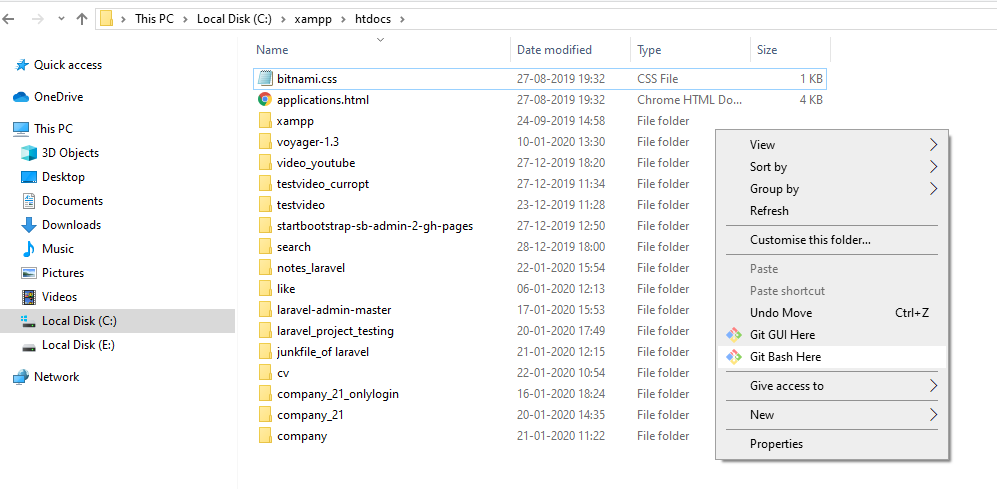
Step:1

Windows Explorer htdocs folder with right-click menu showing the Git Bash Here option

Step:2- click on Git base Here.

It will look like this

Git Bash MINGW64 terminal opened in the C:/xampp/htdocs directory

Step:3- you have to crate own project and put here

Git Bash running composer create-project laravel/laravel demo 5.5 to create a new project

Step:4- Press Enter than project will be run, it will be take time to install.

Step:5- after install your project then go to inside your folder whatever project name. see the pic
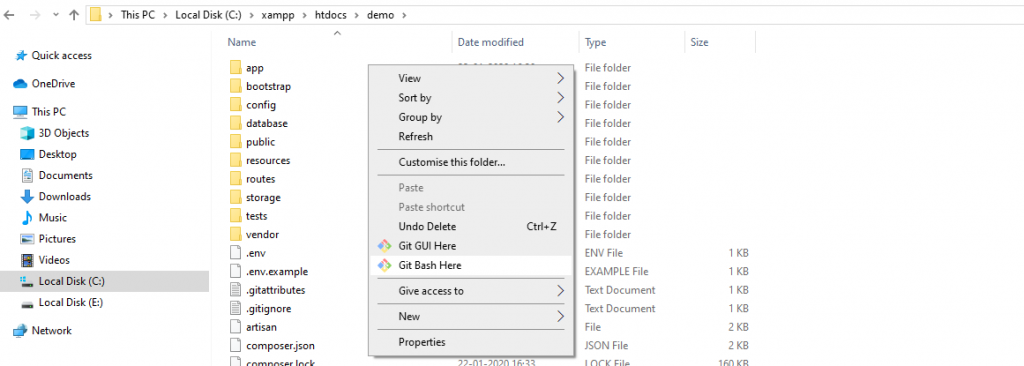
Laravel demo project folder in Explorer with right-click menu showing Git Bash Here

Step:6– click again Git Base Here and write the syntax. php artisan serve press Enter this to check your project in URL: http://127.0.0.1:8000/ .

Git Bash in the demo folder running php artisan serve

Now configure database in .env file

Step:7-

DB_CONNECTION=mysql
DB_HOST=127.0.0.1
DB_PORT=3306
DB_DATABASE=laravel_multi
DB_USERNAME=root
DB_PASSWORD=root@123

Laravel .env file in code editor showing MySQL database connection settings

Step:8- Create migration for admins.

Git Bash running php artisan make:migration create_admins_table

Now the database/migrations directory open the admins migrations file and replace up function.

Git Bash running php artisan make:migration create_bloggers_table

Step:9- database/migrations/_create_bloggers_table.php

Step:10- we have defined our tables, run migrate:

php artisan migrate

Step:11- Admin model
To make the model for the admins, run the following command:

php artisan make:model Admin

Open the Admin model in app/Admin.php and add the following:

Step:12- To make the model for the blogger, run the following command:

php artisan make:model Blogger

Step:13- Open config/auth.php and add the new guards edit as follows:

Step:14- We added two new guards admin and blogger and set their providers. 

Step:15- Modify LoginController

Step:16– Now, Modify RegisterController

Step:17-  resources/views/auth/login.blade.php

Step:18- // resources/views/auth/register.blade.php

Step:19-/ resources/views/layouts/auth.blade.php

Step:20- // resources/views/admin.blade.php

Step:20- / resources/views/blogger.blade.php

Step:21- // resources/views/home.blade.php

Step:22-  routes/web.php

Step:23- // app/Http/Controllers/Middleware/RedirectIfAuthenticated.php

Find Trusted Cardiac Hospitals

Compare heart hospitals by city and services — all in one place.

Explore Hospitals

sam
MotoShare.in is your go-to platform for adventure and exploration. Rent premium bikes for epic journeys or simple scooters for your daily errands—all with the MotoShare.in advantage of affordability and ease.

Related Posts

Top 10 Laravel Interview Questions And Answers 2020.

1- What is Laravel Framework? Laravel is a free, open-source PHP web framework, created by Taylor Otwell and intended for the development of web applications following the model–view–controller…

Read More

Top 100 laravel interview questions and answers

1) What is Laravel? Laravel is an open-source widely used PHP framework. The platform was intended for the development of web application by using MVC architectural pattern….

Read More

How to Login with Token in Laravel PHP Framework?

How to Login with Token in Laravel PHP Framework? Step 1. Create a new Project, so write down the following command on Git Bash: Step 2. Move…

Read More

How to Create REST API in Laravel.

API is also known as Web services. Web services is very important when you are creating web and Mobile app. You require API in mobile application development. If you…

Read More

How to Create a Simple Login Authentication System in LARAVEL?Part-1

How to Create a Simple Login Authentication System in LARAVEL? Firstly, we’ll create a new project for this. Step 1. Go to XAMPP/htdocs folder -> right Click->Open Git…

Read More

How to Upload files or Documents in Mysql Database Using laravel.

Step: 1- First of all you have to go:- Step:2- then right-click in this Drive and got to Git Bas Here and click. Step:3-run the composer step:…

Read More
