
Common terminologies used in IAM Roles and IAM Policies in AWS Identity and Access Management (IAM)
| Term | Description |
|---|---|
| IAM Role | An IAM entity that defines a set of permissions for making AWS service requests. Roles can be assumed by users, applications, or services. |
| IAM Policy | A document that defines permissions for IAM users, groups, and roles. Policies can be attached to roles or users to control access to AWS resources. |
| Trust Policy | A policy attached to an IAM role that specifies who can assume the role. It establishes trust between the role and the entity assuming it. |
| Permissions Policy | A policy attached to an IAM user, group, or role that defines what actions are allowed or denied on which AWS resources. |
| Principal | The entity (user, role, service) that is allowed or denied access to AWS resources. It specifies “who” in IAM policies. |
| Action | Specifies the specific AWS actions that can be allowed or denied (e.g., s3:PutObject, ec2:StartInstances). |
| Resource | Specifies the AWS resources to which the policy applies (e.g., an S3 bucket, an EC2 instance). |
| Condition | Additional conditions that must be met for a policy to apply, such as IP address restrictions, multi-factor authentication (MFA), or time constraints. |
| Assume Role | The process by which an IAM principal (user or service) temporarily takes on the permissions of an IAM role. |
| Managed Policy | A standalone policy created by AWS or by users that can be attached to multiple users, groups, or roles. |
| Inline Policy | A policy embedded directly in a single IAM user, group, or role. It’s specific to that entity and cannot be reused. |
| AWS Managed Policy | A policy created and managed by AWS, which includes common permissions sets, such as AmazonS3ReadOnlyAccess. |
| Customer Managed Policy | A custom policy created by the user to provide specific permissions not covered by AWS Managed Policies. |
| Policy Document | The JSON document that defines an IAM policy, specifying permissions, actions, resources, and conditions. |
| Policy Version | IAM policies have versions to manage updates. Only one version can be the “default” version that is in effect at any time. |
| Session Policy | A policy applied during the temporary session of a user who assumes a role, allowing for additional, session-specific permissions. |
| Role Session Name | A unique identifier for a session when an IAM role is assumed, often used for logging and tracking purposes. |
| Policy Simulator | A tool in IAM that allows testing of policies to see how they will affect access for a specific user or role. |
| STS (Security Token Service) | Service that provides temporary credentials to assume roles, allowing short-term access to AWS resources. |
| Permission Boundary | An advanced feature that sets a limit on the maximum permissions an IAM role or user can have, regardless of their other attached policies. |
| Temporary Security Credentials | Short-term credentials provided by assuming a role, intended for temporary access to AWS resources. |
| Service-linked Role | A role created by AWS services that allow those services to manage resources on the user’s behalf (e.g., AWSServiceRoleForSupport). |
| PassRole | An IAM permission that allows one role to “pass” another role to an AWS service, used in scenarios like launching an EC2 instance with an IAM role. |
| Principal ARN | The Amazon Resource Name (ARN) that uniquely identifies a principal entity, such as an IAM user or role, within AWS. |
| Effect | Specifies whether the policy statement allows or denies access (e.g., "Effect": "Allow" or "Effect": "Deny"). |
| Federated Identity | Allows external identities (e.g., from Google, Facebook, or corporate directory) to access AWS resources through IAM roles. |
Difference of inline policies and assume role policies (also known as trust policies)
In AWS IAM (Identity and Access Management), inline policies and assume role policies (also known as trust policies) serve different purposes within the lifecycle of IAM roles. Here’s a breakdown of the key differences between the two:
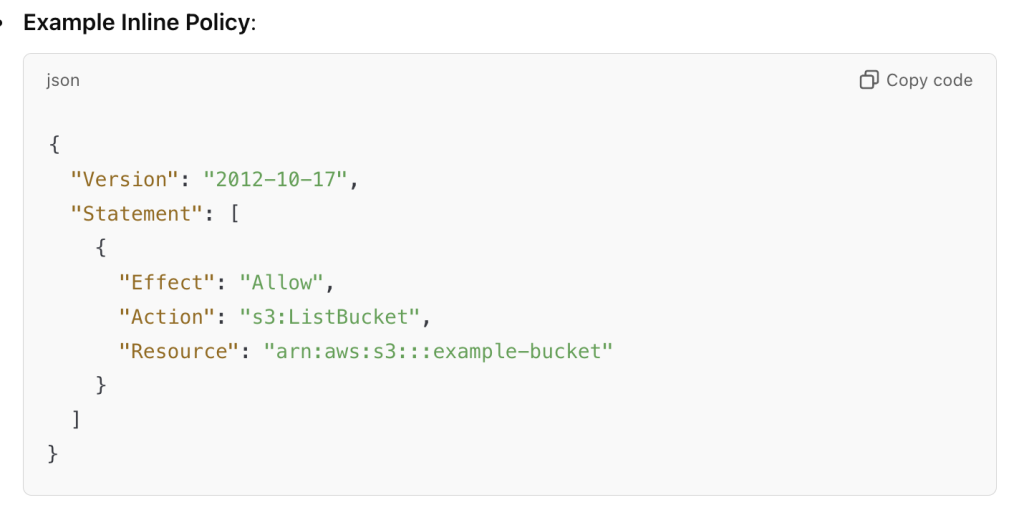
1. Inline Policy:
- Purpose: An inline policy is a permission policy that is embedded directly into an IAM role, user, or group. It defines what actions the role can perform on AWS resources.
- Function: Controls what actions the role can take and on which resources.
- Policy Type: These are permission policies. They grant permissions to the entity (role, user, or group) they are attached to.
- Example Use Case: An inline policy for an IAM role might allow it to perform specific actions, such as listing all S3 buckets or launching EC2 instances.
Where It’s Stored: Inline policies are stored directly in the IAM role, user, or group they are attached to.
Control: Fine-grained control for individual users, roles, or groups.
2. Assume Role Policy (Trust Policy):
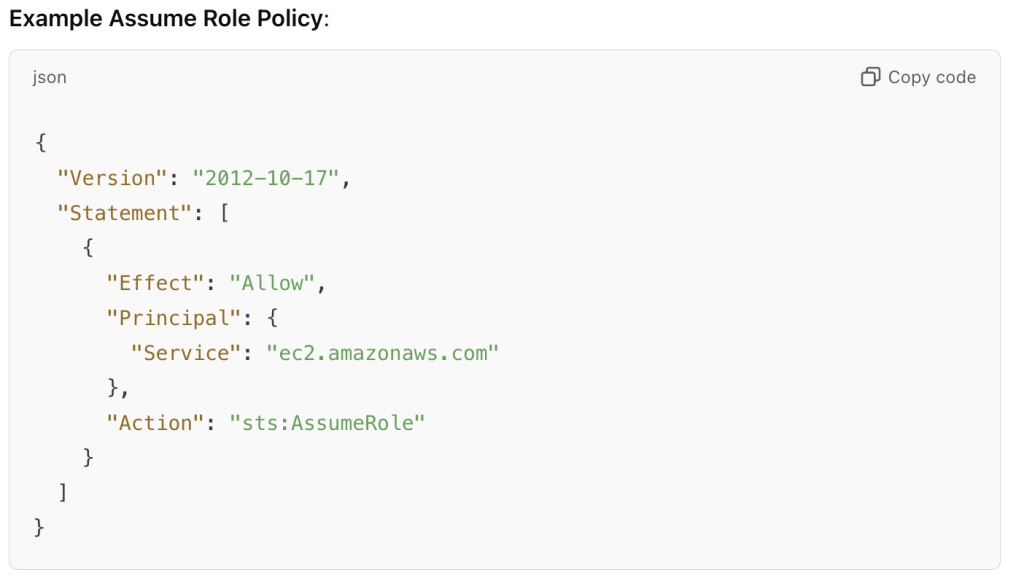
- Purpose: The assume role policy (or trust policy) defines who or what entity (user, service, or another AWS account) can assume the IAM role. This policy grants permission to another entity to assume the role and temporarily gain its permissions.
- Function: Controls who can assume the role and under what conditions.
- Policy Type: These are trust policies. They define the relationship between the role and the principal (like an IAM user, another role, or AWS service) that can assume it.
- Example Use Case: An EC2 instance might assume an IAM role that has permissions to write to an S3 bucket, but only if the trust policy allows the EC2 service to assume the role.
Where It’s Stored: The assume role policy is stored in the IAM role itself and determines who can assume the role.
Control: Controls who can assume the role, typically allowing a user or service (like EC2, Lambda, etc.) to use the role’s permissions.
Summary of Differences:
| Feature | Inline Policy | Assume Role Policy (Trust Policy) |
|---|---|---|
| Purpose | Grants permissions for actions on AWS resources | Defines who (user, service, AWS account) can assume the role |
| Type | Permission policy | Trust policy |
| Controls | What actions the role can perform | Who can assume the role |
| Attached To | Roles, users, or groups | IAM roles |
| Example Usage | Allow a role to list S3 buckets or start EC2 instances | Allow EC2 instances to assume a role and access its policies |
| Policy Example | "Action": "s3:ListBucket" | "Principal": "ec2.amazonaws.com" |
| Stored In | Embedded directly in the role, user, or group | Defined within the IAM role itself |
Key Takeaways:
- Inline policies grant permissions to the entity they are attached to.
- Assume role policies (trust policies) define who can assume the role and temporarily gain its permissions.

I’m Rajesh Kumar, a DevOps, SRE, DevSecOps, Cloud, and Platform Engineering expert passionate about sharing practical knowledge, real-world experiences, and industry best practices. I have worked at Cotocus and regularly write about technology, travel, investing, health, product reviews, and digital marketing through my various platforms.
I publish technical articles at DevOps School, travel stories at Holiday Landmark, stock market insights at Stocks Mantra, health and fitness guidance at My Medic Plus, product reviews at TrueReviewNow, and SEO and digital marketing strategies at Wizbrand.
Find Trusted Cardiac Hospitals
Compare heart hospitals by city and services — all in one place.
Explore Hospitals





