
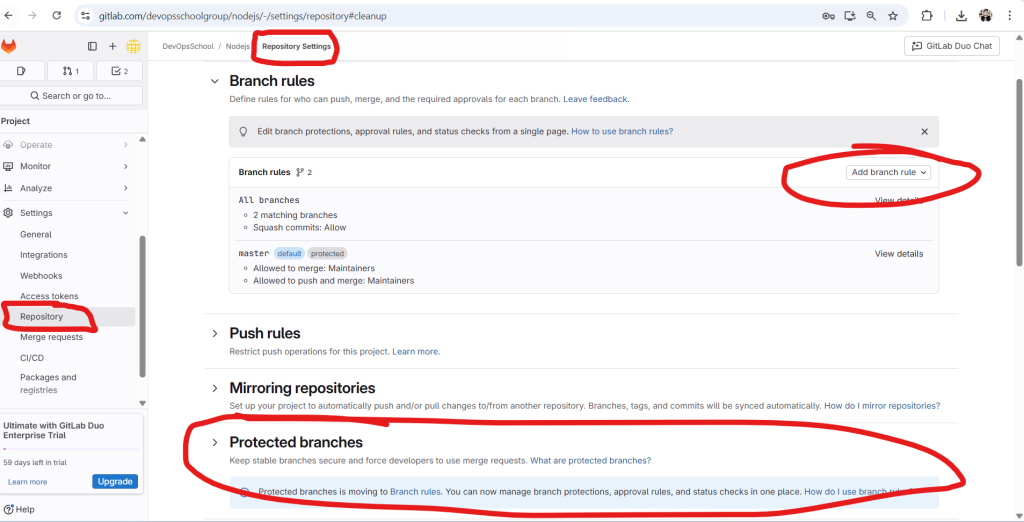
Here is a comprehensive tutorial for understanding and configuring Protected Branches in GitLab 18.0, based on the image you’ve provided and the latest official documentation.
🔐 GitLab Protected Branches – Tutorial Guide (v18.0)
📘 Purpose:
Protecting branches in GitLab helps teams:
- Prevent force pushes
- Restrict who can merge or push
- Enforce code review via merge requests
- Safeguard main/stable branches from accidental or unauthorized changes
🔑 What is a Protected Branch?
A protected branch is a Git branch that has rules and restrictions applied to prevent:
- Direct pushes (without approvals or pipelines)
- Deletion by mistake
- Bypassing CI/CD requirements
GitLab typically uses it for main, master, release/*, or production.
✅ Capabilities of Protected Branches
| Restriction | Description |
|---|---|
| Prevent Direct Pushes | Only selected roles can push |
| Prevent Force Pushes | Force-push is disabled |
| Restrict Who Can Merge | Only selected users/roles can merge |
| Require Merge Requests | Enforce review before integration |
| Status Check Enforcement (EE+) | Only allow merge if pipelines pass |
🛠️ How to Protect a Branch in GitLab (GitLab Cloud / v18.0+)
🔹 Option 1: Using Branch Rules (Recommended)
Step-by-Step:
- Go to your Project → Settings → Repository
- Scroll to Branch Rules
- Click “Add branch rule”
- In the modal:
- Branch name: e.g.,
mainorrelease/* - Allowed to push: Choose
Maintainers,Developers + Maintainers, or custom users/groups - Allowed to merge: Choose same
- Optionally enable:
- ✅ Require merge request approvals
- ✅ Require successful pipeline
- Branch name: e.g.,
- Click “Create”
🎯 Now the branch is protected under branch rules — future pushes & merges are restricted.
🔹 Option 2: [Legacy] Using Protected Branches Panel (Deprecated)
In GitLab 18.0+, this is deprecated and migrated under Branch Rules UI.
Still visible under:Settings → Repository → Protected branchessection.
Here:
- You can protect/unprotect branches
- Define who can push/merge
- Redirects to Branch Rules now
🎯 Best Practices
- ✅ Protect all main, release, and production branches
- ✅ Require merge requests to enforce peer reviews
- ✅ Require pipeline success before merge (CI/CD)
- ✅ Allow only maintainers to merge into protected branches
- 🚫 Avoid giving push access to Developers on protected branches unless justified
💡 Real-World Example: Protect main Branch
| Setting | Value |
|---|---|
| Branch name | main |
| Allowed to push | Maintainers only |
| Allowed to merge | Maintainers only |
| Require pipeline | ✅ Enabled |
| Require approvals | ✅ Enabled (2 reviewers) |
📎 CLI Tip (Git)
Once protected:
# Direct push will fail (if you're not allowed)
git push origin main
# You must open a Merge Request instead
Code language: PHP (php)
📷 Reference Screenshot Explanation (from your image)
- ✅ Branch Rules are shown for
main(default, protected) - ✅ Add new rules via “Add branch rule”
- 🔒 Protected Branches section redirects to branch rules (GitLab is deprecating old interface)
🧪 Need More?

I’m a DevOps/SRE/DevSecOps/Cloud Expert passionate about sharing knowledge and experiences. I have worked at Cotocus. I share tech blog at DevOps School, travel stories at Holiday Landmark, stock market tips at Stocks Mantra, health and fitness guidance at My Medic Plus, product reviews at TrueReviewNow , and SEO strategies at Wizbrand.
Do you want to learn Quantum Computing?
Please find my social handles as below;
Rajesh Kumar Personal Website
Rajesh Kumar at YOUTUBE
Rajesh Kumar at INSTAGRAM
Rajesh Kumar at X
Rajesh Kumar at FACEBOOK
Rajesh Kumar at LINKEDIN
Rajesh Kumar at WIZBRAND
Find Trusted Cardiac Hospitals
Compare heart hospitals by city and services — all in one place.
Explore Hospitals