
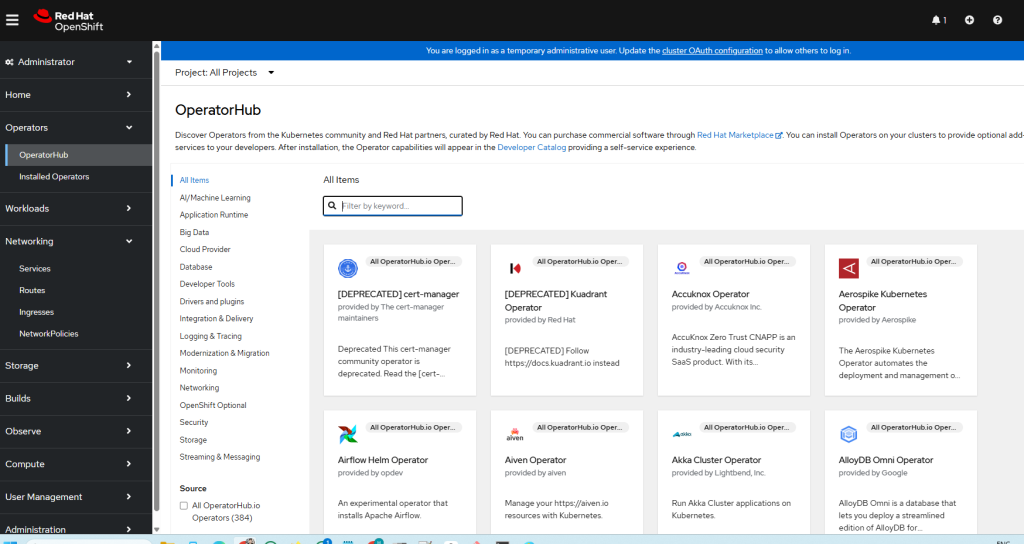
Here’s a complete, step-by-step tutorial — with explanations — to add OperatorHub.io operators to OpenShift by creating a custom CatalogSource pointing to their community catalog image from Quay.io.
🎯 Goal
You will configure OpenShift to pull operators directly from the OperatorHub.io community catalog, so that all available community operators appear inside your OperatorHub UI.
🧰 Prerequisites
- ✅ OpenShift 4.x cluster (4.8+ recommended)
- ✅
ocCLI installed and logged in ascluster-admin - ✅ Internet access to
quay.io
✅ Step 1: Understand What We’re Doing
OpenShift uses the Operator Lifecycle Manager (OLM) to manage OperatorHub. Operator catalogs are delivered via objects called CatalogSource, which point to an OCI-based operator index (usually a container image).
We’ll be adding a new CatalogSource that points to:
quay.io/operatorhubio/catalog:latest
This image is maintained by the OperatorHub.io team and contains all operators shown on their site.
📄 Step 2: Create the YAML File
Save the following content into a file named: operatorhubio-catalogsource.yaml
apiVersion: operators.coreos.com/v1alpha1
kind: CatalogSource
metadata:
  name: operatorhubio-catalog
  namespace: openshift-marketplace
spec:
  sourceType: grpc
  image: quay.io/operatorhubio/catalog:latest
  displayName: "OperatorHub.io Community Catalog"
  publisher: "OperatorHub.io"
  updateStrategy:
    registryPoll:
      interval: 45m
Code language: JavaScript (javascript)
📘 What Each Field Means:
| Field | Description |
|---|---|
name | Internal name used by OLM |
namespace | Must be openshift-marketplace so it’s cluster-wide |
image | Points to the community operator index |
displayName | Friendly name shown in OpenShift UI |
publisher | Shown in the OperatorHub UI |
updateStrategy | Polls the registry every 45 min for updates |
📥 Step 3: Apply the YAML
Run the following command to apply the custom catalog:
oc apply -f operatorhubio-catalogsource.yaml
Code language: CSS (css)
You should see:
catalogsource.operators.coreos.com/operatorhubio-catalog created
👀 Step 4: Verify the CatalogSource Is Working
Check the status of the catalog:
oc get catalogsource -n openshift-marketplace
Code language: JavaScript (javascript)
Expected output:
NAME                    DISPLAY                          PUBLISHER         AGE
operatorhubio-catalog   OperatorHub.io Community Catalog OperatorHub.io    1m
Code language: CSS (css)
Next, check if the catalog is READY:
oc describe catalogsource operatorhubio-catalog -n openshift-marketplace
Look for a Connection state: READY.

🔄 Step 5: Wait for OperatorHub UI to Sync
It may take 2–5 minutes for the UI to display new operators.
- Go to Operators → OperatorHub
- Use the Publisher filter and search for
OperatorHub.io - You’ll now see many new operators available to install
You can also list them via CLI:
oc get packagemanifests -n openshift-marketplace | grep operatorhubio
Code language: JavaScript (javascript)
✅ Step 6: Install an Operator (Optional)
Once the new operators appear, you can install them from the console or via CLI. Example for installing the PostgreSQL Operator:
oc create -f - <<EOF
apiVersion: operators.coreos.com/v1alpha1
kind: Subscription
metadata:
  name: postgresql-subscription
  namespace: my-app-namespace
spec:
  channel: stable
  name: postgresql
  source: operatorhubio-catalog
  sourceNamespace: openshift-marketplace
  installPlanApproval: Automatic
EOF
Code language: PHP (php)
🧹 (Optional) Step 7: Clean Up
To remove the catalog if needed:
oc delete catalogsource operatorhubio-catalog -n openshift-marketplace
Code language: JavaScript (javascript)
I’m a DevOps/SRE/DevSecOps/Cloud Expert passionate about sharing knowledge and experiences. I have worked at Cotocus. I share tech blog at DevOps School, travel stories at Holiday Landmark, stock market tips at Stocks Mantra, health and fitness guidance at My Medic Plus, product reviews at TrueReviewNow , and SEO strategies at Wizbrand.
Do you want to learn Quantum Computing?
Please find my social handles as below;
Rajesh Kumar Personal Website
Rajesh Kumar at YOUTUBE
Rajesh Kumar at INSTAGRAM
Rajesh Kumar at X
Rajesh Kumar at FACEBOOK
Rajesh Kumar at LINKEDIN
Rajesh Kumar at WIZBRAND
Find Trusted Cardiac Hospitals
Compare heart hospitals by city and services — all in one place.
Explore Hospitals