What is Jenkins?
Jenkins is one of the most popular DevOps tool for Continuous Integration and Continuous Deployment (CI/CD). It plays an important role in automating the software development process related to building, testing, and deploying, facilitating continuous integration, and continuous delivery.
It was developed in the year 2004 by “Kohsuke Kawaguchi” and originally named “Hudson”.
Why to use Jenkins? /What are the Benefits of Jenkins? /What are the advantages of Jenkins?
- Popular DevOps tool for CI/CD
- Free and open source
- Easy to install and configure
- 1700 plug-ins to support the automation
- Easy to create new Jenkins plugin if one is not available
- Leading open source automation server
- It requires little maintenance and has built-in GUI tool
- Great community support.
- Available for all platforms and different operating systems
- Written in Java
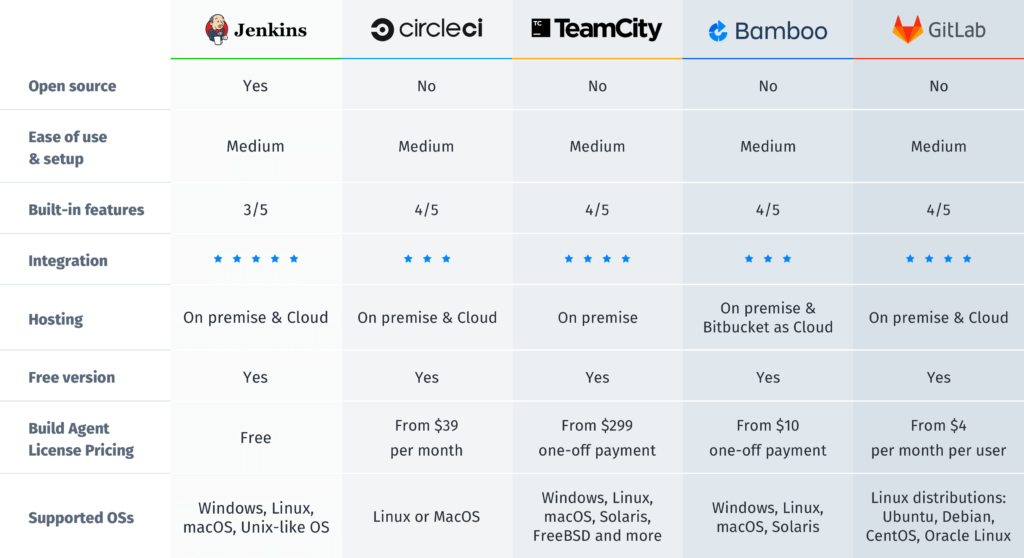
Jenkins Vs Other CI/CD Tools (Camparision)
What are the Certifications available for Jenkins?
Jenkins certifications are managed by cloudbees.com and there are two certifications available for Jenkins:
- Certified Jenkins Engineer – CJE (for proficiency with Jenkins)
- Certified CloudBees Jenkins Engineer – CCJPE (for proficiency with Jenkins and CloudBees Core)
There are certain fee is applicable for the certification exams
- Certified Jenkins Engineer (CJE) 2020 – Fee: – USD 150.00
- Certified CloudBees Jenkins Engineer (CCJE) 2020 – USD 150.00
NOTE:- Due to the coronavirus (COVID-19) outbreak testing centers around the world are temporarily closed and available to take from your home. If you are willing to take the exam then you can apply for it at USD 99.00 ONLY
Generally, certification exams are conducted in “Kryterion test centers” (Kryterion helps companies, associations and education providers develop and deliver exams). Participant can select their preferred location, date, and time while doing the registration.
On the test day, participant needs to visit the center with any identity proof which contains the participant photograph and Participant cannot bring their systems/laptops and one cannot use any personal electronic device.
One can apply for the certification exam from this link – Click here
To help prepare for Jenkins certification exams, you can enroll with DevOpsSchool certification training programs which are completely aligned with the certification curriculum and led by experienced Jenkins trainers.
Preparing for the exam Get free materials from here (<<Study Guides>>, <<self-learning videos>>)
Complete CICD DevOps Implementation from Scratch Using Jenkins

MotoShare.in delivers cost-effective bike rental solutions, empowering users to save on transportation while enjoying reliable two-wheelers. Ideal for city commutes, sightseeing, or adventure rides.
Find Trusted Cardiac Hospitals
Compare heart hospitals by city and services — all in one place.
Explore Hospitals