
What is Udeploy?
IBM UrbanCode Deploy orchestrates and automates the deployment of applications, middleware configuration, and database changes into development, test, and production environments—local, dedicated or shared cloud environments—accelerating time to market and reducing cost by shrinking manual efforts from days to minutes with automation, while reducing risk by cutting deployment errors by up to 90 percent. It orchestrates a complex production environment and changes across servers, tiers, and components. Its tracks are very clear what are the changes, who made the changes & where and make it visible.
Uses of Urbancode Deploy
- Continuous Delivery: To integrate with build and test tools to mechanically deploy, test and endorse new builds.
- Production Deployments: The Score a multifaceted production deployments of applications and configuration.
- Self-Service: The Funding different teams rights to “push the go button” for different applications and surroundings.
- Incremental Updates: The Deploy only the changes mechanisms or lost incremental (patch) versions.
Features
- Multi-Tier Application Models: Modern applications are often made up of many components. Perhaps a three-tier application with database, app and content components. Or A mobile application with the actual mobile application and back-end web services. Even related collections of batch programs are seen as a logical application.
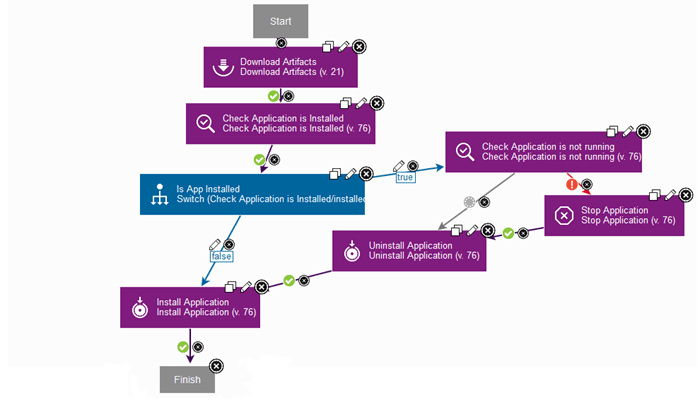
- Easy Process Designer: Processes are defined in the browser using a simple, drag-and-drop process designer. Component processes are made up of automation steps provided by integration plugins.
- Deploy to Public, Private, and Hybrid Cloud: you can model cloud environments and how your applications are deployed to those environments in a simple graphical editor. You connect to clouds, model the virtual images in the environment, and add your application components to those images.
- Track What is Where: Inventory: The inventory system tracks the desired state of each environment, as well as what has been successfully deployed and provides graphical alerts when an environment is out of compliance with that desired state.
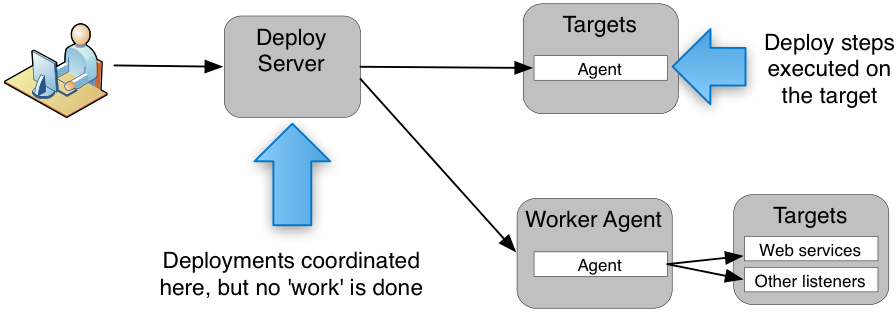
- Scalable Distributed Automation: It is built to support mission-critical deployments to thousands of servers in numerous data centers. Master server clustering support provides high availability and horizontal scalability of the deployment automation tool.
- Quality Gates and Approvals: may not be allowed until some conditions are met. UrbanCode Deploy provides Environment Quality Gates as well as Approval Processes to help you ensure that only the right stuff goes out at the right time.
- Integrations Replace Custom Scripting: Tested integrations are provided with dozens of tools to make the deployment process easier to design and less risky.
Official website
Architecture of UrbanCode Deploy
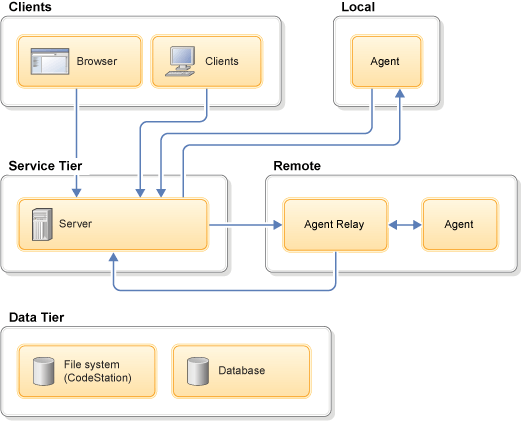
The UrbanCode Deploy architecture consists of a service tier and a data tier. You interface with these by using clients.
The service tier has a central server that provides a web server front-end and core services, such as workflow, agent management, deployment, inventory, security, and others. A service can be thought of as a self-contained mechanism for hosting a piece of business logic. Services can be consumed by clients, agents, or other services. Deployments are orchestrated by the server and run by agents that are distributed throughout the network. Most clients use browsers to communicate with the web server with HTTP(S). Most server-agent communication is done with JMS (discussed below) but HTTP(S) is also used as required.
The data tier’s relational database stores configuration and runtime data. The data tier’s file store, CodeStation, contains log files, artifacts, and other non-structured data objects. Reporting tools can connect directly to the relational database.
Advantages of udeploy
- Achieve continuous delivery. Accelerate code delivery through automated, repeatable processes across dev/test and production.
- Manage quality. Modify multichannel application preparation to any or all or any environments with consistency and repeatability.
- Scale faithfully.
- Automated deployments and rollbacks of applications.
- Orchestration of application changes across servers.
- Inventory Management.
- Clear visibility that defines what and where entity is deployed.
- Integration with varied J2EE
Alternative of udeploy
- GitLab
- Red Hat Ansible
- Octopus Deploy
- Azure Pipelines
- Puppet Enterprise
- CloudBees Flow
- Continuous Delivery Automation (CDA)
- Micro Focus Release Control
- DeployHub
- vRealize Automation Code Stream
- Plutora Release Management
Interview question and answer for udeploy
Best Resources, Tutorials and Guide for uDeploy
Best Courses and Insitute for learning
If you want certification course for such top course. So please visit “DevOpsSchool.com”. You will find more certification courses here.


I’m Rajesh Kumar, a DevOps, SRE, DevSecOps, Cloud, and Platform Engineering expert passionate about sharing practical knowledge, real-world experiences, and industry best practices. I have worked at Cotocus and regularly write about technology, travel, investing, health, product reviews, and digital marketing through my various platforms.
I publish technical articles at DevOps School, travel stories at Holiday Landmark, stock market insights at Stocks Mantra, health and fitness guidance at My Medic Plus, product reviews at TrueReviewNow, and SEO and digital marketing strategies at Wizbrand.
Find Trusted Cardiac Hospitals
Compare heart hospitals by city and services — all in one place.
Explore Hospitals