
How to downgrade npm version?
Error:-
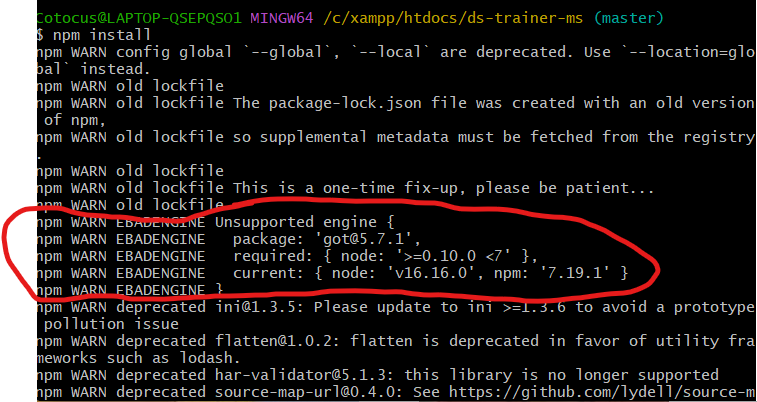
Error Explanation :- My project which is made earlier, uses the older version of node but now i m cloning my project after many months and i installed node’s latest version and my npm is creating this issue. i m not able to install npm in my projects.
Solution:- So i check my node version but that is correct and then the npm version which is the highest version and my projects required lesser version. so, i m giving some steps below which i have taken.
Step 1:- Check your current version and see which is required version of your project. commands are:-
<strong><mark class="has-inline-color has-black-color">Node Version check :-></mark><mark class="has-inline-color has-vivid-red-color"> node -v
</mark><mark class="has-inline-color has-black-color">Npm Version check :-></mark><mark class="has-inline-color has-vivid-red-color"> npm -v</mark></strong>Code language: HTML, XML (xml)
Step 2:- Downgrade your npm version. Commands are:-
<strong><mark class="has-inline-color has-vivid-red-color">npm install -g npm@6.14.17</mark></strong>Code language: HTML, XML (xml)Step 3:- now install npm in your project. commands are:-
<strong><mark class="has-inline-color has-vivid-red-color">npm install</mark></strong>Code language: HTML, XML (xml)If you want to download the node version which is required then you can have a look on this website. all the node version are present here :-
Download :- https://www.npackd.org/p/org.nodejs.NodeJS64

👤 About the Author
Ashwani is passionate about DevOps, DevSecOps, SRE, MLOps, and AiOps, with a strong drive to simplify and scale modern IT operations. Through continuous learning and sharing, Ashwani helps organizations and engineers adopt best practices for automation, security, reliability, and AI-driven operations.
🌐 Connect & Follow:
Website: WizBrand.com
Facebook: facebook.com/DevOpsSchool
X (Twitter): x.com/DevOpsSchools
LinkedIn: linkedin.com/company/devopsschool
YouTube: youtube.com/@TheDevOpsSchool
Instagram: instagram.com/devopsschool
Quora: devopsschool.quora.com
Email– contact@devopsschool.com
Find Trusted Cardiac Hospitals
Compare heart hospitals by city and services — all in one place.
Explore Hospitals




