
Major programming languages, the common package tool(s), and the central community package repository.
Most programming languages pair a command-line package tool with a public registry it downloads dependencies from. Examples are cargo with crates.io, pip with PyPI, Maven with Maven…
Best Software Supply Chain Malware Detection Tools
A malicious dependency presents a different question from an ordinary vulnerable library: should this package be allowed to run at all? A tool that reports a problem…

Grunt Training Guide: Course Outline, Hands-On Labs, and CI Workflow
This updated guide turns a legacy Grunt course post into a practical training reference for developers and DevOps teams. It includes a structured curriculum, build workflow, sample Grunt configuration, CI example, and tool comparisons.
GitHub Packages Essentials — 2-Hour Hands-On Tutorial
Last Verified: September 2026Scope: GitHub.com / GitHub Enterprise Cloud unless explicitly stated otherwiseDuration: ~2 hours including hands-on practiceAudience: Developers, DevOps engineers, platform engineers, administrators, trainers, and studentsPrimary hands-on registry: GitHub Container Registry…
Complete Marp installation + command + examples guide
Marp is a Markdown presentation ecosystem. Marp CLI converts Marp/Marpit Markdown files into static HTML/CSS, PDF, PowerPoint/PPTX, and images. The official CLI docs also say Node.js v18+…
Top 10 Package Managers: Features, Pros, Cons & Comparison
Introduction Package managers are essential tools in modern software development and IT operations. At their core, package managers automate the process of installing, updating, configuring, and removing…
Artifacatory: Upload Artifacts to Artifactory using NPM with Node.js Project
Step-by-Step Guide: Create a Node.js Project with npm and Upload Artifacts to Artifactory 1. Install Prerequisites 2. Initialize a New Node.js Project 3. Develop Your Node.js Artifact…
Package Management tools in 2024
In the ever-evolving world of software development, package management tools play a crucial role in streamlining dependencies, ensuring reproducibility, and simplifying development workflows. As we venture into…
Dependency Management tools in 2024
The world of dependency management tools continues to evolve in 2024, offering increasingly sophisticated solutions for handling the complex web of dependencies in modern software development. Following…
Jenkins Assignment Labs and Exercise
Please submit each assignment with print screen and step by step at www.Debug.School and share a url in Whatsapp Groups Assignment 1: Create a Simple Jenkins Job:…
Dependency Management Tools
Have you ever struggled with managing dependencies in your project? Fear not, for there are many tools available to make your life easier. In this blog post,…
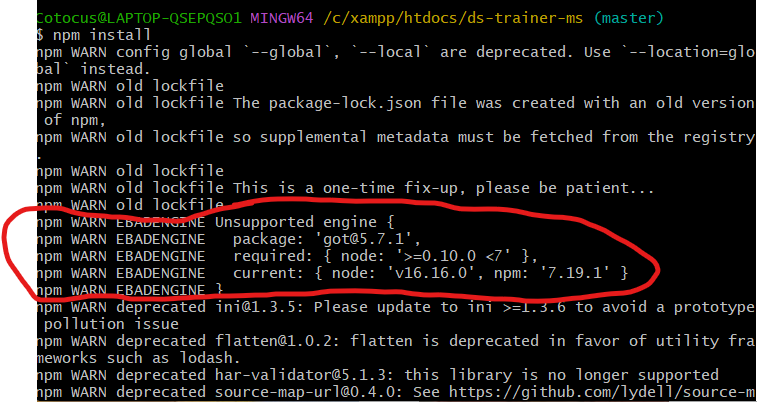
How to downgrade npm version?
How to downgrade npm version? Error:- Error Explanation :- My project which is made earlier, uses the older version of node but now i m cloning my…
How to upload and download NPM Package using Sonatype Nexus?
Step 1 – Create a npm nexus repo Step 2 – Step 2 – Install Node in your server Step 3 – Create a Sample Project using…
How to Fix ” Vue packages version mismatch:” error in Laravel 5.5
If you find any issue like above then run below Commands for solution : Solution : Above Command solve my issue if you are still in issue…
NPM Error: Node Sass does not yet support your current environment
Deepak KumarMotoShare.in is your go-to platform for adventure and exploration. Rent premium bikes for epic journeys or simple scooters for your daily errands—all with the MotoShare.in advantage…

ERROR: sh: 1: cross-env: Permission denied
Deepak KumarMotoShare.in is your go-to platform for adventure and exploration. Rent premium bikes for epic journeys or simple scooters for your daily errands—all with the MotoShare.in advantage…
gyp ERR! stack Error: EACCES: permission denied
Deepak KumarMotoShare.in is your go-to platform for adventure and exploration. Rent premium bikes for epic journeys or simple scooters for your daily errands—all with the MotoShare.in advantage…
npm error: code ELIFECYCLE errno 1
Error Solution Rajesh KumarI’m Rajesh Kumar, a DevOps, SRE, DevSecOps, Cloud, and Platform Engineering expert passionate about sharing practical knowledge, real-world experiences, and industry best practices. I…
Bootstrap 4 upgrade in laravel 5.5
Introduction Hello Friends,In this article I will describe how to create a Laravel 5.5 application from scratch and also I am going to describe how you can…
npm error on Linux: Node Sass could not find a binding for your current environment: Linux 64-bit with Node.js 12.x
Environment:Linux 64-bitLaravel 5.5Node.js 12.x How I got this error:I made some changes in one of the js file of my project. Hence, I needed to rebuild the…
Npm Error: Error: pngquant failed to build, make sure that libpng-dev is installed
Command I tried $ npm i –unsafe-perm Got following Error; Solution $ apt-get install libpng-dev Rajesh KumarI’m Rajesh Kumar, a DevOps, SRE, DevSecOps, Cloud, and Platform Engineering…
How to configure Laravel 5.5 with Bootstrap 4
Bootstrap 3 to bootstrap 4.3.1 upgrade in Laravel 5.5 Note: Laravel 5.5 uses bootstrap 3 by default Steps involved in the upgrade Open gitbash in the home…
npm – Node Packaged Modules
Install a package SYNOPSIS npm install (with no args in a package dir) npm install <tarball file> npm install <tarball url> npm install <folder> npm install <name>…
Npm module “grunt-open” not found. Is it installed?
scmuser created the topic: Npm module “grunt-open” not found. Is it installed? I am getting following error… [code language=”css”] grunt lite [31m>> [39mLocal Npm module “grunt-open” not…
Throw new Error(‘npm.load() required’)
rajeshkumar created the topic: throw new Error(‘npm.load() required’) Error: C:\Program Files\nodejs\node_modules\npm\lib\npm.js:37 throw new Error(‘npm.load() required’) ^ Error: npm.load() required at Object.npm.config.get (C:\Program Files\nodejs\node_modules\npm\lib\npm.js:37:11) at exit (C:\Program Files\nodejs\node_modules\npm\lib\utils\error-handler.js:49:27)…
Fatal error: Unable to find local grunt.
scmuser created the topic: Fatal error: Unable to find local grunt. I am getting following error… grunt lite grunt-cli: The grunt command line interface. (v0.1.9) Fatal error:…
Error: Cannot find module ‘graceful-fs’
rajeshkumar created the topic: Error: Cannot find module ‘graceful-fs’ Error – Error: Cannot find module ‘graceful-fs’ at Function.Module._resolveFilename (module.js:331:15) at Function.Module._load (module.js:273:25) at Module.require (module.js:357:17) at require…