Find the Best Cosmetic Hospitals

Explore trusted cosmetic hospitals and make a confident choice for your transformation.

“Invest in yourself — your confidence is always worth it.”

Explore Cosmetic Hospitals

Start your journey today — compare options in one place.

How to Trigger builds remotely in Jenkins? | Jenkins Tutorials


curl -X POST --user rajesh:1152f227ae20792ed6ac30120d73f547a3 http://20.81.129.174:8080/job/Rajesh/job/raj-compile/build?delay=0secCode language: JavaScript (javascript)
 
How to Trigger builds remotely in Jenkins?
 
1. Create a user – You need to create a user in jenkins using you would like to trigger a jenkins jobs from remote loction or script
 
How to create users in Jenkins?
Manage Jenkins –> Manage Users –> Create User
 
2. Assign a right privillage to the specific user?
How to assign privillage to the user?
Manage Jenkins –> Configure Global Security –> Enabled “Anyone can do anything”
OR
Manage Jenkins –> Configure Global Security –> Configure “Matrix-based security” for the specific users and assign atleast following Permissions.
 
Overall – Read
Job – Build
Job – Read
Job – Workspace
 
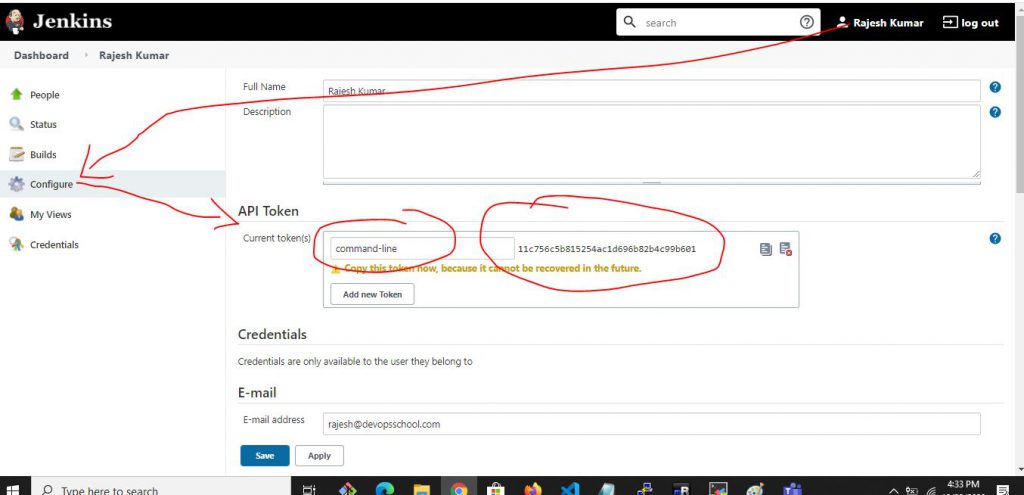
3. Find out jenkins user “API Token”
How to find jenkins user “API Token”?
“
Click on the user name located at top right(e.g http://54.171.140.1:8080/user/admin1/) –> Configure –> Locate the “API Token” section.
 
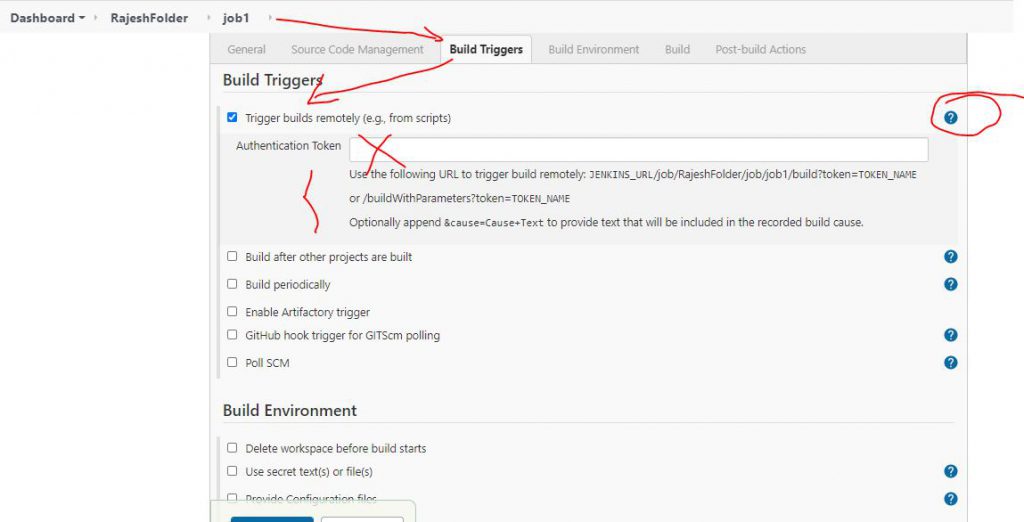
4. Enabled “Trigger builds remotely” in Jenkins Job Configuration.
Click on the desired job –> Configure –> Locate the “Trigger builds remotely” under “Build Triggers” Tab
Enabled the check box of “Trigger builds remotely”
Provide some Authentication Token e.g – iFBDOBhNhaxL4T9ass93HRXun2JF161Z
$ Save
 
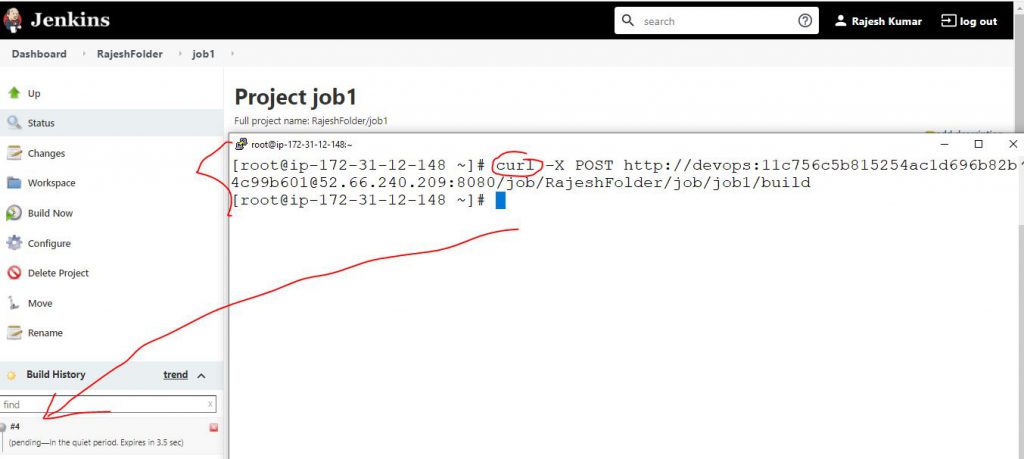
5. Formulate the command to run using curl. 
> curl –user userid:API-Token http://IP OR HOST:PORT/job/JOB_NAME/build?token=Authentication_Token
eg.curl –user admin1:91367cf0389eaf89669f74c9963c9fb3 http://54.171.140.1:8080/job/ANT-BUILD/build?token=iFBDOBhNhaxL4T9ass93HRXun2JF161Z
 
Some of other formats which is being tried in google but need to be tested with specific users. there are working with “Anonymous”
> curl -X POST http://admin1:91367cf0389eaf89669f74c9963c9fb3@54.171.140.1:8080/job/ANT-BUILD/build?token=iFBDOBhNhaxL4T9ass93HRXun2JF161Z
 

> wget http://admin1:91367cf0389eaf89669f74c9963c9fb3@54.171.140.1:8080/job/ANT-BUILD/build?token=iFBDOBhNhaxL4T9ass93HRXun2JF161Z

WORKING WITH NEW JENKINS
> wget –auth-no-challenge –user=admin –password=5ad344f0518640f62d0483084bb889bc http://13.126.143.49:8080/job/ANT//build?token=iFBDOBhNhaxL4T9ass93HRXun2JF161Z

If you are using wget 1.11 against Jenkins version 1.586 and above with the JENKINS-25169 fix, you might need to use the following options:
wget –auth-no-challenge –http-user=user –http-password=apiToken –secure-protocol=TLSv1 http://jenkins.yourcompany.com/job/your_job/build?token=TOKEN

If you are using wget 1.11, you might need to use the following options:
wget –auth-no-challenge –http-user=user –http-password=apiToken http://jenkins.yourcompany.com/job/your_job/build?token=TOKEN

With wget 1.10.x the following is enough (but will not work with 1.11.x) :
wget http://user:apiToken@jenkins.yourcompany.com/job/your_job/build?token=TOKEN

If you are a Windows User!
 
‘gitbash’ is a program combined of git and bash. A bash is shell that runs commands once you type the name of command and press enter. 🙂
 
Download  the git bash from here https://git-scm.com/download/win and install it.
 

Find Trusted Cardiac Hospitals

Compare heart hospitals by city and services — all in one place.

Explore Hospitals
I'm Rajesh Kumar, a DevOps, SRE, DevSecOps, Cloud, and Platform Engineering expert passionate about sharing practical knowledge, real-world experiences, and industry best practices. I have worked at Cotocus and regularly write about technology, travel, investing, health, product reviews, and digital marketing through my various platforms. I publish technical articles at DevOps School, travel stories at Holiday Landmark, stock market insights at Stocks Mantra, health and fitness guidance at My Medic Plus, product reviews at TrueReviewNow, and SEO and digital marketing strategies at Wizbrand.

Related Posts

Automating Jenkins Job Configuration: Job DSL, Multibranch, Job Generator, and JJB

Manually creating many Jenkins jobs is slow and error-prone. This guide compares the main automation options and shows practical jobs-as-code examples for repeatable setup.

Read More

Install Jenkins with Docker: Persistent Setup, Port Mapping, and Logs

Learn how to run Jenkins in Docker with correct port mapping, persistent storage, and operational commands. This updated guide keeps the original workflow but adds modern, production-minded practices.

Read More

Jenkins at Scale: Practical References and Admin Cheatsheet

This revised guide upgrades a short 2015 Jenkins link post into an operations-ready reference for teams running Jenkins at scale. It preserves the original links and adds a workflow diagram, comparison table, and practical API/CLI examples.

Read More

Jenkins Backup and Restore Runbook: ThinBackup, Filesystem Archives, and Recovery Steps

A practical Jenkins backup and restore guide for DevOps teams, covering what to back up, strategy trade-offs, and step-by-step command examples. Includes a workflow diagram and a recovery checklist you can operationalize.

Read More
Subscribe
Notify of
guest
0 Comments
Newest
Oldest Most Voted
0
Would love your thoughts, please comment.x
()
x