
Task in Gradle is a code that Gradle execute.
Everything such a each type features is powered in Gradle using Plugin. Plugins add new tasks domain objects (e.g. SourceSet), conventions (e.g. Java source is located at src/main/java) as well as extending core objects and objects from other plugins. Thus, Gradle plugins define a set of tasks, DSL extensions, and conventions which can be reused across projects.
There are 2 types of plugins.
- Script plugins: Which allows you declare your own tasks and their behaviours such similar to what we have been doing in Apache Ant. Ant is declarative scripting lang.
- Binary plugins: Binary plugins follows a procedural approach in which each task’s behaviour is defined already such as (Goals in Maven). So, Binary plugins are classes that implement the Plugin interface and adopt a programmatic approach to manipulating the build. Binary plugins can reside within a build script, within the project hierarchy or externally in a plugin jar. Binary plugins are also 3 types.
— Core Binary Plugins such as (e.g. JavaPlugin)
— External Binary Plugins using community repos
— custom Plugins
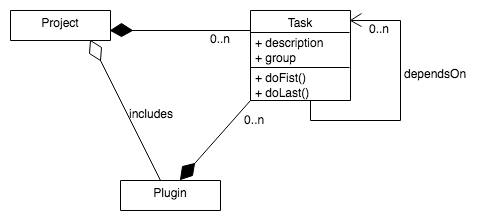
Thus, plugins manages everything in Gradle sits on top of two basic concepts: projects and tasks. Each gradle build script would have
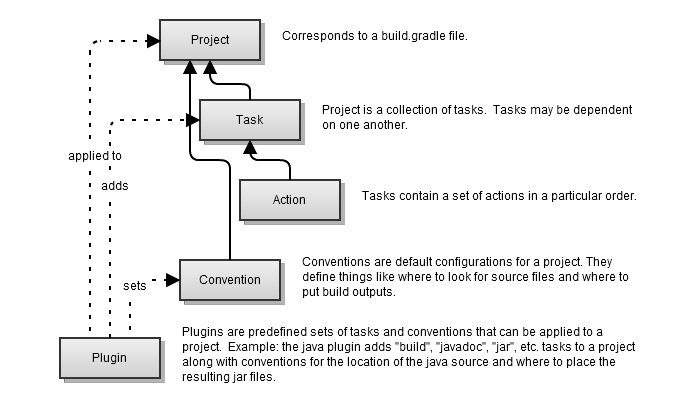
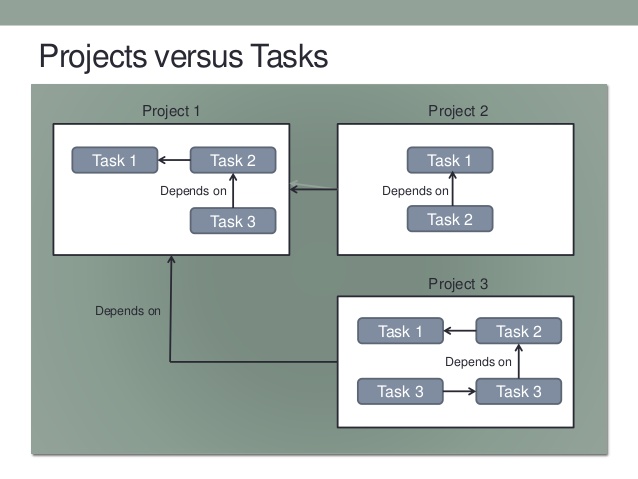
- Every Gradle build is made up of one or more projects.
- Each project is made up of one or more tasks.
A task, as the name suggests, is a representation of actions (default or custom) that need to be executed during the build process. For example, the compilation of Java code is started by a task. Tasks are defined in the project build script and can have dependencies with each other. this, A Task represents a single atomic piece of work for a build.
Task has following…
- Has a Lifecycle
- Has Properties
- Has Actions & Methods
- Has Dependencies
- Script Block
Gradle Project Vs Gradle Tasks
Lets understand a Gradle Tasks!

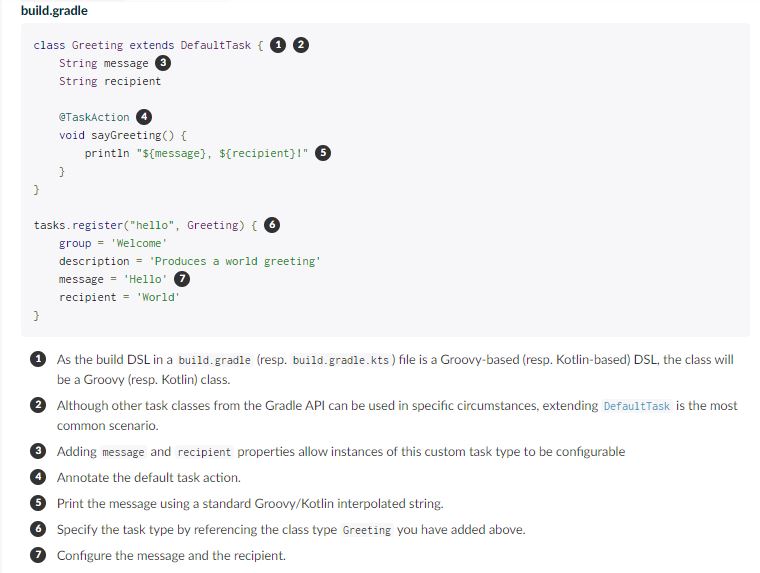
What are different ways to declare Gradle Tasks?
Example 1 – Sample Task has description and action and method
Example 2 – Task has description and action and method
task Task6 {
  description "This is task 6"
  dependsOn Task5
  doFirst {
    println "Task 6 - First"
  }
  doLast {
    println "This is task 6 - version $projectVersion"
  }
}Code language: JavaScript (javascript)
Example 3 – Task has dependsOn
Task6.dependsOn Task3
Task5.dependsOn Task4Code language: CSS (css)
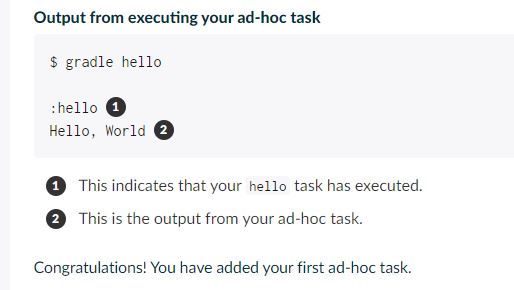
Example 4. Your first build script
#build.gradle
task hello {
    doLast {
        println 'Hello world!'
    }
}
Code language: PHP (php)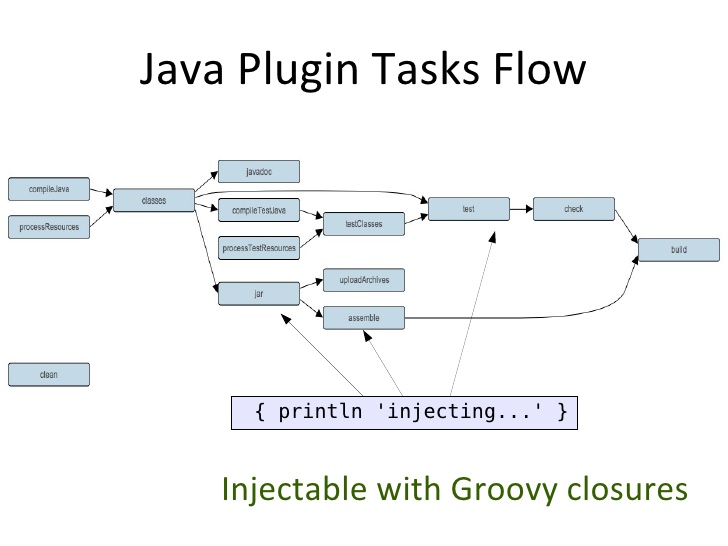
What does -q do?
Most of the examples in this user guide are run with the -q command-line option. This suppresses Gradle’s log messages, so that only the output of the tasks is shown.
Example 5. Your first build script
# build.gradle
task upper {
    doLast {
        String someString = 'mY_nAmE'
        println "Original: $someString"
        println "Upper case: ${someString.toUpperCase()}"
    }
}
> gradle -q upperCode language: PHP (php)
Example 6. Using Groovy or Kotlin in Gradle’s tasks
#build.gradle
task upper {
    doLast {
        String someString = 'mY_nAmE'
        println "Original: $someString"
        println "Upper case: ${someString.toUpperCase()}"
    }
}
> gradle -q upperCode language: PHP (php)
Example 7. Using Groovy or Kotlin in Gradle’s tasks
# build.gradle
task count {
    doLast {
        4.times { print "$it " }
    }
}
> gradle -q countCode language: PHP (php)
Example 8. Declaration of task that depends on other task
#build.gradle
task hello {
    doLast {
        println 'Hello world!'
    }
}
task intro {
    dependsOn hello
    doLast {
        println "I'm Gradle"
    }
}

> gradle -q introCode language: PHP (php)
Example 9. Lazy dependsOn – the other task does not exist (yet)
# build.gradle
task taskX {
    dependsOn 'taskY'
    doLast {
        println 'taskX'
    }
}
task taskY {
    doLast {
        println 'taskY'
    }
}
> gradle -q taskXCode language: PHP (php)
Example 10. Dynamic creation of a task
build.gradle
4.times { counter ->
    task "task$counter" {
        doLast {
            println "I'm task number $counter"
        }
    }
}
> gradle -q task1Code language: JavaScript (javascript)
Example 11. Accessing a task via API – adding a dependency. Once tasks are created they can be accessed via an API. For instance, you could use this to dynamically add dependencies to a task, at runtime.
# build.gradle
4.times { counter ->
    task "task$counter" {
        doLast {
            println "I'm task number $counter"
        }
    }
}
task0.dependsOn task2, task3
> gradle -q task0Code language: PHP (php)
Example 12. Accessing a task via API – adding behaviour
# build.gradle
task hello {
    doLast {
        println 'Hello Earth'
    }
}
hello.doFirst {
    println 'Hello Venus'
}
hello.configure {
    doLast {
        println 'Hello Mars'
    }
}
hello.configure {
    doLast {
        println 'Hello Jupiter'
    }
}
> gradle -q hello
Code language: PHP (php)
Example 13. Accessing task as a property of the build script. There is a convenient notation for accessing an existing task. Each task is available as a property of the build script:
#build.gradle
task hello {
    doLast {
        println 'Hello world!'
    }
}
hello.doLast {
    println "Greetings from the $hello.name task."
}

> gradle -q helloCode language: PHP (php)
Example 13. Adding extra properties to a task. You can add your own properties to a task. To add a property named myProperty, set ext.myProperty to an initial value. From that point on, the property can be read and set like a predefined task property.
#build.gradle
task myTask {
    ext.myProperty = "myValue"
}

task printTaskProperties {
    doLast {
        println myTask.myProperty
    }
}
> gradle -q printTaskPropertiesCode language: PHP (php)
Example 15. Using methods to organize your build logic. Gradle scales in how you can organize your build logic. The first level of organizing your build logic for the example above, is extracting a method.
# build.gradle
task checksum {
    doLast {
        fileList('./antLoadfileResources').each { File file ->
            ant.checksum(file: file, property: "cs_$file.name")
            println "$file.name Checksum: ${ant.properties["cs_$file.name"]}"
        }
    }
}

task loadfile {
    doLast {
        fileList('./antLoadfileResources').each { File file ->
            ant.loadfile(srcFile: file, property: file.name)
            println "I'm fond of $file.name"
        }
    }
}

File[] fileList(String dir) {
    file(dir).listFiles({file -> file.isFile() } as FileFilter).sort()
}

> gradle -q loadfile
Code language: PHP (php)
Example 16. Defining a default task. Gradle allows you to define one or more default tasks that are executed if no other tasks are specified.
#build.gradle
defaultTasks 'clean', 'run'

task clean {
    doLast {
        println 'Default Cleaning!'
    }
}

task run {
    doLast {
        println 'Default Running!'
    }
}

task other {
    doLast {
        println "I'm not a default task!"
    }
}

> gradle -qCode language: PHP (php)
I’m Rajesh Kumar, a DevOps, SRE, DevSecOps, Cloud, and Platform Engineering expert passionate about sharing practical knowledge, real-world experiences, and industry best practices. I have worked at Cotocus and regularly write about technology, travel, investing, health, product reviews, and digital marketing through my various platforms.
I publish technical articles at DevOps School, travel stories at Holiday Landmark, stock market insights at Stocks Mantra, health and fitness guidance at My Medic Plus, product reviews at TrueReviewNow, and SEO and digital marketing strategies at Wizbrand.
Find Trusted Cardiac Hospitals
Compare heart hospitals by city and services — all in one place.
Explore Hospitals





