HTTP Proxy corporate environment for kubernetes can be fixed by including all my cluster node IPs in NO_PROXY and using the same NO_PROXY on all the minions when joining the cluster. In short…
$ export NO_PROXY='ip,ip,ip,ip,.example.com'
[master]$ kubeadm init
[minion]$ kubeadm join --token={token} a.b.c.d:6443Code language: JavaScript (javascript)
kubeadm gets and checks environment from your currently running session. You can see what do you have if you execute $ env | grep -i _proxy= | sort. E.g. inside our company firewall I have something like this:
$ env | grep -i _proxy= | sort
ALL_PROXY=http://proxy-ir.example.com:911
FTP_PROXY=http://proxy-ir.example.com:911
HTTPS_PROXY=http://proxy-ir.example.com:911
HTTP_PROXY=http://proxy-ir.example.com:911
NO_PROXY=.example.com
all_proxy=http://proxy-ir.example.com:911
ftp_proxy=http://proxy-ir.example.com:911
http_proxy=http://proxy-ir.example.com:911
https_proxy=http://proxy-ir.example.com:911
no_proxy=.example.comCode language: JavaScript (javascript)
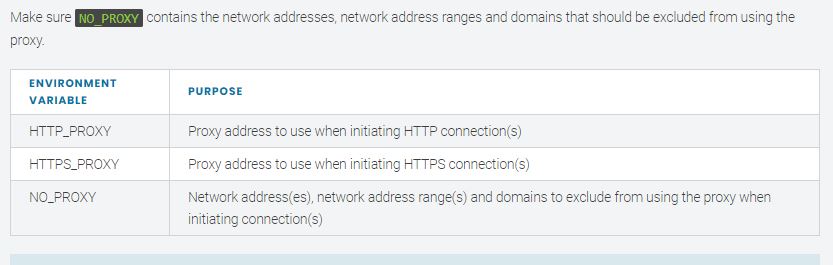
In order to setup Kubernetes clustors in HTTP Proxy corporate environment, we need to have http_proxy and https_proxy (lower and uppercase environment variables) pointing to the proxy server, and no_proxy set to IPs that should not go through the proxy server.
For this system, no_proxy had the host IP, 127.0.0.1, and then the IPs for the IPv4 pool and IPs for the service IPs. The defaults use large subnets, so Ankur reduced these to help make the no-proxy setting more manageable.
For the IPv4 pool, if using 192.168.0.0/24 (reduced size from default), and for the kubernetes service IP subnet, if using 10.96.0.0/24. these lines in .bashrc to create the no_proxy setting (gedit .bashrc):
export http_proxy=http://proxy-host:proxy-port/
export HTTP_PROXY=$http_proxy
export https_proxy=$http_proxy
export HTTPS_PROXY=$http_proxy
printf -v lan '%s,' localip_of_machine
printf -v pool '%s,' 192.168.0.{1..253}
printf -v service '%s,' 10.96.0.{1..253}
export no_proxy="${lan%,},${service%,},${pool%,},127.0.0.1";
export NO_PROXY=$no_proxy

kubeadm init --apiserver-advertise-address=localip_of_machine --service-cidr=10.96.0.0/16Code language: JavaScript (javascript)
I’m Rajesh Kumar, a DevOps, SRE, DevSecOps, Cloud, and Platform Engineering expert passionate about sharing practical knowledge, real-world experiences, and industry best practices. I have worked at Cotocus and regularly write about technology, travel, investing, health, product reviews, and digital marketing through my various platforms.
I publish technical articles at DevOps School, travel stories at Holiday Landmark, stock market insights at Stocks Mantra, health and fitness guidance at My Medic Plus, product reviews at TrueReviewNow, and SEO and digital marketing strategies at Wizbrand.
Find Trusted Cardiac Hospitals
Compare heart hospitals by city and services — all in one place.
Explore Hospitals