The Terraform language includes a number of built-in functions that you can call from within expressions to transform and combine values. The general syntax for function calls is a function name followed by comma-separated arguments in parentheses:
max(5, 12, 9)
The Terraform language does not support user-defined functions, and so only the functions built in to the language are available for use.
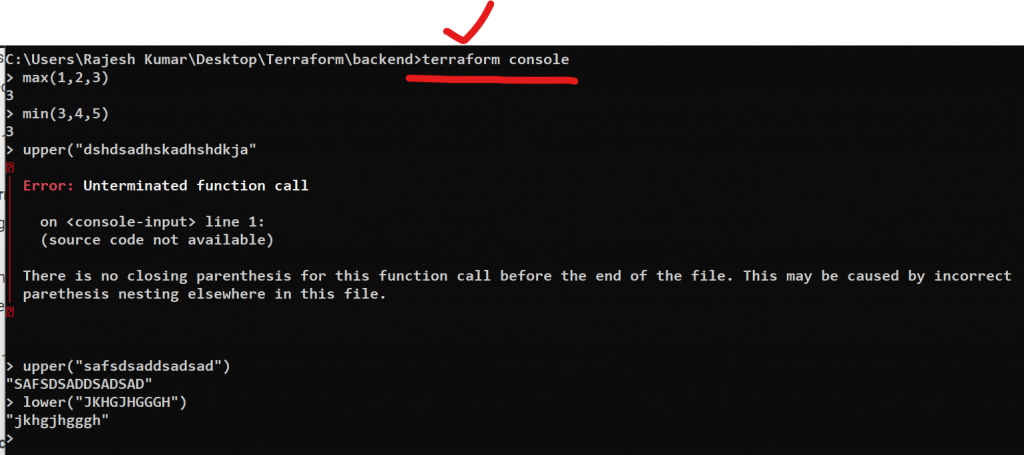
You can experiment with the behavior of Terraform’s built-in functions from the Terraform expression console, by running the terraform console command:
max(5, 12, 9)
12
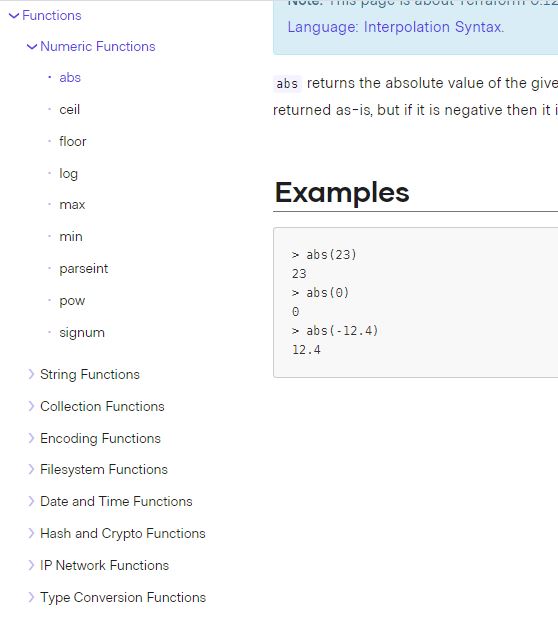
List of category of terraform Built-in Functions
List of top 20 terraform Function
Here are the top 20 Terraform functions with one-liner explanations:
concat: Concatenates two or more lists together.element: Selects a specific element from a list.join: Joins a list of strings into a single string.map: Creates a map from a list of keys and values.slice: Extracts a slice of a list.format: Formats a string with placeholders for variables.file: Reads the contents of a file.lookup: Looks up a value in a map based on a key.replace: Replaces parts of a string with other values.setproduct: Generates all combinations of elements from multiple sets.sort: Sorts a list of values.toset: Converts a list to a set, removing any duplicates.transpose: Transposes a matrix.uuid: Generates a unique ID.abs: Returns the absolute value of a number.ceil: Rounds up to the nearest integer.floor: Rounds down to the nearest integer.max: Returns the maximum value from a list.min: Returns the minimum value from a list.timeadd: Adds a duration to a timestamp.
These functions can be used to manipulate and transform data within your Terraform configurations, and can help you to write more flexible and dynamic infrastructure as code.
Top terraform function with example usecase with aws provider
count: Thecountfunction allows you to create multiple instances of a resource based on a variable value. For example, you can usecountto create multiple EC2 instances.
resource "aws_instance" "example" {
  count = var.instance_count
  ami = "ami-0c55b159cbfafe1f0"
  instance_type = "t2.micro"
}
Code language: JavaScript (javascript)element: Theelementfunction allows you to select a specific element from a list. For example, you can useelementto select a specific subnet in a list of subnets.
resource "aws_instance" "example" {
  subnet_id = element(var.subnet_ids, 0)
  ami = "ami-0c55b159cbfafe1f0"
  instance_type = "t2.micro"
}
Code language: JavaScript (javascript)join: Thejoinfunction allows you to join a list of strings into a single string. For example, you can usejointo create a comma-separated list of security group IDs.
resource "aws_security_group_rule" "example" {
  security_group_id = aws_security_group.example.id
  type = "ingress"
  from_port = 0
  to_port = 65535
  protocol = "tcp"
  cidr_blocks = [join(",", aws_security_group.allow_all_sg.*.id)]
}
Code language: JavaScript (javascript)merge: Themergefunction allows you to merge multiple maps into a single map. For example, you can usemergeto merge multiple tags into a single map.
resource "aws_instance" "example" {
  ami = "ami-0c55b159cbfafe1f0"
  instance_type = "t2.micro"
  tags = merge(
    {
      "Name" = "example-instance"
    },
    var.extra_tags
  )
}
Code language: JavaScript (javascript)
List 20 of terraform functions command example on terraform console
Here are 20 examples of Terraform functions that you can try out in the Terraform console:
abs(-5)– Returns the absolute value of a number.basename("path/to/file.txt")– Returns the basename of a file path.ceil(3.14159)– Returns the smallest integer greater than or equal to a number.coalesce(null, "default")– Returns the first non-null argument.compact(["a", "", "b", null])– Returns a list with all empty and null values removed.element(["a", "b", "c"], 1)– Returns the element at a specific index of a list.file("path/to/file.txt")– Returns the contents of a file.format("Hello, %s!", "Terraform")– Returns a formatted string.index(["a", "b", "c"], "b")– Returns the index of an element in a list.join(", ", ["a", "b", "c"])– Returns a string with the elements of a list joined together with a delimiter.jsonencode({"key": "value"})– Returns a JSON-encoded string.length("hello")– Returns the length of a string.list("a", "b", "c")– Returns a list.lower("HELLO")– Returns a string with all characters in lowercase.map("key", "value")– Returns a map.merge({"a": 1}, {"b": 2})– Returns a map with two maps merged together.range(1, 5)– Returns a list of numbers between two values.regex("hello", "^h")– Returns a boolean indicating whether a string matches a regular expression.reverse(["a", "b", "c"])– Returns a list with the elements in reverse order.timeadd("2022-02-15T00:00:00Z", "24h")– Returns a string representing a time that is a specified duration after a given time.
You can try these functions out in the Terraform console by running terraform console in your terminal and typing in the function call. For example, to try out lower("HELLO"), you would type lower("HELLO") into the console and hit enter.
Example Program
variable "instance_count1" {
  type = number
  default = 1
}

variable "instance_count2" {
  type = number
  default = 2
}

resource "aws_instance" "web" {
  ami           = "ami-053b0d53c279acc90"
  instance_type = "t3.micro"
  count = sum([var.instance_count1,var.instance_count2])
  tags = {
    Name = "RajeshKumar"
  }
}Code language: JavaScript (javascript)
variable "plans" {
type = map
default = {
"5USD" = "1xCPU-1GB"
"10USD" = "1xCPU-2GB"
"20USD" = "2xCPU-4GB"
}
}
variable "storage_sizes" {
type = map
default = {
"1xCPU-1GB" = "25"
"1xCPU-2GB" = "50"
"2xCPU-4GB" = "80"
}
}
resource "aws_ebs_volume" "example" {
availability_zone = "us-east-1a"
size = lookup(var.storage_sizes, var.plans["5USD"])
tags = {
Name = "example-ebs-volume"
}
}
Code language: JavaScript (javascript)resource "aws_key_pair" "example" {
key_name = "examplekey"
public_key = file("~/.ssh/terraform.pub")
}Code language: JavaScript (javascript)resource "aws_instance" "example" {
key_name = aws_key_pair.example.key_name
ami = "ami-04590e7389a6e577c"
instance_type = "t2.micro"
connection {
type = "ssh"
user = "ec2-user"
private_key = file("rajesh.pem")
host = self.public_ip
}
provisioner "remote-exec" {
inline = [
"sudo amazon-linux-extras enable nginx1.12",
"sudo yum -y install nginx",
"sudo systemctl start nginx"
]
}
}Code language: PHP (php)
I’m Rajesh Kumar, a DevOps, SRE, DevSecOps, Cloud, and Platform Engineering expert passionate about sharing practical knowledge, real-world experiences, and industry best practices. I have worked at Cotocus and regularly write about technology, travel, investing, health, product reviews, and digital marketing through my various platforms.
I publish technical articles at DevOps School, travel stories at Holiday Landmark, stock market insights at Stocks Mantra, health and fitness guidance at My Medic Plus, product reviews at TrueReviewNow, and SEO and digital marketing strategies at Wizbrand.
Find Trusted Cardiac Hospitals
Compare heart hospitals by city and services — all in one place.
Explore Hospitals