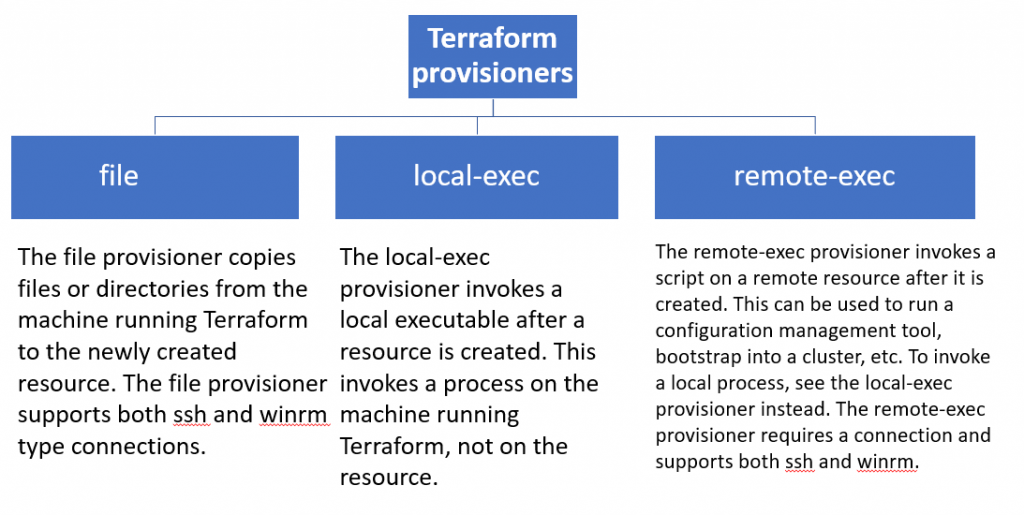
Terraform provisioners are used to execute scripts or shell commands on a local or remote machine as part of resource creation/deletion. They are similar to “EC2 instance user data” scripts that only run once on the creation and if it fails terraform marks it tainted.
Terraform includes a number of built-in provisioners, such as:
- file: Copies files or directories from the machine running Terraform to the newly created resource.
- remote-exec: Executes a command on the newly created resource.
- local-exec: Executes a command on the machine running Terraform.
Provisioners can also be used to implement custom logic, such as:
- Installing and configuring software
- Creating and configuring user accounts
- Starting and stopping services
- Performing health checks
Provisioners should be used as a last resort. There are better alternatives for most situations, such as using Terraform modules or a configuration management tool like Ansible or Chef. However, provisioners can be useful for certain tasks, such as configuring resources that are not supported by Terraform modules or for integrating Terraform with other tools.
resource "aws_instance" "web" {
  ami           = "ami-053b0d53c279acc90"
  instance_type = "t3.micro"
  key_name 		= "aws-hl-training"

  tags = {
    Name = "HelloWorld-rajesh"
  }

  connection {
      type     = "ssh"
      user     = "ubuntu"
      private_key = file("aws-hl-training.pem")
      #host = aws_instance.web.public_ip
      host = self.public_ip
  }

  provisioner "local-exec" {
    command = "mkdir devopsschool-local"
  }

 provisioner "remote-exec" {
    inline = [
	  "sudo apt-get update",
      "sudo apt-get install apache2 -y",
	  "sudo systemctl start apache2",
    ]
  }

  provisioner "file" {
    source      = "terraform.tfstate.backup"
    destination = "/tmp/"
  }


}

output "instance_public_ip" {
  value = aws_instance.web.public_ip
}

output "instance_public_sg" {
  value = aws_instance.web.security_groups
}

Code language: PHP (php)
LOCAL-EXEC — Real Production Use Cases (10)
| # | Real Use Case | Real Project Scenario | Typical Tool/Command Used |
|---|---|---|---|
| 1 | Register DNS entries | After creating VM/EC2, register hostname/IP into enterprise DNS (Infoblox/Bind) | Python or curl API call to DNS system |
| 2 | Trigger CI/CD post-deployment step | Notify Jenkins/GitLab that infrastructure provisioning completed | curl webhook to CI/CD |
| 3 | Generate dynamic inventory | Build Ansible inventory after VM creation | Bash script writing inventory file |
| 4 | Update CMDB records | Send newly created resource details into ServiceNow/CMDB | REST API call |
| 5 | Notify Slack/Teams | Send success/failure notifications to operations channel | Slack webhook curl |
| 6 | Run security scan locally | Scan Terraform resources using Checkov/tfsec | checkov / tfsec CLI |
| 7 | Generate TLS certificates | Create certificates locally before pushing to remote systems | openssl commands |
| 8 | Register monitoring targets | Add new servers into Datadog/Zabbix monitoring | Python/REST script |
| 9 | Trigger smoke testing | Validate deployed services externally after creation | curl / custom test scripts |
| 10 | Export Terraform outputs to external tools | Save infrastructure metadata for external automation tools | Bash export or file write |
FILE — Real Production Use Cases (10)
| # | Real Use Case | Real Project Scenario | Typical File Transferred |
|---|---|---|---|
| 1 | Upload application config | Deploy application configuration to VM | app.conf |
| 2 | Upload SSH authorized keys | Add public keys to server for access | authorized_keys |
| 3 | Upload SSL certificates | Install TLS certificates on web servers | cert.pem / key.pem |
| 4 | Upload database initialization script | Initialize DB schemas on new database server | init.sql |
| 5 | Upload Docker Compose files | Deploy microservices stack | docker-compose.yml |
| 6 | Upload monitoring configuration | Configure Datadog/Prometheus agent | datadog.yaml |
| 7 | Upload OS hardening scripts | Apply CIS hardening policies | hardening.sh |
| 8 | Upload Kubernetes kubeconfig | Enable cluster administration access | kubeconfig |
| 9 | Upload custom application binaries | Deploy compiled services to server | binary executable |
| 10 | Upload logging configurations | Configure centralized logging agents | rsyslog.conf |
REMOTE-EXEC — Real Production Use Cases (10)
| # | Real Use Case | Real Project Scenario | Typical Command Executed |
|---|---|---|---|
| 1 | Install required packages | Install NGINX, Docker, or dependencies on new VM | apt/yum install |
| 2 | Configure web server | Enable and start NGINX/Apache services | systemctl start nginx |
| 3 | Initialize database | Execute DB schema initialization | mysql < init.sql |
| 4 | Install monitoring agent | Install Datadog/NewRelic agents | curl install script |
| 5 | Configure firewall rules | Open required service ports | firewall-cmd / iptables |
| 6 | Join Kubernetes cluster | Add worker nodes to cluster | kubeadm join |
| 7 | Deploy containerized application | Launch containers after setup | docker-compose up |
| 8 | Apply OS hardening | Run security scripts on remote system | bash hardening.sh |
| 9 | Configure logging agents | Setup centralized log forwarding | systemctl restart rsyslog |
| 10 | Validate system readiness | Perform system health checks | df -h, free -m |
These tables reflect actual real-world Terraform usage patterns seen in:
- AWS EC2 deployments
- Kubernetes/EKS provisioning
- DevOps CI/CD pipelines
- Security hardening workflows
- Enterprise infrastructure automation
- Monitoring and logging setups
List of connection types in Terraform remote-exec provisioner?
SSH (Secure Shell):
- Type:
"ssh" - Description: Used for connecting to Unix-based operating systems, including Linux and macOS.
- Commonly Used With: Linux and Unix-based cloud instances.
- Example:
connection {
  type        = "ssh"
  user        = "your_username"
  private_key = file("~/.ssh/your_private_key.pem")
  host        = aws_instance.example.public_ip
}
Code language: JavaScript (javascript)
WinRM (Windows Remote Management):
- Type:
"winrm" - Description: Used for connecting to Windows-based operating systems.
- Commonly Used With: Windows cloud instances.
- Example:
connection {
  type     = "winrm"
  host     = aws_instance.example.private_ip
  user     = "Administrator"
  password = "your_password"
}
Code language: JavaScript (javascript)
To establish a WinRM connection over HTTPS with SSL and ignore certificate validation, you can modify the connection block as follows:
connection {
  type        = "winrm"
  host        = aws_instance.example.private_ip
  user        = "Administrator"
  password    = "your_password"
  https       = true  # Enable HTTPS
  insecure    = true  # Ignore SSL certificate validation (for testing purposes, not recommended in production)
  port        = 5986  # Use the default HTTPS port for WinRM
  cacert      = "/path/to/ca.crt"  # Optional path to a CA certificate file (if required)
  cert        = "/path/to/client.crt"  # Optional path to a client certificate file (if required)
  key         = "/path/to/client.key"  # Optional path to the client certificate's private key file (if required)
  timeout     = "5m"  # Set a timeout for the WinRM connection
  max_retries = 3     # Maximum number of connection retries
}
Code language: PHP (php)
Explanation of the options:
https: Set totrueto enable HTTPS for the WinRM connection.insecure: Set totrueto ignore SSL certificate validation. This option is typically used for testing and debugging but is not recommended for production due to security concerns.port: Use5986as the default port for HTTPS WinRM connections.cacert: Optional path to a CA certificate file. Use this if your WinRM server’s certificate is signed by a custom CA.cert: Optional path to a client certificate file. Use this if client certificate authentication is required.key: Optional path to the private key file corresponding to the client certificate.timeout: Set a timeout for the WinRM connection (e.g.,"5m"for 5 minutes).max_retries: Maximum number of connection retries in case of failures.
Basic Terraform Code — Local Exec Provisioner Demo
terraform {
  required_version = ">= 1.0"
}

# Dummy resource just to trigger local-exec
resource "null_resource" "local_exec_demo" {

  provisioner "local-exec" {

    command = <<EOT

echo "Creating directory..."
mkdir -p terraform_localexec_demo

echo "Checking system memory..."

# Linux memory check
if command -v free >/dev/null 2>&1; then
  free -h > terraform_localexec_demo/memory.txt
fi

# macOS memory check (for MacBook users)
if command -v vm_stat >/dev/null 2>&1; then
  vm_stat > terraform_localexec_demo/memory.txt
fi

echo "Memory details saved to terraform_localexec_demo/memory.txt"

EOT

    interpreter = ["/bin/bash", "-c"]
  }
}Code language: PHP (php)Below are real, production-grade use cases for Terraform provisioners based on how they are actually used in enterprise/cloud/DevOps projects (not toy examples).
You’ll recognize many patterns from AWS, EKS, CI/CD, security hardening, and migration projects like the ones you typically work on.
I’ll give:
- 10 REAL Local-Exec use cases
- 10 REAL File provisioner use cases
- 10 REAL Remote-Exec use cases
All based on real infrastructure workflows, not hypothetical lab-only scenarios.
LOCAL-EXEC — 10 Real Production Use Cases
Runs commands on the Terraform runner machine (CI/CD or laptop).
1. Register DNS Records After Infrastructure Creation
Real scenario:
After creating an EC2 instance, register its IP into an external DNS system (Infoblox / Route53 script / corporate DNS).
provisioner "local-exec" {
  command = "python register_dns.py ${aws_instance.app.private_ip}"
}
Code language: JavaScript (javascript)
Used in:
- Enterprise data center automation
- Hybrid cloud onboarding
- Internal DNS automation
2. Notify Slack or Teams After Deployment
Real scenario:
Send deployment notifications to Slack after Terraform apply.
provisioner "local-exec" {
  command = <<EOT
curl -X POST -H 'Content-type: application/json' \
--data '{"text":"Infrastructure deployed successfully"}' \
$SLACK_WEBHOOK
EOT
}
Code language: PHP (php)
Used in:
- CI/CD pipelines
- DevOps release workflows
3. Generate Inventory for Ansible
Real scenario:
After VM creation, generate dynamic inventory.
provisioner "local-exec" {
  command = <<EOT
echo "[web]" > inventory.ini
echo "${aws_instance.web.private_ip}" >> inventory.ini
EOT
}
Code language: PHP (php)
Used in:
- Terraform → Ansible workflows
- Hybrid provisioning models
4. Trigger External Configuration Tool
Real scenario:
Trigger Ansible playbook after infra creation.
provisioner "local-exec" {
  command = "ansible-playbook site.yml -i inventory.ini"
}
Code language: JavaScript (javascript)
Used in:
- Enterprise Linux automation
- VM configuration
5. Validate Security Compliance
Real scenario:
Run security validation tools like:
terraform-compliancecheckov
provisioner "local-exec" {
  command = "checkov -d ."
}
Code language: JavaScript (javascript)
Used in:
- Security pipelines
- DevSecOps workflows
6. Store Outputs to External Systems
Real scenario:
Send resource metadata to CMDB.
provisioner "local-exec" {
  command = <<EOT
curl -X POST https://cmdb.company.com/api \
-d "ip=${aws_instance.app.private_ip}"
EOT
}
Code language: JavaScript (javascript)
Used in:
- Enterprise asset tracking
7. Generate TLS Certificates
Real scenario:
Generate certificates locally.
provisioner "local-exec" {
  command = <<EOT
openssl req -x509 -newkey rsa:4096 \
-keyout key.pem \
-out cert.pem -days 365 -nodes
EOT
}
Code language: JavaScript (javascript)
Used in:
- Private cluster deployments
- Internal services
8. Backup Terraform State Metadata
Real scenario:
Backup state metadata after apply.
provisioner "local-exec" {
  command = "cp terraform.tfstate backup/"
}
Code language: JavaScript (javascript)
Used in:
- Disaster recovery
9. Trigger Monitoring Registration
Real scenario:
Register instances in monitoring system.
provisioner "local-exec" {
  command = "python register_datadog.py"
}
Code language: JavaScript (javascript)
Used in:
- Datadog
- Zabbix
- Prometheus automation
10. Run Smoke Tests After Deployment
Real scenario:
Test deployed services.
provisioner "local-exec" {
  command = "curl http://${aws_instance.web.public_ip}"
}
Code language: JavaScript (javascript)
Used in:
- Production release validation
FILE PROVISIONER — 10 Real Production Use Cases
Copies files from local machine → remote machine.
1. Upload SSH Keys
provisioner "file" {
  source      = "~/.ssh/id_rsa.pub"
  destination = "/home/ec2-user/.ssh/authorized_keys"
}
Code language: JavaScript (javascript)
Used in:
- Secure server access
2. Upload Application Configuration Files
provisioner "file" {
  source      = "app.conf"
  destination = "/etc/myapp/app.conf"
}
Code language: JavaScript (javascript)
Used in:
- App deployments
3. Upload Kubernetes kubeconfig
provisioner "file" {
  source      = "kubeconfig"
  destination = "/home/ubuntu/.kube/config"
}
Code language: JavaScript (javascript)
Used in:
- Cluster management
4. Upload SSL Certificates
provisioner "file" {
  source      = "cert.pem"
  destination = "/etc/ssl/certs/cert.pem"
}
Code language: JavaScript (javascript)
Used in:
- TLS-enabled services
5. Upload Docker Compose Files
provisioner "file" {
  source      = "docker-compose.yml"
  destination = "/home/ubuntu/docker-compose.yml"
}
Code language: JavaScript (javascript)
Used in:
- Microservices deployment
6. Upload Monitoring Agent Config
provisioner "file" {
  source      = "datadog.yaml"
  destination = "/etc/datadog-agent/datadog.yaml"
}
Code language: JavaScript (javascript)
Used in:
- Observability setups
7. Upload Application Binaries
provisioner "file" {
  source      = "myapp"
  destination = "/usr/local/bin/myapp"
}
Code language: JavaScript (javascript)
Used in:
- Custom application deployment
8. Upload Database Initialization Scripts
provisioner "file" {
  source      = "init.sql"
  destination = "/tmp/init.sql"
}
Code language: JavaScript (javascript)
Used in:
- DB bootstrapping
9. Upload Cloud-init Overrides
provisioner "file" {
  source      = "user-data.sh"
  destination = "/tmp/user-data.sh"
}
Code language: JavaScript (javascript)
Used in:
- Custom provisioning
10. Upload Security Hardening Scripts
provisioner "file" {
  source      = "hardening.sh"
  destination = "/tmp/hardening.sh"
}
Code language: JavaScript (javascript)
Used in:
- CIS hardening workflows
REMOTE-EXEC — 10 Real Production Use Cases
Runs commands directly on remote machines.
1. Install Required Packages
provisioner "remote-exec" {
  inline = [
    "sudo yum update -y",
    "sudo yum install nginx -y"
  ]
}
Code language: JavaScript (javascript)
Used in:
- Server bootstrapping
2. Configure Web Server
inline = [
  "sudo systemctl enable nginx",
  "sudo systemctl start nginx"
]
Code language: JavaScript (javascript)
Used in:
- Production web setup
3. Initialize Database
inline = [
  "mysql < /tmp/init.sql"
]
Code language: JavaScript (javascript)
Used in:
- DB provisioning
4. Install Monitoring Agents
inline = [
  "curl -O https://agent.install.sh",
  "sudo bash agent.install.sh"
]
Code language: JavaScript (javascript)
Used in:
- Observability setup
5. Configure Firewall Rules
inline = [
  "sudo firewall-cmd --add-port=80/tcp"
]
Code language: JavaScript (javascript)
Used in:
- Security configuration
6. Join Node to Kubernetes Cluster
inline = [
  "sudo kubeadm join ..."
]
Code language: JavaScript (javascript)
Used in:
- Kubernetes cluster scaling
7. Deploy Application Using Docker
inline = [
  "docker-compose up -d"
]
Code language: JavaScript (javascript)
Used in:
- Container deployment
8. Apply OS Hardening
inline = [
  "bash /tmp/hardening.sh"
]
Code language: JavaScript (javascript)
Used in:
- Security compliance
9. Configure Logging Agent
inline = [
  "sudo systemctl restart rsyslog"
]
Code language: JavaScript (javascript)
Used in:
- Centralized logging
10. Run System Validation Checks
inline = [
  "df -h",
  "free -m"
]
Code language: JavaScript (javascript)
Used in:
- Post-provision validation
REAL-WORLD SUMMARY (Industry Practice)
| Provisioner | Real Purpose |
|---|---|
| local-exec | Integration with external systems |
| file | Transfer configs/scripts |
| remote-exec | Configure servers |
Important Reality (Production Best Practice)
Most mature Terraform projects avoid heavy use of provisioners.
Instead they prefer:
- cloud-init
- userdata
- configuration management tools
- immutable infrastructure
Provisioners are mainly used for:
- Bootstrapping
- Integration hooks
- Transitional automation
If You Want Enterprise-Level Understanding
Next useful topics would be:
- Provisioner lifecycle (
create,destroy) - Connection blocks (SSH, WinRM)
null_resourceorchestration patterns- When NOT to use provisioners
- Enterprise alternatives (cloud-init vs Ansible vs Packer)

I’m Rajesh Kumar, a DevOps, SRE, DevSecOps, Cloud, and Platform Engineering expert passionate about sharing practical knowledge, real-world experiences, and industry best practices. I have worked at Cotocus and regularly write about technology, travel, investing, health, product reviews, and digital marketing through my various platforms.
I publish technical articles at DevOps School, travel stories at Holiday Landmark, stock market insights at Stocks Mantra, health and fitness guidance at My Medic Plus, product reviews at TrueReviewNow, and SEO and digital marketing strategies at Wizbrand.
Find Trusted Cardiac Hospitals
Compare heart hospitals by city and services — all in one place.
Explore Hospitals