Top 10 Templating Engines Across Major Programming Languages
| # | Templating Engine | Programming Language | Common Framework / Ecosystem | Typical Real Use |
|---|---|---|---|---|
| 1 | Jinja2 | Python | Flask, Ansible | HTML generation, configuration templates, automation scripts |
| 2 | Django Templates (DTL) | Python | Django | Web page rendering in Django applications |
| 3 | Go Templates (text/template, html/template) | Go | Helm, Terraform tools, Kubernetes | YAML/HTML templating, Helm charts, infra configs |
| 4 | Handlebars | JavaScript | Node.js, Express | Dynamic HTML rendering in web applications |
| 5 | Mustache | Multi-language | Node.js, Java, Ruby, Go | Logic-less templating for config and UI rendering |
| 6 | EJS (Embedded JavaScript) | JavaScript | Express.js | Server-side HTML rendering |
| 7 | Twig | PHP | Symfony, Drupal | HTML rendering in PHP frameworks |
| 8 | Blade | PHP | Laravel | Web UI rendering in Laravel apps |
| 9 | Thymeleaf | Java | Spring Boot | Server-side HTML templates for Java apps |
| 10 | Velocity / FreeMarker | Java | Apache, Spring | Email templates, config generation, UI rendering |
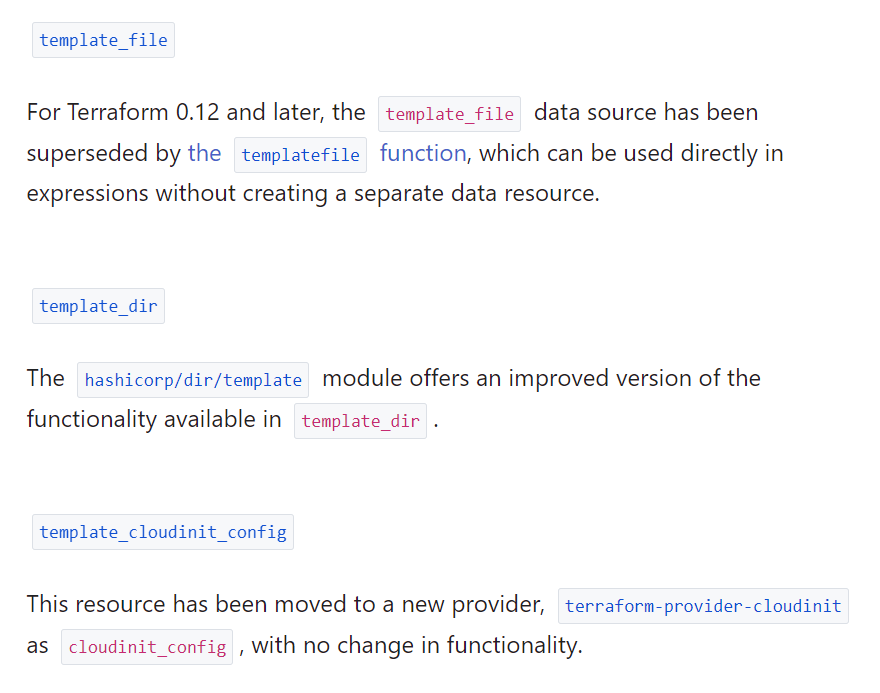
In Terraform, the template process refers to the process of using a template engine to dynamically generate configuration files or values based on a set of input parameters.
Terraform supports various template engines, including Go’s text/template and html/template, as well as the Jinja2 template engine. These template engines enable you to write dynamic templates with placeholders for values that will be replaced by actual values at runtime.
The template process in Terraform involves the following steps:
- Define a template file: Create a template file with placeholders for the values that will be replaced at runtime.
- Define variables: Define input variables that will be used to replace the placeholders in the template file.
- Use the template engine: Use the
templatefile()function ortemplate_filedata source to render the template and generate the final output. - Use the output: Use the generated output in your Terraform configuration, such as passing it to a resource as a value.
The template process is useful for generating dynamic configuration files, such as cloud-init scripts, Kubernetes manifests, and shell scripts, among others. It enables you to generate configuration files based on the specific needs of your environment, without having to hard-code the values in your Terraform configuration.
Example – 1
Example 2
List 10 real use case where i can use Template template_file of Terrraform
- Cloud-init Configuration: You can use Terraform’s
template_filedata source to create cloud-init configuration files for your virtual machines or instances. - Nginx Configuration: With
template_file, you can create an Nginx configuration file to customize the web server based on your specific needs. - DNS Records: Use
template_fileto create custom DNS records and add them to your DNS server configuration files. - Configuration Files for Services:
template_filecan be used to generate configuration files for various services such as Apache, MySQL, Postgres, etc. - SSL/TLS Certificates: You can use
template_fileto generate SSL/TLS certificate configuration files for various web servers. - Bash Scripts: Use
template_fileto generate bash scripts to automate repetitive tasks such as backing up files or deploying code. - User Data for EC2 Instances: With
template_file, you can create EC2 instance user data scripts to configure your instances when they launch. - Load Balancer Configuration: You can use
template_fileto create load balancer configuration files for services like AWS Elastic Load Balancer (ELB) or NGINX. - Kubernetes Manifests:
template_filecan be used to create Kubernetes manifest files for deploying applications to a Kubernetes cluster. - Database Configuration Files: Use
template_fileto generate database configuration files for various databases like MongoDB, Redis, Cassandra, etc.
Here is a basic 1-page tutorial for templating in Terraform using a simple Hello World example.
Basic Templating in Terraform — Hello World Tutorial
What is Templating in Terraform?
Templating in Terraform allows you to insert dynamic values into files such as:
- Configuration files
- Scripts
- YAML / JSON
- Application configs
Terraform commonly uses:
templatefile()
function to process templates.
Basic Flow of Terraform Templates
Values (variables)
        ↓
Template file (.tftpl)
        ↓
templatefile() function
        ↓
Rendered Output File
Code language: JavaScript (javascript)
Example: Hello World Template in Terraform
Goal:
Generate a file that prints:
Hello Rajesh, Welcome to Terraform Templates!
Step 1 — Create Template File
Create file:
hello.tftpl
Code language: CSS (css)
Hello ${name}, Welcome to Terraform Templates!
Here:
${name}
means:
Insert value of name variable.
Step 2 — Create Terraform File
Create file:
main.tf
Code language: CSS (css)
terraform {
required_version = ">= 1.0"
}
# Step 1 — Define variable
variable "name" {
default = "Rajesh"
}
# Step 2 — Generate output file using template
resource "local_file" "hello_output" {
filename = "hello.txt"
content = templatefile(
"${path.module}/hello.tftpl",
{
name = var.name
}
)
}
Code language: PHP (php)Step 3 — Initialize Terraform
terraform init
Step 4 — Apply Terraform
terraform apply
Type:
yes
Step 5 — Check Output File
Terraform will create:
hello.txt
Code language: CSS (css)
Content:
Hello Rajesh, Welcome to Terraform Templates!
Understanding Key Components
| Component | Purpose |
|---|---|
.tftpl | Template file |
${name} | Variable placeholder |
templatefile() | Processes template |
local_file | Writes output file |
Minimal Multi-Line Template Example
Template:
hello.tftpl
Code language: CSS (css)
Hello ${name}
Environment: ${env}
Welcome to Terraform templating!
Terraform:
variable "env" {
  default = "dev"
}
Code language: JavaScript (javascript)
Output:
Hello Rajesh

Environment: dev

Welcome to Terraform templating!
Real-World Uses of Terraform Templates
Terraform templates are commonly used for:
| Use Case | Example |
|---|---|
| Generate config files | nginx.conf |
| Create cloud-init scripts | VM startup scripts |
| Build Kubernetes YAML | Deployment manifests |
| Create JSON configs | IAM policies |
| Produce environment files | .env files |
Summary
Basic Terraform templating workflow:
1. Create template file (.tftpl)
2. Define variables
3. Use templatefile()
4. Generate output file
5. Review rendered content
Code language: CSS (css)
Core syntax:
${variable_name}
This is the basic foundation of Terraform templating, widely used in cloud-init scripts, configuration generation, and Kubernetes manifests in real DevOps projects.
Here is a 1-page basic tutorial on templating in Go with a simple Hello World example.
Basic Use of Templating in Go — Hello World Tutorial
What is Templating in Go?
Templating in Go allows you to insert dynamic values into text output such as:
- HTML pages
- Configuration files
- Logs
- YAML/JSON files
Go provides two built-in templating packages:
| Package | Used For |
|---|---|
text/template | Text output (configs, logs, CLI output) |
html/template | HTML output (web pages, UI rendering) |
Basic Flow of Go Templates
Values (data)
        ↓
Template file (.tmpl)
        ↓
Interpolation {{ }}
        ↓
Rendered Output
Example: Hello World Using text/template
This example prints:
Hello Rajesh, Welcome to Go Templates!
Step 1 — Create Template File
Create file:
hello.tmpl
Code language: CSS (css)
Hello {{.Name}}, Welcome to Go Templates!
Here:
{{.Name}}
means:
Insert value of Name from data.
Step 2 — Create Go Program
Create file:
main.go
Code language: CSS (css)
package main
import (
"os"
"text/template"
)
// Step 1 — Define structure for values
type User struct {
Name string
}
func main() {
// Step 2 — Provide values
data := User{
Name: "Rajesh",
}
// Step 3 — Load template file
tmpl := template.Must(
template.ParseFiles("hello.tmpl"),
)
// Step 4 — Execute template
tmpl.Execute(os.Stdout, data)
}
Code language: JavaScript (javascript)Step 3 — Run the Program
go run main.go
Code language: CSS (css)
Output
Hello Rajesh, Welcome to Go Templates!
Understanding the Syntax
| Syntax | Meaning |
|---|---|
{{.Name}} | Access field Name |
{{.}} | Access full data |
{{range}} | Loop through list |
{{if}} | Conditional logic |
Example: Hello Multiple Users (List Example)
Template:
Users:

{{range .}}
Hello {{.Name}}
{{end}}
Go Code:
users := []User{
	{Name: "Rajesh"},
	{Name: "Amit"},
	{Name: "Neha"},
}

tmpl.Execute(os.Stdout, users)
Code language: JavaScript (javascript)
Output:
Users:

Hello Rajesh
Hello Amit
Hello Neha
When to Use html/template
Use html/template when generating web pages.
Example:
import "html/template"
Code language: JavaScript (javascript)
It automatically:
- Escapes HTML
- Prevents XSS attacks
- Secures web output
Real-World Uses of Go Templates
Go templates are widely used in:
| Tool | Usage |
|---|---|
| Helm | Kubernetes YAML templating |
| Docker tools | Config generation |
| Terraform ecosystem tools | File generation |
| Web servers | HTML rendering |
| DevOps automation | Config templating |
Summary
Basic Go templating steps:
1. Create template file (.tmpl)
2. Provide data (struct or list)
3. Parse template
4. Execute template
5. Get output
Code language: CSS (css)
Core syntax:
{{.FieldName}}
That is the foundation of Go templating, and it is exactly the same concept used in Helm charts, Kubernetes configs, and many DevOps tools.

I’m Rajesh Kumar, a DevOps, SRE, DevSecOps, Cloud, and Platform Engineering expert passionate about sharing practical knowledge, real-world experiences, and industry best practices. I have worked at Cotocus and regularly write about technology, travel, investing, health, product reviews, and digital marketing through my various platforms.
I publish technical articles at DevOps School, travel stories at Holiday Landmark, stock market insights at Stocks Mantra, health and fitness guidance at My Medic Plus, product reviews at TrueReviewNow, and SEO and digital marketing strategies at Wizbrand.
Find Trusted Cardiac Hospitals
Compare heart hospitals by city and services — all in one place.
Explore Hospitals