
Rundeck is an open-source runbook automation and job scheduling tool. Teams use it to turn operational procedures into jobs that run commands, scripts or playbooks across many nodes. Access control, execution logs and a web console make it safe to hand routine tasks to other people.
The guides here follow a practical path. They explain what Rundeck is, how to install it on Linux or Windows, and how to build a first project with nodes, jobs, schedules and notifications. Another guide moves the backend database to PostgreSQL. Configuration posts cover the options in rundeck-config.properties and file-based authentication with ACL policies in Community Edition. Integration guides show five ways to run Ansible from Rundeck and how to add a Windows node over WinRM to a Rundeck server on Linux.
Wider reading compares the Community, Enterprise and Cloud editions, reviews other runbook automation tools and explains auto remediation in SRE and IT operations. The material is aimed at SRE, DevOps and operations engineers who want repeatable, self-service automation for day-to-day work.
Start here
- What is Rundeck? – Explains Rundeck's purpose, features, architecture and common use cases.
- How to install and Configure Rundeck? – Covers system requirements, Java setup and a step-by-step installation.
- Rundeck Basic Workflow: Step-by-Step – Walks through creating a project, nodes, jobs, schedules and notifications.
- Rundeck Community Edition: Authentication & Authorization Tutorial – Shows how to lock down users and permissions with file-based auth and ACL policies.
- Rundeck – Methods to Run Ansible from Rundeck – Gives five ways to trigger Ansible playbooks from Rundeck jobs.
- How to Configure Rundeck with postgresql – Moves Rundeck to a PostgreSQL database, a common step before production use.
- Rundeck Community Vs RunDeck Enterprise Vs RunDeck Cloud – Compares the three editions so you can see what the free version includes.
Latest Rundeck articles
How to Work with Rundeck Webhooks?
A Rundeck webhook is a project-level HTTP endpoint. When it receives a POST request, a handler plugin runs, usually one that starts a job and passes values…
Rundeck Database Migration From H2 to MySql and postgresql
This guide moves Rundeck off its embedded H2 database and onto MySQL or PostgreSQL, which is what you should use in production. The steps above set up…
Top 10 Runbook Automation Tools: Features, Pros, Cons & Comparison
Introduction Runbook Automation Tools are purpose-built platforms that automate repetitive operational procedures, commonly known as runbooks. Traditionally, runbooks were static documents describing step-by-step actions engineers should take…
Complete Beginner-to-Advanced Guide on Auto Remediation in SRE & IT Operations
What is Auto Remediation? Auto Remediation refers to the automatic detection and resolution of incidents in IT systems without manual intervention. It bridges the gap between monitoring,…
How to Configure Rundeck with postgresql
Step 1 – Setup PostgreSQL server Step 2 – Login to PostgreSQL server & create user/db & grant perm Step 3 – Download PostgreSQL driver cd /var/lib/rundeck/libextsudo…
Guide to add and use a Windows node in Rundeck installed on a Linux server
Here’s a step-by-step guide to add and use a Windows node in Rundeck installed on a Linux server, using WinRM (Windows Remote Management), which is the most…
Rundeck Configuration Options – rundeck-config.properties
🔧 Rundeck Configuration Options 1. General Settings Property Description Example loglevel.default Sets the default log level for jobs. Options: ERROR, WARN, INFO, VERBOSE, DEBUG. INFO rdeck.base Specifies…
Rundeck Community Edition: Authentication & Authorization Tutorial
Here’s a detailed tutorial for Authentication and Authorization in Rundeck Community Edition. This guide includes setup for both file-based authentication and role-based access control (RBAC) using ACL…
Rundeck Project SCM Export and SCM Import
The Rundeck Project SCM Export and SCM Import features are designed to version control your job definitions and project configuration, by integrating Rundeck projects with a source…
Rundeck – Methods to Run Ansible from Rundeck
Here’s a complete guide to running Ansible Playbooks using Rundeck, covering all supported methods, including what you’ve done, plus troubleshooting options and best practices. ✅ Goal Run…
How to install and Configure Rundeck?
System Requirements for Rundeck Supported Operating Systems: Amazon EC2 Supported Database. Supported Log store Others Important Network access How to Install Rundeck OSS in Ubtunu? Step 1-…
Rundeck Assignments 2 – Windows
Rundeck Student Assignments (Windows Local Node) 📝 Setup Prerequisites: 🎓 Assignment List Assignment 1: Hello World in PowerShell Objective: Run a basic PowerShell script as a Rundeck…
Rundeck Assignments 1 – Linux
Rundeck Student Assignments (Local Node Only) — Assignment 1: Hello World Job Objective: Learn to create and execute your first Rundeck job. Assignment 2: Disk Usage Check…
What is Rundeck?
✅ What is Rundeck? Rundeck is an open-source tool used for Runbook Automation, designed to help DevOps teams, SREs, and IT operations teams automate routine tasks, reduce…
Rundeck Basic Workflow: Step-by-Step
Here’s a clear explanation of the Rundeck Basic Workflow, perfect for beginners or teams implementing Rundeck for the first time. 🔄 Rundeck Basic Workflow: Step-by-Step This describes…
How to Install Rundeck in Windows?
RUNDECK INSTALL PACKAGE Rajesh KumarI’m Rajesh Kumar, a DevOps, SRE, DevSecOps, Cloud, and Platform Engineering expert passionate about sharing practical knowledge, real-world experiences, and industry best practices….
Rundeck Tutorials: Introduction Demo
Rajesh KumarI’m Rajesh Kumar, a DevOps, SRE, DevSecOps, Cloud, and Platform Engineering expert passionate about sharing practical knowledge, real-world experiences, and industry best practices. I have worked…
How to add Windows Node in Rundeck?
Rundeck allows users to execute jobs to remote Windows nodes to manage and automate tasks using Rundeck workflows. This article shows how to add a Windows node…
How to add Linux Node in Rundeck?
Step 1 – Add authentication keys/password in Key Storage Add authentication keys/password of the linux node in Rundeck’s built-in Key Storage. Step 2 – Create a Project…
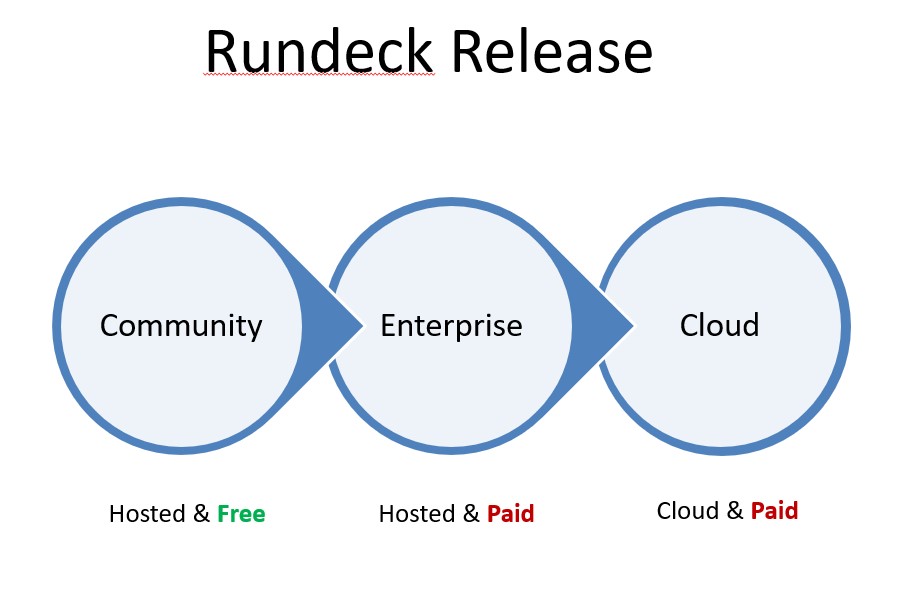
Rundeck Community Vs RunDeck Enterprise Vs RunDeck Cloud
What is Runbook? Rundeck is runbook automation that gives you and your colleagues self-service access to the processes and tools they need to get their job done….
Rundeck: frequently asked questions
What is Rundeck used for?
Rundeck automates operational tasks such as restarts, deployments, maintenance scripts and incident runbooks. These tasks run as jobs that can be scheduled, triggered on demand or handed to other teams with access controls.
Is Rundeck free?
Rundeck Community Edition is open source and free to use. The Enterprise and cloud offerings are commercial products with extra features and support.
Can Rundeck run Ansible playbooks?
Yes. You can use the Ansible plugin to run playbooks and use Ansible inventory as Rundeck nodes, or call ansible-playbook from command or script steps.
Which database should Rundeck use in production?
The default embedded H2 database is meant for testing. For production, point Rundeck at an external database such as PostgreSQL or MySQL through the dataSource settings in rundeck-config.properties.