
Introduction
AI knowledge base auto-authoring tools help support, product, IT, and customer success teams create, improve, and maintain help articles automatically. These platforms use AI to turn support tickets, call transcripts, product workflows, internal documents, screenshots, release notes, and FAQs into structured knowledge base articles. Instead of relying only on manual documentation work, teams can use AI to draft articles, identify missing topics, update outdated content, and organize knowledge for both customers and internal agents.
Why it matters: support teams often struggle with outdated documentation, repeated questions, inconsistent answers, and slow article creation. A weak knowledge base also makes AI chatbots less reliable because the bot can only answer well when the source content is accurate. AI auto-authoring tools help teams close knowledge gaps faster, reduce repetitive tickets, improve self-service, and keep help content aligned with product changes.
Real-world use cases include creating help center articles from support tickets, converting call summaries into troubleshooting guides, generating FAQs from customer questions, updating outdated product documentation, drafting internal agent playbooks, creating onboarding guides, writing release note explainers, and preparing knowledge for AI chatbots.
Evaluation criteria for buyers should include article quality, source ingestion, knowledge gap detection, approval workflows, version control, help desk integration, chatbot readiness, multilingual support, governance, brand tone control, analytics, security, data retention, editing experience, and ease of publishing.
Best for: SaaS companies, ecommerce teams, IT service desks, customer support teams, BPOs, product documentation teams, customer success teams, and enterprises that need accurate self-service content at scale. Not ideal for: teams with very small documentation needs, businesses without repeatable support questions, or organizations that cannot allow AI to process internal support data and do not have a secure review workflow.
What’s Changed in AI Knowledge Base Auto-Authoring Tools
- Knowledge base tools are moving from manual article editors to AI-assisted content creation and maintenance systems.
- AI can now identify repeated customer questions and suggest new articles based on real support demand.
- Modern tools increasingly draft articles from tickets, chats, call summaries, help docs, product pages, screenshots, and internal notes.
- Support teams now want AI-generated articles that are ready for chatbot retrieval, not just human reading.
- Knowledge gap detection is becoming a major buying feature because outdated or missing articles directly affect support automation quality.
- AI article generation is becoming more structured with templates for FAQs, troubleshooting, how-to guides, policies, and release updates.
- Approval workflows are more important because companies need human review before AI-written content goes live.
- RAG readiness matters because AI support bots depend on clean, accurate, and chunk-friendly knowledge content.
- Multilingual content generation and localization are becoming more useful for global support teams.
- Governance is becoming critical, especially for regulated teams that need audit logs, ownership, permissions, and retention controls.
- Product-led companies increasingly want documentation that updates when UI flows, features, or policies change.
- Buyers now evaluate knowledge tools based on content freshness, not only article creation speed.
Quick Buyer Checklist
Use this checklist to shortlist AI knowledge base auto-authoring tools quickly:
- Check whether the tool can generate articles from support tickets, transcripts, docs, videos, screenshots, or product workflows.
- Confirm whether it identifies missing articles and outdated knowledge automatically.
- Test article quality using your real support cases and product language.
- Review whether the tool supports templates for FAQs, how-to guides, troubleshooting, policies, and release notes.
- Confirm whether writers can edit and approve AI-generated drafts before publishing.
- Check whether it integrates with your help desk, CRM, chatbot, documentation portal, and knowledge base.
- Review whether content is optimized for AI search, customer self-service, and chatbot retrieval.
- Confirm support for version history, ownership, review cycles, and content governance.
- Check multilingual content creation and localization support.
- Review role-based access, audit logs, retention controls, encryption, and admin settings.
- Test whether the platform can maintain brand tone and support style.
- Evaluate analytics for search failures, content gaps, article usefulness, and ticket deflection.
- Check pricing by seats, articles, AI usage, workspace, storage, and enterprise features.
- Confirm export options so your knowledge base is not locked inside one platform.
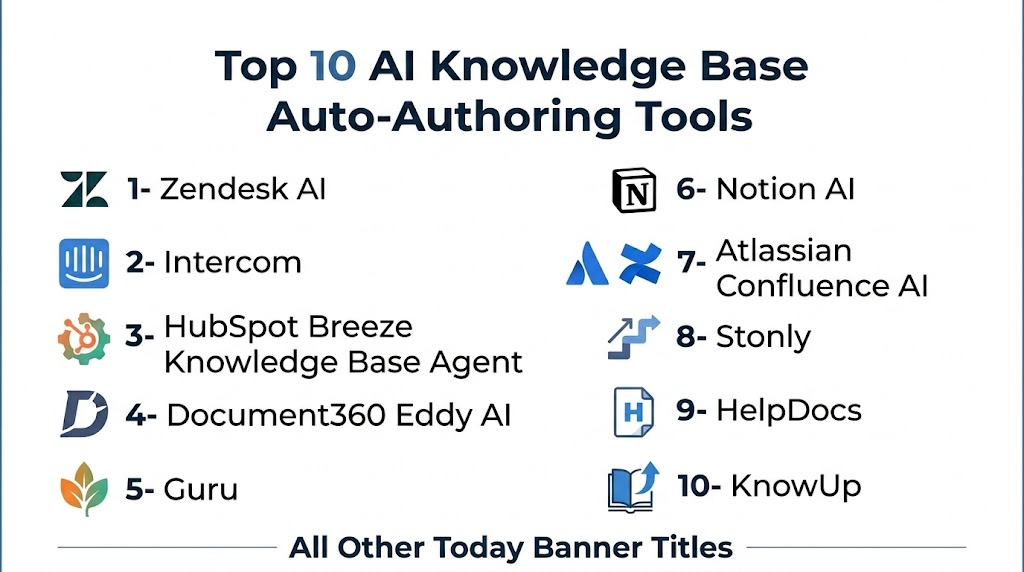
Top 10 AI Knowledge Base Auto-Authoring Tools
1- Zendesk AI
One-line verdict: Best for support teams that want AI knowledge creation connected to ticketing and help center workflows.
Short description:
Zendesk AI helps support teams improve help center content, assist agents, summarize tickets, suggest answers, and identify recurring support themes. It is especially useful for teams already using Zendesk for tickets, customer service, and self-service knowledge.
Standout Capabilities
- AI assistance for support content and customer service workflows
- Help center and ticketing integration
- Suggested replies and article recommendations
- Support topic detection from customer conversations
- AI-powered ticket summaries
- Knowledge base improvement workflows
- Strong omnichannel support ecosystem
- Reporting for support operations and self-service performance
AI-Specific Depth
- Model support: Hosted AI model approach
- RAG / knowledge integration: Native help center and support content integration
- Evaluation: Ticket analytics, content performance review, and support reporting
- Guardrails: Admin rules, permissions, escalation workflows, and approval processes
- Observability: Dashboards for tickets, help center performance, automation, and customer service trends
Pros
- Strong fit for existing Zendesk users
- Connects support tickets with knowledge workflows
- Mature ecosystem for help center and customer service operations
Cons
- Advanced AI capabilities may depend on plan and configuration
- Best value appears inside the Zendesk ecosystem
- Complex enterprise setups may require admin expertise
Security & Compliance
Zendesk provides enterprise security controls such as SSO, role permissions, encryption, audit capabilities, and admin settings depending on plan. Buyers should verify data retention, regional hosting, and compliance details directly. Unknown certifications should be treated as Not publicly stated.
Deployment & Platforms
- Web-based platform
- Cloud deployment
- Mobile apps available for support workflows
- Self-hosted deployment: N/A
Integrations & Ecosystem
Zendesk AI is strongest when knowledge base content needs to connect with tickets, customer conversations, agent workflows, and help center analytics.
- Zendesk help center
- CRM integrations
- Collaboration tools
- Ecommerce systems
- Chat and messaging channels
- APIs and webhooks
- Marketplace apps
Pricing Model
Zendesk generally uses seat-based SaaS pricing with AI and advanced automation features depending on plan and add-ons. Exact pricing varies by package.
Best-Fit Scenarios
- Support teams using Zendesk help center
- AI-assisted article improvement from ticket trends
- Customer service teams building chatbot-ready knowledge
2- Intercom
One-line verdict: Best for SaaS teams that want AI-assisted help content connected to customer conversations and support automation.
Short description:
Intercom combines customer messaging, help center content, AI support automation, and agent workflows. Its AI capabilities help teams answer questions, improve support content, and connect customer conversations with documentation and self-service.
Standout Capabilities
- AI support automation connected to help center content
- Article suggestions for customer-facing conversations
- Strong customer messaging and inbox integration
- AI summaries for support conversations
- Help center content used for customer self-service
- Human handoff with context
- Workflow automation for support teams
- Modern user experience for SaaS support operations
AI-Specific Depth
- Model support: Hosted AI model approach
- RAG / knowledge integration: Native help center and support content integration
- Evaluation: Conversation analytics, resolution tracking, and content performance review
- Guardrails: Answer grounding, escalation rules, and admin controls
- Observability: Conversation reporting, resolution tracking, self-service metrics, and support analytics
Pros
- Strong for SaaS and product-led support teams
- Good connection between content and live customer conversations
- Helps teams improve knowledge used by AI support agents
Cons
- Best value for teams already using Intercom widely
- Costs can increase as usage grows
- Documentation governance may be lighter than enterprise knowledge platforms
Security & Compliance
Intercom provides business and enterprise security features such as encryption, access controls, SSO options, and admin permissions depending on plan. Buyers should verify audit logs, retention, residency, and compliance requirements directly.
Deployment & Platforms
- Web-based platform
- Cloud deployment
- Mobile apps available
- Customer messaging and help center channels
- Self-hosted deployment: N/A
Integrations & Ecosystem
Intercom is useful when support documentation, customer chat, automation, and agent workflows need to work together.
- Help center
- CRM tools
- Slack
- Billing tools
- Product analytics tools
- APIs and webhooks
- Support workflow integrations
Pricing Model
Intercom generally uses SaaS subscription pricing with AI usage and advanced support features depending on plan.
Best-Fit Scenarios
- SaaS help center improvement
- AI chatbot knowledge preparation
- Customer conversation driven documentation
3- HubSpot Breeze Knowledge Base Agent
One-line verdict: Best for growing businesses that want knowledge base drafting inside a CRM and service platform.
Short description:
HubSpot Breeze Knowledge Base Agent helps teams create and improve knowledge base content using AI inside the HubSpot ecosystem. It is suited for teams that want support documentation connected with CRM, service, marketing, and customer data.
Standout Capabilities
- AI-assisted knowledge base content creation
- Integration with HubSpot service workflows
- CRM context for customer-facing content
- Support for self-service documentation
- AI agents connected to business operations
- Easy adoption for HubSpot users
- Content drafting and improvement workflows
- Useful for small and mid-market service teams
AI-Specific Depth
- Model support: Hosted AI model approach
- RAG / knowledge integration: HubSpot knowledge and CRM context integration
- Evaluation: Content review, service analytics, and human editing workflows
- Guardrails: Workspace permissions, approval workflows, and admin controls
- Observability: Service reporting, content performance, and CRM analytics depending on plan
Pros
- Strong fit for HubSpot-centered teams
- Good for SMB and mid-market service operations
- Connects knowledge content with CRM workflows
Cons
- Best value depends on HubSpot adoption
- Less flexible for teams outside the HubSpot ecosystem
- Advanced governance may vary by plan
Security & Compliance
HubSpot provides business security and admin controls depending on plan and configuration. Buyers should verify SSO, RBAC, audit logs, encryption, retention, and compliance requirements directly.
Deployment & Platforms
- Web-based platform
- Cloud deployment
- CRM and service platform environment
- Self-hosted deployment: N/A
Integrations & Ecosystem
HubSpot Breeze Knowledge Base Agent works best when documentation is part of a broader customer relationship workflow.
- HubSpot CRM
- HubSpot Service Hub
- Marketing tools
- Sales tools
- Knowledge base workflows
- Email and support workflows
- App marketplace integrations
Pricing Model
HubSpot uses subscription-based SaaS pricing, and AI features may depend on product edition, plan, and platform access.
Best-Fit Scenarios
- HubSpot-based customer service teams
- SMB knowledge base drafting
- CRM-connected self-service documentation
4- Document360 Eddy AI
One-line verdict: Best for product and support teams needing structured AI documentation inside a dedicated knowledge base platform.
Short description:
Document360 is a knowledge base platform for product documentation, help centers, internal knowledge, and customer self-service. Eddy AI adds AI assistance for writing, improving, searching, and managing documentation workflows.
Standout Capabilities
- AI writing assistance for knowledge articles
- Dedicated knowledge base management
- Public and private documentation portals
- Version control and article history
- Category and content organization
- AI search and self-service support
- Team review and publishing workflows
- Strong fit for product documentation teams
AI-Specific Depth
- Model support: Hosted AI model approach
- RAG / knowledge integration: Native knowledge base content and documentation structure
- Evaluation: Article review, editorial workflows, and usage analytics
- Guardrails: Permissions, publishing workflows, versioning, and role controls
- Observability: Search analytics, article analytics, feedback, and documentation performance metrics
Pros
- Strong dedicated knowledge base platform
- Useful for product and technical documentation
- Good structure for article governance and versioning
Cons
- May require migration from existing help centers
- AI auto-authoring depth should be tested with real workflows
- More documentation-focused than ticketing-focused
Security & Compliance
Document360 provides business and enterprise controls depending on plan. Buyers should verify SSO, RBAC, audit logs, encryption, retention, and compliance requirements directly.
Deployment & Platforms
- Web-based platform
- Cloud deployment
- Public and private knowledge base portals
- Self-hosted deployment: Varies / N/A
Integrations & Ecosystem
Document360 fits teams that need a standalone knowledge base connected to support, product, and content workflows.
- Help desk integrations
- Analytics tools
- Chat tools
- API access
- Import and export workflows
- Team collaboration tools
- Search and feedback systems
Pricing Model
Document360 generally uses tiered SaaS pricing based on workspaces, users, projects, and advanced features. AI capabilities may vary by plan.
Best-Fit Scenarios
- Product documentation teams
- Customer help center creation
- Internal and external knowledge base management
5- Guru
One-line verdict: Best for internal knowledge teams that want AI-assisted answers, verification, and knowledge governance.
Short description:
Guru is a knowledge management platform focused on capturing, verifying, and delivering trusted information to teams. Its AI capabilities help employees find answers, generate knowledge, and maintain internal content quality across support, sales, operations, and enablement.
Standout Capabilities
- AI-powered enterprise knowledge search
- Knowledge verification workflows
- Internal knowledge card management
- Suggested answers from trusted content
- Browser and workflow integrations
- Support and sales enablement use cases
- Content ownership and review cycles
- Strong internal knowledge governance
AI-Specific Depth
- Model support: Hosted AI model approach
- RAG / knowledge integration: Internal knowledge sources and verified content integration
- Evaluation: Verification workflows, answer review, and content freshness tracking
- Guardrails: Trusted sources, permissions, owners, and verification controls
- Observability: Usage analytics, content verification status, and search performance
Pros
- Strong for internal support knowledge
- Good governance through verification workflows
- Useful for support, sales, and operations enablement
Cons
- Less focused on public help center article publishing
- Requires content ownership discipline
- Best value depends on employee adoption
Security & Compliance
Guru provides business and enterprise security controls depending on plan. Buyers should verify SSO, RBAC, audit logs, encryption, data retention, and compliance requirements directly.
Deployment & Platforms
- Web-based platform
- Cloud deployment
- Browser and workplace integrations
- Self-hosted deployment: Varies / N/A
Integrations & Ecosystem
Guru works well when teams need knowledge delivered inside daily workflows rather than only in a static help center.
- Slack
- Microsoft Teams
- Browser extension
- CRM systems
- Help desk tools
- Knowledge repositories
- APIs and workflow integrations
Pricing Model
Guru generally uses seat-based SaaS pricing with advanced AI, governance, and enterprise controls depending on plan.
Best-Fit Scenarios
- Internal support knowledge management
- Agent enablement and verified answers
- Sales and customer success knowledge workflows
6- Notion AI
One-line verdict: Best for teams that want flexible AI-assisted internal knowledge creation in a collaborative workspace.
Short description:
Notion AI helps teams draft, rewrite, summarize, and organize knowledge inside Notion workspaces. It is useful for internal documentation, SOPs, FAQs, team wikis, onboarding guides, and lightweight knowledge base content.
Standout Capabilities
- AI-assisted writing and editing
- Flexible workspace for internal knowledge
- Summarization and rewriting support
- Team wiki and documentation workflows
- Database-based content organization
- Templates for process and support docs
- Collaboration and commenting
- Search across workspace knowledge
AI-Specific Depth
- Model support: Hosted AI model approach
- RAG / knowledge integration: Notion workspace content and connected knowledge depending on configuration
- Evaluation: Human review, editing workflows, and workspace collaboration
- Guardrails: Workspace permissions, page sharing controls, and admin settings
- Observability: Workspace analytics and usage visibility vary by plan
Pros
- Very flexible for many documentation styles
- Easy for teams to draft and collaborate
- Good for internal knowledge and process docs
Cons
- Not a dedicated customer support knowledge base
- Governance can become messy without structure
- Advanced help desk publishing may require integrations
Security & Compliance
Notion provides workspace security and admin controls depending on plan. Buyers should verify SSO, RBAC, audit logs, retention, encryption, and compliance requirements directly.
Deployment & Platforms
- Web-based platform
- Desktop apps
- Mobile apps
- Cloud deployment
- Self-hosted deployment: N/A
Integrations & Ecosystem
Notion AI is useful when knowledge creation happens across product, support, operations, and internal teams.
- Slack
- Google Workspace
- Microsoft tools
- Jira
- GitHub
- API integrations
- Workflow automation tools
Pricing Model
Notion uses seat-based SaaS pricing, with AI capabilities usually available through plan-based or add-on pricing depending on account configuration.
Best-Fit Scenarios
- Internal knowledge base creation
- SOP and onboarding documentation
- Flexible team wiki authoring
7- Atlassian Confluence AI
One-line verdict: Best for engineering and enterprise teams that want AI-assisted documentation inside Confluence.
Short description:
Confluence AI helps teams draft, summarize, rewrite, and organize internal documentation within the Atlassian ecosystem. It is especially useful for engineering, IT, product, and operations teams that already use Jira and Confluence for collaboration.
Standout Capabilities
- AI-assisted page drafting and summarization
- Strong internal documentation workflows
- Integration with Jira and Atlassian tools
- Team collaboration and page ownership
- Space-based knowledge organization
- Search and knowledge discovery
- Templates for product and technical docs
- Enterprise workspace governance
AI-Specific Depth
- Model support: Hosted AI model approach
- RAG / knowledge integration: Confluence spaces, pages, and Atlassian ecosystem context
- Evaluation: Human review, page history, and collaboration workflows
- Guardrails: Permissions, admin controls, space-level governance, and content ownership
- Observability: Workspace analytics and admin reporting vary by plan
Pros
- Strong fit for engineering and IT documentation
- Works well with Jira and product workflows
- Good governance for enterprise knowledge spaces
Cons
- Less specialized for public customer help centers
- Requires structured spaces and ownership
- AI authoring quality depends on source content
Security & Compliance
Atlassian provides enterprise security and admin controls depending on plan and deployment. Buyers should verify SSO, RBAC, audit logs, encryption, data residency, retention, and compliance needs directly.
Deployment & Platforms
- Web-based platform
- Cloud deployment
- Enterprise workspace environment
- Self-hosted options vary by Atlassian product strategy and licensing
Integrations & Ecosystem
Confluence AI is strongest inside the Atlassian ecosystem, especially where product, engineering, IT, and support teams collaborate.
- Jira
- Atlassian tools
- Slack
- Microsoft Teams
- Marketplace apps
- APIs
- Knowledge and project workflows
Pricing Model
Atlassian generally uses seat-based SaaS pricing with AI capabilities depending on plan and platform access.
Best-Fit Scenarios
- Engineering knowledge bases
- IT and product documentation
- Enterprise internal documentation workflows
8- Stonly
One-line verdict: Best for teams creating interactive help guides, agent workflows, and customer self-service content.
Short description:
Stonly is a knowledge and guidance platform used to create interactive help content, agent scripts, product guides, and self-service workflows. Its AI-assisted capabilities help teams generate and improve support content while making guidance more actionable.
Standout Capabilities
- Interactive step-by-step guides
- Customer self-service knowledge workflows
- Agent guidance and scripts
- Help center and product support content
- AI-assisted content creation and improvement
- Decision-tree style troubleshooting
- Embedded guidance experiences
- Analytics for guide performance
AI-Specific Depth
- Model support: Hosted AI capabilities vary by configuration
- RAG / knowledge integration: Interactive guides, help content, and support knowledge workflows
- Evaluation: Guide performance review, usage analytics, and human editing
- Guardrails: Approval workflows, permissions, and structured guidance controls
- Observability: Guide analytics, completion metrics, and customer behavior insights
Pros
- Strong for interactive troubleshooting content
- Useful for both customers and agents
- More actionable than static articles
Cons
- Less suited for long-form documentation libraries
- Requires thoughtful guide design
- AI depth should be validated with real content workflows
Security & Compliance
Stonly provides business security and admin features depending on plan. Buyers should verify SSO, RBAC, audit logs, encryption, retention, and compliance requirements directly.
Deployment & Platforms
- Web-based platform
- Cloud deployment
- Embeddable guides and help content
- Self-hosted deployment: Varies / N/A
Integrations & Ecosystem
Stonly works well when knowledge content needs to guide users through workflows, not just provide static answers.
- Help desk integrations
- CRM tools
- Product apps
- Knowledge base systems
- APIs
- Embedded widgets
- Analytics workflows
Pricing Model
Stonly generally uses SaaS pricing based on usage, seats, guides, and business features. Exact pricing should be verified directly.
Best-Fit Scenarios
- Interactive troubleshooting guides
- Agent scripts and support workflows
- Customer self-service journeys
9- HelpDocs
One-line verdict: Best for teams wanting a clean help center with AI-assisted article drafting and content organization.
Short description:
HelpDocs is a knowledge base platform for creating branded help centers and support documentation. It supports AI-assisted drafting, article organization, search, customization, and integrations with support workflows.
Standout Capabilities
- Branded help center creation
- AI-assisted article drafting
- Knowledge base organization and categories
- Smart search for self-service
- Customization for brand experience
- Feedback and content improvement workflows
- Support tool integrations
- Clean editor for support teams
AI-Specific Depth
- Model support: Hosted AI model approach
- RAG / knowledge integration: Native article library and help center content
- Evaluation: Article feedback, editing, and usage review
- Guardrails: Publishing controls, user permissions, and human review workflows
- Observability: Search analytics, article performance, and feedback depending on plan
Pros
- Easy help center creation
- Good for branded customer self-service
- Practical AI drafting for support articles
Cons
- Less advanced than enterprise knowledge management suites
- AI governance depth should be verified
- May need integrations for deeper ticket-based authoring
Security & Compliance
HelpDocs provides business security and admin controls depending on plan. Buyers should verify SSO, RBAC, audit logs, encryption, retention, and compliance details directly.
Deployment & Platforms
- Web-based platform
- Cloud deployment
- Public help center
- Private documentation options vary by plan
- Self-hosted deployment: Varies / N/A
Integrations & Ecosystem
HelpDocs fits teams that need a straightforward customer-facing knowledge base connected to support tools.
- Intercom
- Slack
- Front
- Help desk tools
- Analytics tools
- Custom scripts
- API workflows
Pricing Model
HelpDocs generally uses tiered SaaS pricing based on users, features, and knowledge base needs.
Best-Fit Scenarios
- Customer help center creation
- AI-assisted support article drafting
- Branded self-service documentation
10- KnowUp
One-line verdict: Best for SaaS teams that want AI to detect documentation gaps and draft updated help content.
Short description:
KnowUp is an AI-driven help center maintenance platform focused on automatically finding gaps, creating drafts, and keeping SaaS documentation updated. It is useful for product-led teams that struggle to maintain help content as their product changes.
Standout Capabilities
- AI-driven help center maintenance
- Automatic documentation gap detection
- Draft creation for missing or outdated articles
- Product workflow understanding
- Support for SaaS documentation updates
- Helps reduce manual article writing
- Focus on keeping help content fresh
- Useful for chatbot and self-service readiness
AI-Specific Depth
- Model support: Hosted AI model approach
- RAG / knowledge integration: Help center, product workflow, and documentation context
- Evaluation: Draft review, content freshness checks, and human approval
- Guardrails: Human review, publishing control, and workflow approval
- Observability: Documentation gap signals, draft status, and content maintenance visibility
Pros
- Strong focus on knowledge gap detection
- Useful for fast-changing SaaS products
- Helps reduce documentation maintenance workload
Cons
- Emerging platform compared with larger vendors
- Enterprise ecosystem depth should be validated
- Buyers should test fit with their product and help center stack
Security & Compliance
Security and compliance details should be verified directly. Buyers should confirm SSO, RBAC, audit logs, encryption, data retention, product access controls, and customer data handling before deployment. Unknown details should be treated as Not publicly stated.
Deployment & Platforms
- Web-based platform
- Cloud deployment
- Help center and product workflow focus
- Self-hosted deployment: Varies / N/A
Integrations & Ecosystem
KnowUp is designed for teams that want documentation maintenance connected to product workflows and help center content.
- Help center platforms
- Product workflow analysis
- Support documentation tools
- Draft review workflows
- AI content generation
- SaaS product documentation processes
- Export and publishing workflows vary by setup
Pricing Model
Pricing is Not publicly stated and should be verified directly based on workspace, documentation volume, integrations, and support needs.
Best-Fit Scenarios
- SaaS teams with fast-changing products
- Help center gap detection
- Automatic draft creation for support articles
Comparison Table
| Tool Name | Best For | Deployment | Model Flexibility | Strength | Watch-Out | Public Rating |
|---|---|---|---|---|---|---|
| Zendesk AI | Support knowledge workflows | Cloud | Hosted | Ticket and help center alignment | Best inside Zendesk | N/A |
| Intercom | SaaS support documentation | Cloud | Hosted | Customer conversation context | Costs can scale with usage | N/A |
| HubSpot Breeze Knowledge Base Agent | CRM-connected knowledge creation | Cloud | Hosted | HubSpot ecosystem fit | Less flexible outside HubSpot | N/A |
| Document360 Eddy AI | Product and support documentation | Cloud | Hosted | Dedicated knowledge base structure | Migration may take planning | N/A |
| Guru | Internal knowledge governance | Cloud | Hosted | Verified knowledge workflows | Less public help center focus | N/A |
| Notion AI | Flexible internal authoring | Cloud | Hosted | Collaborative workspace | Needs governance discipline | N/A |
| Atlassian Confluence AI | Engineering and IT docs | Cloud | Hosted | Atlassian ecosystem integration | Less customer help center focused | N/A |
| Stonly | Interactive guides | Cloud | Hosted | Step-by-step guidance | Requires guide design | N/A |
| HelpDocs | Branded help centers | Cloud | Hosted | Simple AI article drafting | Less enterprise depth | N/A |
| KnowUp | Documentation gap detection | Cloud | Hosted | Auto-maintenance focus | Emerging platform | N/A |
Scoring & Evaluation
This scoring is comparative, not absolute. It reflects knowledge authoring depth, AI content quality, support workflow fit, governance, integrations, ease of use, security readiness, and practical buyer value. Scores should be used for shortlisting only. Buyers should test each tool with real tickets, outdated articles, product workflows, support transcripts, internal docs, and chatbot retrieval needs before making a final decision.
| Tool | Core | Reliability and Eval | Guardrails | Integrations | Ease | Perf and Cost | Security and Admin | Support | Weighted Total |
|---|---|---|---|---|---|---|---|---|---|
| Zendesk AI | 9 | 8 | 8 | 10 | 8 | 7 | 9 | 9 | 8.6 |
| Intercom | 8 | 8 | 8 | 9 | 9 | 7 | 8 | 8 | 8.3 |
| HubSpot Breeze Knowledge Base Agent | 8 | 7 | 7 | 8 | 9 | 8 | 8 | 8 | 7.9 |
| Document360 Eddy AI | 9 | 8 | 8 | 8 | 8 | 8 | 8 | 8 | 8.2 |
| Guru | 8 | 8 | 9 | 8 | 8 | 8 | 9 | 8 | 8.2 |
| Notion AI | 8 | 7 | 7 | 8 | 9 | 8 | 8 | 8 | 7.9 |
| Atlassian Confluence AI | 8 | 8 | 8 | 9 | 7 | 8 | 9 | 9 | 8.2 |
| Stonly | 8 | 7 | 8 | 8 | 8 | 8 | 8 | 7 | 7.8 |
| HelpDocs | 7 | 7 | 7 | 7 | 9 | 8 | 7 | 8 | 7.5 |
| KnowUp | 8 | 8 | 7 | 7 | 8 | 8 | 7 | 7 | 7.7 |
Top 3 for Enterprise
- Zendesk AI
- Guru
- Atlassian Confluence AI
Top 3 for SMB
- HelpDocs
- HubSpot Breeze Knowledge Base Agent
- Notion AI
Top 3 for Developers
- Document360 Eddy AI
- Atlassian Confluence AI
- Stonly
Which AI Knowledge Base Auto-Authoring Tool Is Right for You
Solo / Freelancer
Solo users usually need simple article drafting, FAQs, and lightweight internal notes. Notion AI and HelpDocs are practical choices because they are easier to set up and do not require complex support operations. If the goal is a public help center, HelpDocs is a better fit. If the goal is internal documentation, Notion AI is often easier to manage.
SMB
Small and growing businesses should prioritize fast article creation, clean help center publishing, simple editing, and affordable team adoption. HelpDocs, HubSpot Breeze Knowledge Base Agent, Notion AI, and Document360 Eddy AI are strong options depending on whether the team needs a public help center, CRM-connected support knowledge, or structured documentation. SMBs should avoid overly complex enterprise platforms before defining ownership and review workflows.
Mid-Market
Mid-market teams often need help center analytics, knowledge gap detection, approval workflows, integrations, multilingual support, and better governance. Zendesk AI, Intercom, Document360 Eddy AI, Guru, and Stonly are worth evaluating. These teams should test whether AI-generated drafts are accurate enough, whether content can be approved before publishing, and whether knowledge is usable by AI chatbots.
Enterprise
Enterprises should prioritize permissions, audit logs, version control, content ownership, approval processes, data governance, integrations, and support for internal and external knowledge. Zendesk AI is strong for customer service knowledge. Guru is strong for verified internal knowledge. Atlassian Confluence AI is strong for engineering and IT documentation. Document360 Eddy AI is useful when a dedicated knowledge base platform is required.
Regulated industries
Finance, healthcare, insurance, public sector, and legal teams should focus on review workflows, audit logs, access control, retention rules, approval requirements, and secure AI processing. Guru, Zendesk AI, Atlassian Confluence AI, and Document360 Eddy AI are strong candidates for evaluation, but every security and compliance detail should be confirmed directly. AI-generated articles should never be published without human review in regulated workflows.
Budget vs premium
Budget-conscious teams can start with Notion AI, HelpDocs, or HubSpot Breeze Knowledge Base Agent depending on their existing stack. Premium buyers should evaluate Zendesk AI, Document360 Eddy AI, Guru, Intercom, and Atlassian Confluence AI when they need advanced workflow governance, stronger integrations, and better knowledge lifecycle management. KnowUp and Stonly can be strong choices for specialized documentation maintenance and interactive guidance.
Build vs buy
Building your own AI knowledge auto-authoring workflow may make sense if you have strong AI engineering, strict internal data rules, and custom content pipelines. Most teams should buy because article editors, permissions, publishing workflows, analytics, integrations, approval processes, and knowledge search are difficult to build well. A hybrid approach can work when teams use a knowledge platform for authoring and publishing while building custom AI pipelines for ticket analysis or product-specific drafts.
Implementation Playbook 30 / 60 / 90 Days
First 30 Days
- Define your main knowledge goals such as ticket deflection, chatbot accuracy, agent enablement, onboarding, or product documentation.
- Audit your existing help center, internal wiki, support macros, and ticket history.
- Identify the top repeated questions that should become new or improved articles.
- Select a small content area for the first pilot.
- Create article templates for FAQs, how-to guides, troubleshooting, policies, and release explanations.
- Test AI-generated drafts using real tickets and support transcripts.
- Define human review and approval workflows before publishing.
- Assign article owners for each product area or support category.
- Review privacy, retention, and access settings before connecting sensitive data.
- Measure baseline metrics such as search failures, ticket volume, article feedback, and self-service usage.
Days 31 to 60
- Expand AI drafting to more support categories and product areas.
- Add knowledge gap detection from tickets, chats, call summaries, and search analytics.
- Standardize tone, structure, headings, and article quality rules.
- Connect the tool with your help desk, chatbot, CRM, or internal knowledge system.
- Create a review cycle for outdated, low-rated, or high-impact articles.
- Add multilingual workflows if customers use multiple languages.
- Train support agents and product teams to request or review AI-generated drafts.
- Build dashboards for content gaps, article usefulness, search success, and ticket deflection.
- Add governance for sensitive content and policy-related articles.
- Review whether AI-written content improves chatbot answer quality.
Days 61 to 90
- Scale auto-authoring across teams, products, and customer segments.
- Use AI to update outdated articles after product releases or workflow changes.
- Create a formal content ownership and approval model.
- Link support insights to product documentation planning.
- Optimize articles for both human readers and AI retrieval systems.
- Monitor article freshness, customer feedback, and support ticket trends.
- Add audit workflows for regulated or sensitive knowledge.
- Review export options and vendor lock-in risk.
- Use knowledge analytics to improve onboarding, support macros, and chatbot flows.
- Establish a continuous improvement loop across support, product, customer success, and documentation teams.
Common Mistakes and How to Avoid Them
- Publishing AI-generated articles without human review.
- Creating too many articles without checking real customer demand.
- Ignoring outdated content and focusing only on new drafts.
- Using messy ticket data as the only source for article generation.
- Not assigning owners for article approval and maintenance.
- Writing articles for humans but not optimizing them for AI chatbot retrieval.
- Ignoring search failures and customer feedback signals.
- Not separating internal agent knowledge from public customer knowledge.
- Allowing sensitive policy, legal, financial, or medical content to be generated without strict review.
- Choosing a tool before testing it with real support cases.
- Forgetting multilingual review for global support teams.
- Not tracking whether articles reduce tickets or improve resolution.
- Overusing AI tone that sounds generic or off-brand.
- Failing to create a regular documentation update cycle after product changes.
FAQs
1. What is an AI knowledge base auto-authoring tool?
An AI knowledge base auto-authoring tool helps teams create, improve, and maintain help articles automatically. It can draft content from support tickets, transcripts, internal docs, product workflows, and customer questions.
2. How is auto-authoring different from normal AI writing?
Normal AI writing creates text from a prompt. Auto-authoring focuses on structured support knowledge, article templates, customer issues, knowledge gaps, approval workflows, and publishing into help centers or internal knowledge bases.
3. Can AI create accurate help center articles?
AI can create useful drafts, but accuracy depends on source quality, product complexity, and review workflows. Human review is still important before publishing customer-facing or policy-sensitive content.
4. Can these tools identify missing knowledge base articles?
Some tools can analyze tickets, search failures, support conversations, and product workflows to identify missing or outdated articles. Buyers should test this feature with real support data.
5. Are AI-generated knowledge base articles good for chatbots?
They can be very useful if written clearly, structured well, and grounded in accurate product information. Chatbots perform better when articles are specific, updated, and easy for retrieval systems to parse.
6. What sources can AI auto-authoring tools use?
Common sources include tickets, chats, call summaries, transcripts, existing help articles, internal docs, product pages, release notes, videos, screenshots, and FAQs. Source support varies by vendor.
7. Do these tools support multilingual knowledge bases?
Many platforms support multilingual drafting or translation, but quality varies by language and domain. Teams should review translated content before publishing.
8. Are these tools secure for internal support data?
Security depends on vendor and configuration. Buyers should verify encryption, SSO, RBAC, audit logs, retention controls, data residency, and AI data handling before connecting sensitive support content.
9. Can AI update outdated knowledge base articles?
Some tools can suggest updates based on product changes, new support tickets, or outdated content signals. However, human review is recommended before replacing existing articles.
10. Should AI-generated articles be published automatically?
Automatic publishing is risky for most teams. A safer workflow is AI draft, human review, approval, publish, monitor feedback, then update continuously.
11. What metrics should teams track?
Important metrics include search success, article feedback, ticket deflection, repeated question volume, article freshness, chatbot answer accuracy, escalation rate, and time saved in article creation.
12. Should teams build or buy an AI knowledge base authoring system?
Most teams should buy because article editing, publishing, permissions, analytics, integrations, and governance are complex to build. Building may make sense only for organizations with strong AI engineering and strict custom requirements.
Conclusion
AI knowledge base auto-authoring tools help teams turn real support demand into accurate, structured, and maintainable documentation. The best choice depends on whether your priority is public help center creation, internal knowledge governance, product documentation, chatbot readiness, or support-driven article drafting. Zendesk AI and Intercom are strong for support-centered teams, HubSpot Breeze Knowledge Base Agent fits CRM-connected service teams, Document360 Eddy AI is strong for structured documentation, Guru is excellent for verified internal knowledge, and Notion AI or Confluence AI can support flexible internal authoring. The safest path is to shortlist tools based on your current knowledge workflow, pilot them with real tickets and existing articles, verify security and approval controls, then scale with content ownership, human review, and continuous knowledge gap monitoring.

Find Trusted Cardiac Hospitals
Compare heart hospitals by city and services — all in one place.
Explore Hospitals
Great roundup of AI knowledge base auto-authoring tools—very useful comparison for understanding how each tool supports automation and content scalability.