If a linux-build-server suddenly starts getting slow, I would divide my approach / troubleshooting into 3 section as follows;
System Level troubleshooting
- RAM related issues
- Disk Space related Issues
- Disk I/O read write issues
- Network Hardware issues
- Mount issues
- Too Many process running in the machine
- Permission Issues
- Ownership
Application Level troubleshooting
- Application is not behaving properly. Hit to Application log file OR application server log file OR web server Log file and try to understand the issues.
- zombie process issues – Find out if any as such process which is causing the system performance issues.
- Application Log – depends on the application installed, this can be referred and make use of the experience with the project and troubleshoot.
- Web Server Log – we can check http, tomcat log as well.
- Application Server Log – We can see jboss, weblogic logs to see if the application server response/receive time is the issues for slowness.
- Memory Leak of any application – This is one of well known issues in lunux based server due to bad application coding. Many times this can be resolved either by fixing the code or rebooting. But many other solutions are there to apply.
Dependent Services troubleshooting
- SMTP Response time – SMTP server is not responding faster which is causing delay in response and queue up many processes.
- Network issues – There are many System performance issues is dependent on network or service which is depends on the network.
- Firewall related issues
- Antivirus related issues
Understand Logs Level
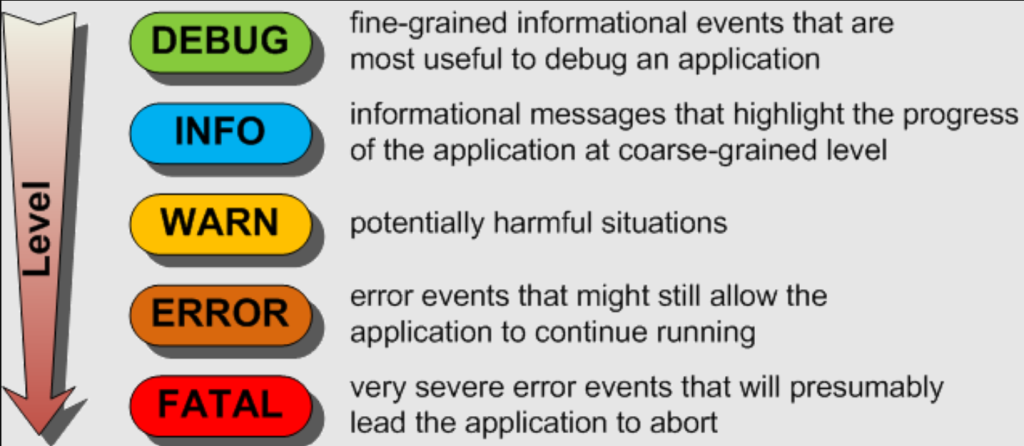
Here are the common log levels, typically ordered from least to most severe:
- Trace: The most detailed level, used for fine-grained informational events. It’s mainly used for debugging, providing insights into the behavior of the application, including detailed flow tracing.
- Debug: Provides information that is useful for debugging. Debug logs contain more detailed information than higher levels and are usually turned off in a production environment.
- Info: Informational messages that highlight the progress of the application at a high level. This level is typically used for regular operation information such as user logins, SQL logs, etc.
- Warn: Indicates potentially harmful situations. These are not errors but could be hints or warnings of potential issues that should be investigated.
- Error: Error events of considerable importance that will prevent normal program execution, but might still allow the application to continue running.
- Fatal/Critical: Very severe error events that will presumably lead the application to abort. These are critical problems, like data corruption or loss.
- Off: No logs are recorded.
Some of the useful commands for troubleshooting are..
1. df –k

2. du –sh

3. top

4. uptime

5. ps –eaf | grep

6. vmstat

7. ping

8. tail –f <logfile>

9. iostat

10.free

11.kill -9

12.mount

13.sar

14.ifconfig eth0 | enable | disable

15.traceroute

16.netstat -r

17.nslookup

18.routeCode language: HTML, XML (xml)
I’m Rajesh Kumar, a DevOps, SRE, DevSecOps, Cloud, and Platform Engineering expert passionate about sharing practical knowledge, real-world experiences, and industry best practices. I have worked at Cotocus and regularly write about technology, travel, investing, health, product reviews, and digital marketing through my various platforms.
I publish technical articles at DevOps School, travel stories at Holiday Landmark, stock market insights at Stocks Mantra, health and fitness guidance at My Medic Plus, product reviews at TrueReviewNow, and SEO and digital marketing strategies at Wizbrand.
Find Trusted Cardiac Hospitals
Compare heart hospitals by city and services — all in one place.
Explore Hospitals