
Introduction
Model Benchmarking Suites help AI teams test, compare, and validate machine learning models, large language models, multimodal models, and AI agents before they are deployed in real business workflows. These tools measure how well a model performs across accuracy, reasoning, coding, retrieval quality, hallucination risk, latency, cost, robustness, safety, and domain-specific tasks. In simple terms, they help teams answer one important question: Which model is actually reliable enough for our use case?
Model benchmarking matters because businesses are no longer choosing models only by popularity or vendor claims. Teams now need practical evaluation pipelines that compare hosted models, open-source models, fine-tuned models, and internal models using consistent tests. Benchmarking suites are especially important for AI agents, RAG systems, customer support bots, coding assistants, enterprise copilots, and regulated AI workflows where poor model performance can create security, compliance, or customer trust problems.
Real-world use cases
- Comparing multiple LLMs before selecting one for production
- Testing hallucination risk in customer-facing chatbots
- Evaluating AI agents across multi-step workflows
- Measuring RAG response quality and source faithfulness
- Benchmarking coding assistants on real engineering tasks
- Tracking model performance after prompt, dataset, or model changes
Evaluation Criteria for Buyers
- Model coverage across hosted, open-source, and BYO models
- Support for custom benchmarks and domain-specific datasets
- Evaluation automation and regression testing
- Metrics for accuracy, hallucination, bias, toxicity, latency, and cost
- RAG evaluation support for retrieval quality and grounded responses
- Integration with CI/CD, observability, and LLMOps workflows
- Human review and feedback support
- Audit logs, reproducibility, and governance controls
- Support for multimodal or agentic workflows
- Ease of use for engineers, analysts, and AI product teams
Best for: AI engineers, ML teams, LLMOps teams, research teams, CTOs, product leaders, enterprises, AI startups, and regulated organizations that need reliable model selection, evaluation, and monitoring.
Not ideal for: Teams using only simple AI features with no customization, no production risk, and no need to compare models. In very small use cases, basic manual testing or lightweight scripts may be enough.
What’s Changed in Model Benchmarking Suites
- Benchmarking has moved from static leaderboard scores to continuous evaluation pipelines.
- Teams now benchmark AI agents, not only single-turn chat responses.
- RAG evaluation has become important for measuring retrieval quality, citation accuracy, and grounded answers.
- Enterprises now compare models based on cost, latency, reliability, and governance, not only raw accuracy.
- Benchmarking suites increasingly support hosted APIs, open-source models, and BYO model workflows.
- Evaluation now includes hallucination detection, jailbreak resistance, toxicity, and policy compliance.
- Model benchmarking is becoming part of CI/CD pipelines so teams can catch regressions before release.
- Human review and AI-assisted evaluation are being combined for faster and more practical scoring.
- Multimodal benchmarking is growing as teams test text, image, audio, and document workflows.
- Observability platforms are merging with evaluation tools to connect test results with production behavior.
- Enterprises want reproducible benchmarks with audit trails, dataset versioning, and access controls.
- Developers want lightweight frameworks that can run locally, inside notebooks, or inside automated test suites.
Quick Buyer Checklist
- Does the tool support your model types: hosted, open-source, fine-tuned, or BYO?
- Can you create custom benchmarks using your own real-world tasks?
- Does it support automated regression testing after prompt or model changes?
- Can it evaluate RAG quality, retrieval relevance, and grounded answers?
- Does it measure cost, latency, token usage, and performance trade-offs?
- Are hallucination, toxicity, jailbreak, and bias checks available?
- Can results be traced, reproduced, exported, and audited?
- Does it integrate with CI/CD, ML pipelines, observability tools, and data platforms?
- Can human reviewers participate in evaluation workflows?
- Does it reduce vendor lock-in by supporting multiple model providers?
- Is the platform usable by both technical and non-technical teams?
- Does pricing match your expected test volume and model usage?
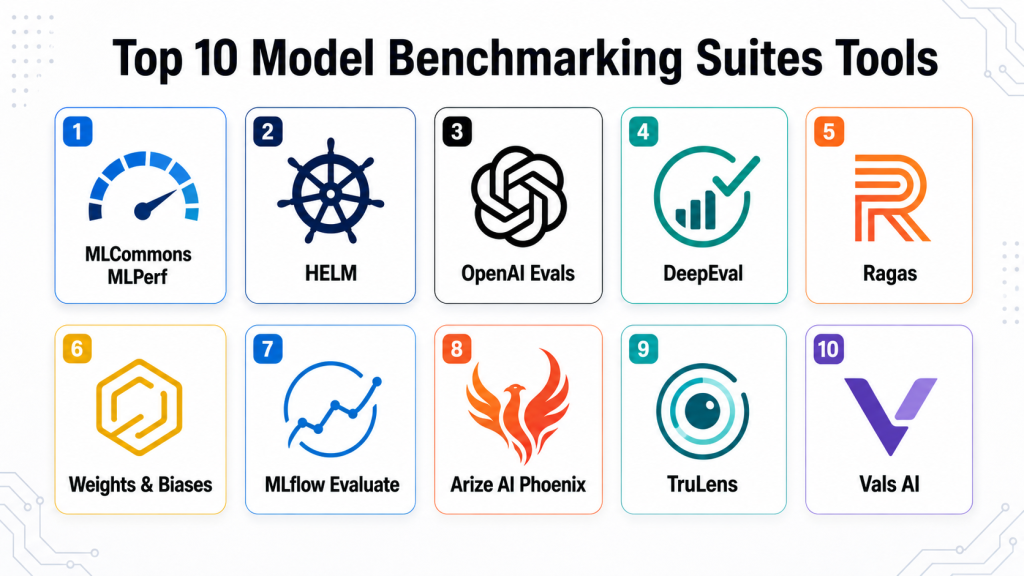
Top 10 Model Benchmarking Suites Tools
#1 — MLCommons MLPerf
One-line verdict: Best for standardized AI infrastructure benchmarking across model performance, training, and inference workloads.
Short description:
MLCommons MLPerf is a widely recognized benchmarking suite for measuring machine learning training and inference performance. It is especially useful for organizations comparing hardware, accelerators, systems, and model performance under standardized conditions. It is more infrastructure-focused than product-focused, making it ideal for technical teams evaluating AI compute environments.
Standout Capabilities
- Standardized benchmarks for AI training and inference
- Strong focus on reproducibility and fair comparison
- Useful for evaluating hardware and infrastructure performance
- Community-driven benchmark development
- Supports enterprise, research, and infrastructure teams
- Helps compare system-level AI performance
- Useful for procurement and architecture planning
AI-Specific Depth
- Model support: Multi-model, benchmark-specific
- RAG / knowledge integration: N/A
- Evaluation: Strong standardized performance evaluation
- Guardrails: N/A
- Observability: Performance metrics, throughput, latency, and efficiency indicators
Pros
- Highly trusted benchmark methodology
- Useful for infrastructure and hardware comparison
- Strong industry recognition
Cons
- Not designed for everyday product teams
- Less focused on LLM behavior evaluation
- Setup can be complex for beginners
Security & Compliance
Not publicly stated
Deployment & Platforms
Cloud, self-hosted, and on-premise environments depending on implementation.
Integrations & Ecosystem
MLPerf works well in AI infrastructure evaluation environments where teams need consistent, repeatable benchmarking. It is commonly used by hardware vendors, research groups, and enterprise architecture teams.
- AI infrastructure environments
- GPU and accelerator benchmarking workflows
- ML training and inference pipelines
- Research benchmarking setups
- Enterprise procurement evaluations
Pricing Model
Open benchmarking framework; commercial support or implementation costs may vary.
Best-Fit Scenarios
- Comparing AI hardware performance
- Evaluating training and inference infrastructure
- Supporting enterprise AI procurement decisions
#2 — HELM
One-line verdict: Best for broad, transparent language model evaluation across accuracy, robustness, fairness, and safety.
Short description:
HELM is a structured benchmark framework focused on evaluating language models across many scenarios and metrics. It is valuable for research teams, AI policy teams, and enterprises that want a broader view of model behavior beyond simple accuracy. HELM is especially useful when teams need transparent comparisons across multiple model capabilities.
Standout Capabilities
- Broad language model evaluation coverage
- Measures multiple dimensions of model behavior
- Supports transparent and reproducible comparisons
- Useful for academic and enterprise evaluation research
- Includes robustness and fairness-oriented evaluation
- Helps teams compare models beyond headline scores
- Good fit for responsible AI discussions
AI-Specific Depth
- Model support: Multi-model
- RAG / knowledge integration: N/A
- Evaluation: Strong benchmark-based evaluation
- Guardrails: Limited; mainly evaluation-oriented
- Observability: Benchmark result tracking and comparative analysis
Pros
- Strong evaluation breadth
- Useful for responsible AI benchmarking
- Helps avoid one-dimensional model selection
Cons
- Less focused on production monitoring
- Requires technical interpretation
- Not a full LLMOps platform
Security & Compliance
Not publicly stated
Deployment & Platforms
Research and self-hosted style workflows; exact deployment varies by implementation.
Integrations & Ecosystem
HELM is best used as part of a research or internal AI evaluation workflow. Teams may combine it with notebooks, model APIs, internal reporting tools, or governance documentation.
- Research workflows
- Model comparison pipelines
- Responsible AI evaluation
- Internal governance reporting
- Academic benchmarking processes
Pricing Model
Open research-oriented framework; operational costs vary.
Best-Fit Scenarios
- Comparing language models across multiple metrics
- Responsible AI and fairness evaluation
- Research-grade benchmark reporting
#3 — OpenAI Evals
One-line verdict: Best for teams creating custom evaluation sets for LLM behavior, regression, and task quality.
Short description:
OpenAI Evals is an evaluation framework that helps teams test model outputs against structured tasks and expected behaviors. It is useful for building repeatable tests around prompts, responses, reasoning tasks, and model upgrades. Developers can use it to create custom evaluations that reflect their real production use cases.
Standout Capabilities
- Custom evaluation creation
- Useful for regression testing model changes
- Good fit for LLM behavior testing
- Supports task-specific evaluation workflows
- Developer-friendly evaluation structure
- Helps compare model versions
- Useful for prompt and application testing
AI-Specific Depth
- Model support: Multi-model depending on configuration
- RAG / knowledge integration: Varies / N/A
- Evaluation: Strong custom evaluation support
- Guardrails: Limited; evaluation-focused
- Observability: Evaluation results and test outputs
Pros
- Flexible for custom LLM tests
- Good for developer workflows
- Useful for regression evaluation
Cons
- Not a complete benchmarking platform by itself
- Requires engineering setup
- Guardrails and production dashboards are limited
Security & Compliance
Not publicly stated
Deployment & Platforms
Self-hosted or developer environment; cloud usage depends on connected model APIs.
Integrations & Ecosystem
OpenAI Evals can fit into custom AI development pipelines where teams need repeatable testing. It is often paired with model APIs, internal datasets, CI workflows, and prompt versioning systems.
- Model API workflows
- Internal benchmark datasets
- CI/CD testing
- Prompt evaluation pipelines
- Developer experimentation
Pricing Model
Framework usage may be open-source, while model API usage costs vary.
Best-Fit Scenarios
- Testing prompt changes
- Running regression checks
- Creating custom model evaluations
#4 — DeepEval
One-line verdict: Best lightweight LLM evaluation framework for developers testing applications and RAG systems.
Short description:
DeepEval is a developer-friendly framework for evaluating LLM outputs using metrics such as correctness, faithfulness, relevancy, and hallucination-related checks. It works well for teams building AI apps, RAG systems, and LLM-based workflows. Its lightweight structure makes it practical for small teams that want fast evaluation without heavy enterprise setup.
Standout Capabilities
- LLM-specific evaluation metrics
- RAG evaluation support
- Developer-friendly testing workflow
- Custom metric creation
- Easy integration into application testing
- Useful for CI-style evaluation
- Good fit for fast iteration
AI-Specific Depth
- Model support: Multi-model / BYO model depending on setup
- RAG / knowledge integration: Supported through evaluation workflows
- Evaluation: Strong LLM and RAG evaluation
- Guardrails: Basic evaluation checks; not a full guardrail platform
- Observability: Test outputs and evaluation metrics
Pros
- Fast to adopt for developers
- Strong fit for RAG and LLM apps
- Flexible evaluation approach
Cons
- Limited enterprise governance features
- Requires technical setup
- Not designed for large annotation workflows
Security & Compliance
Not publicly stated
Deployment & Platforms
Self-hosted or developer environment; cloud usage depends on connected services.
Integrations & Ecosystem
DeepEval fits naturally into Python-based AI application stacks. Teams can connect it with LLM apps, RAG pipelines, test suites, and internal development workflows.
- Python applications
- RAG pipelines
- LLM test suites
- CI/CD workflows
- Custom evaluation datasets
Pricing Model
Open-source and commercial options may vary.
Best-Fit Scenarios
- Testing RAG quality
- Evaluating chatbot responses
- Adding LLM tests to developer workflows
#5 — Ragas
One-line verdict: Best for RAG-focused benchmarking across faithfulness, context relevance, and answer quality.
Short description:
Ragas is focused on evaluating retrieval-augmented generation systems. It helps teams measure whether retrieved context is relevant, whether answers are grounded, and whether responses are useful. It is especially helpful for enterprises building knowledge assistants, document chatbots, and search-based AI applications.
Standout Capabilities
- RAG-specific evaluation metrics
- Measures faithfulness and answer relevance
- Helps diagnose retrieval quality issues
- Useful for document-based AI assistants
- Works with custom datasets
- Supports automated evaluation workflows
- Good for improving knowledge-grounded AI systems
AI-Specific Depth
- Model support: Multi-model / BYO depending on setup
- RAG / knowledge integration: Strong RAG evaluation focus
- Evaluation: Strong RAG quality evaluation
- Guardrails: Limited; evaluation-focused
- Observability: Evaluation results and metric tracking
Pros
- Excellent fit for RAG systems
- Practical evaluation metrics
- Helps improve retrieval and response quality
Cons
- Narrower focus outside RAG
- Requires dataset preparation
- Enterprise governance features may be limited
Security & Compliance
Not publicly stated
Deployment & Platforms
Self-hosted or developer environment; cloud usage depends on implementation.
Integrations & Ecosystem
Ragas is often used alongside vector databases, retrieval pipelines, LLM frameworks, and application testing tools. It is especially useful when teams need to improve knowledge-based answer quality.
- RAG frameworks
- Vector database workflows
- Document AI applications
- LLM testing pipelines
- Internal knowledge assistants
Pricing Model
Open-source and commercial options may vary.
Best-Fit Scenarios
- Evaluating RAG chatbots
- Testing document-grounded answers
- Improving retrieval quality
#6 — Weights & Biases
One-line verdict: Best for teams that want experiment tracking, model comparison, and evaluation visibility together.
Short description:
Weights & Biases is a popular ML platform used for experiment tracking, model monitoring, visualization, and evaluation workflows. While it is not only a benchmark suite, it helps teams compare model runs, track metrics, and organize evaluation experiments. It is useful for ML teams that already need structured collaboration and model lifecycle visibility.
Standout Capabilities
- Experiment tracking and comparison
- Model evaluation dashboards
- Collaboration features for ML teams
- Dataset and model version visibility
- Useful visualizations for performance trends
- Integrates with common ML frameworks
- Supports reproducible experimentation
AI-Specific Depth
- Model support: Multi-model
- RAG / knowledge integration: Varies / N/A
- Evaluation: Strong experiment and metric tracking
- Guardrails: Limited
- Observability: Strong training and evaluation visibility
Pros
- Excellent experiment tracking
- Strong developer and ML team adoption
- Helpful for benchmarking model iterations
Cons
- Not purely benchmark-focused
- Requires setup and workflow design
- Advanced governance depends on plan and configuration
Security & Compliance
Not publicly stated
Deployment & Platforms
Cloud and self-hosted options may be available depending on plan.
Integrations & Ecosystem
Weights & Biases integrates with many ML frameworks and development workflows. Teams often use it to connect training runs, benchmark metrics, visual reports, and collaboration across AI teams.
- ML frameworks
- Notebooks
- Training pipelines
- Experiment tracking workflows
- Model registry and reporting processes
Pricing Model
Tiered; exact pricing varies.
Best-Fit Scenarios
- Tracking benchmark experiments
- Comparing model versions
- Supporting collaborative ML teams
#7 — MLflow Evaluate
One-line verdict: Best for teams already using MLflow who need integrated model evaluation workflows.
Short description:
MLflow Evaluate helps teams evaluate models inside the broader MLflow lifecycle. It is practical for teams that already use MLflow for tracking experiments, packaging models, and managing machine learning workflows. It is especially useful when benchmarking should be part of a repeatable ML pipeline rather than a standalone activity.
Standout Capabilities
- Integrated with MLflow lifecycle
- Evaluation inside existing ML pipelines
- Useful for model comparison
- Supports repeatable experiment tracking
- Works with structured evaluation metrics
- Good fit for technical ML teams
- Helpful for governance through experiment records
AI-Specific Depth
- Model support: Multi-model depending on setup
- RAG / knowledge integration: Varies / N/A
- Evaluation: Strong inside MLflow workflows
- Guardrails: Limited
- Observability: Experiment and metric tracking
Pros
- Strong fit for existing MLflow users
- Useful for reproducible evaluation
- Open and flexible workflow
Cons
- Requires technical implementation
- UI may not satisfy non-technical users
- Not built only for LLM benchmarking
Security & Compliance
Not publicly stated
Deployment & Platforms
Cloud, self-hosted, or managed environments depending on implementation.
Integrations & Ecosystem
MLflow Evaluate works best when teams already rely on MLflow for model lifecycle management. It can connect evaluation metrics with experiments, model versions, and deployment workflows.
- MLflow tracking
- Model registry workflows
- Training pipelines
- Notebook environments
- CI/CD model testing
Pricing Model
Open-source framework; managed platform costs vary.
Best-Fit Scenarios
- Existing MLflow users
- Repeatable model evaluation
- ML lifecycle benchmarking
#8 — Arize AI Phoenix
One-line verdict: Best for open-source observability and evaluation of LLM applications and traces.
Short description:
Arize AI Phoenix is designed for evaluating and observing LLM applications, including traces, retrieval quality, and application behavior. It helps teams debug model responses, inspect application traces, and understand where LLM systems fail. It is useful for developers and AI teams building RAG apps, agents, and production LLM systems.
Standout Capabilities
- LLM observability workflows
- Trace inspection and debugging
- RAG evaluation support
- Helps diagnose production AI failures
- Supports evaluation of application behavior
- Useful for developer and platform teams
- Open-source-friendly approach
AI-Specific Depth
- Model support: Multi-model depending on setup
- RAG / knowledge integration: Supported
- Evaluation: Strong for LLM app evaluation
- Guardrails: Limited; mainly evaluation and observability
- Observability: Strong traces, application behavior, and evaluation visibility
Pros
- Strong LLM application observability
- Good for RAG and agent debugging
- Useful open-source option
Cons
- Not a traditional benchmark leaderboard
- Requires technical setup
- Governance features depend on broader platform use
Security & Compliance
Not publicly stated
Deployment & Platforms
Cloud and self-hosted style workflows may vary by product and setup.
Integrations & Ecosystem
Phoenix is useful when teams want to connect evaluation with traces and application debugging. It can be paired with LLM frameworks, RAG systems, and production monitoring workflows.
- LLM applications
- RAG pipelines
- Tracing workflows
- Observability stacks
- Developer debugging workflows
Pricing Model
Open-source and enterprise options may vary.
Best-Fit Scenarios
- Debugging LLM applications
- Evaluating RAG traces
- Monitoring model behavior in workflows
#9 — TruLens
One-line verdict: Best for evaluating and tracking LLM application quality with feedback functions and traces.
Short description:
TruLens helps developers evaluate LLM applications using feedback functions, quality metrics, and trace-level inspection. It is useful for teams building RAG systems, chatbots, and agentic applications that need more than simple output checking. It helps connect model answers with context, reasoning flow, and measurable quality indicators.
Standout Capabilities
- Feedback functions for LLM evaluation
- RAG and application quality metrics
- Trace-level visibility
- Useful for hallucination and groundedness checks
- Supports iterative improvement workflows
- Developer-friendly evaluation model
- Good for LLM application testing
AI-Specific Depth
- Model support: Multi-model depending on configuration
- RAG / knowledge integration: Supported
- Evaluation: Strong LLM app evaluation
- Guardrails: Limited; evaluation-focused
- Observability: Trace and feedback visibility
Pros
- Strong fit for RAG app evaluation
- Helps understand response quality
- Developer-oriented workflow
Cons
- Requires technical setup
- Not a full enterprise benchmarking suite
- May need integration with other tools for governance
Security & Compliance
Not publicly stated
Deployment & Platforms
Self-hosted or developer environment; deployment depends on configuration.
Integrations & Ecosystem
TruLens works well with LLM apps where developers need measurable feedback on response quality. It is often combined with RAG pipelines, model APIs, and app-level tracing workflows.
- LLM frameworks
- RAG workflows
- Application traces
- Feedback metrics
- Developer testing pipelines
Pricing Model
Open-source and commercial options may vary.
Best-Fit Scenarios
- Evaluating RAG applications
- Tracking groundedness and quality
- Improving LLM app behavior
#10 — Vals AI
One-line verdict: Best for practical model evaluations using real-world tasks and domain-specific benchmarks.
Short description:
Vals AI focuses on evaluating models using realistic tasks, custom benchmarks, and domain-oriented test cases. It is useful for teams that want to compare models based on business-relevant performance rather than generic public leaderboards. It can help AI teams understand how models perform in practical settings such as coding, legal, finance, operations, and enterprise tasks.
Standout Capabilities
- Real-world model evaluation
- Domain-specific benchmark design
- Custom test sets for practical use cases
- Useful for comparing frontier and open models
- Helps with model selection decisions
- Supports practical benchmark reporting
- Good fit for enterprise model comparison
AI-Specific Depth
- Model support: Multi-model
- RAG / knowledge integration: Varies / N/A
- Evaluation: Strong practical evaluation
- Guardrails: Varies / N/A
- Observability: Benchmark reporting and evaluation metrics
Pros
- Strong real-world relevance
- Useful for model selection
- Practical benchmark orientation
Cons
- Platform details may vary
- Less suitable for infrastructure benchmarking
- Pricing and deployment may require vendor discussion
Security & Compliance
Not publicly stated
Deployment & Platforms
Cloud; other options vary.
Integrations & Ecosystem
Vals AI is useful when teams need practical model comparisons that reflect real operational tasks. It can support AI product teams, enterprise AI leaders, and technical teams choosing between models.
- Model comparison workflows
- Domain benchmark creation
- AI product evaluation
- Enterprise model selection
- Custom task testing
Pricing Model
Not publicly stated
Best-Fit Scenarios
- Comparing models for business workflows
- Creating domain-specific benchmarks
- Supporting enterprise model selection
Comparison Table
| Tool Name | Best For | Deployment | Model Flexibility | Strength | Watch-Out | Public Rating |
|---|---|---|---|---|---|---|
| MLCommons MLPerf | Infrastructure benchmarking | Cloud / Self-hosted / On-prem | Multi-model | Standardized performance testing | Complex setup | N/A |
| HELM | Broad LLM evaluation | Self-hosted / Research workflow | Multi-model | Transparent multi-metric evaluation | Less production-focused | N/A |
| OpenAI Evals | Custom LLM testing | Self-hosted / Developer workflow | Multi-model | Flexible task evaluation | Requires engineering setup | N/A |
| DeepEval | Developer LLM testing | Self-hosted | Multi-model / BYO | Lightweight LLM evaluation | Limited enterprise governance | N/A |
| Ragas | RAG evaluation | Self-hosted | Multi-model / BYO | Strong RAG metrics | Narrower outside RAG | N/A |
| Weights & Biases | Experiment tracking | Cloud / Self-hosted | Multi-model | Benchmark visibility | Not benchmark-only | N/A |
| MLflow Evaluate | ML lifecycle evaluation | Cloud / Self-hosted | Multi-model | Integrated ML workflow | Technical setup needed | N/A |
| Arize AI Phoenix | LLM observability | Cloud / Self-hosted | Multi-model | Traces and app debugging | Not classic leaderboard benchmarking | N/A |
| TruLens | LLM app quality | Self-hosted | Multi-model | Feedback functions | Needs integration | N/A |
| Vals AI | Practical model comparison | Cloud | Multi-model | Real-world task evaluation | Deployment details vary | N/A |
Scoring & Evaluation
The scores below are comparative, not absolute. They are designed to help buyers understand relative strengths across common evaluation needs. A higher score does not mean one tool is universally better; it means the tool is stronger for the selected criteria. Teams should always run a pilot with their own tasks, datasets, risk profile, and production requirements. Scores are based on category fit, practical usability, evaluation depth, ecosystem maturity, and likely buyer value.
| Tool | Core | Reliability/Eval | Guardrails | Integrations | Ease | Perf/Cost | Security/Admin | Support | Weighted Total |
|---|---|---|---|---|---|---|---|---|---|
| MLCommons MLPerf | 9 | 9 | 4 | 7 | 5 | 9 | 6 | 8 | 7.55 |
| HELM | 8 | 9 | 6 | 6 | 5 | 7 | 5 | 7 | 7.05 |
| OpenAI Evals | 8 | 8 | 5 | 7 | 7 | 7 | 5 | 7 | 7.05 |
| DeepEval | 8 | 8 | 5 | 7 | 8 | 8 | 5 | 7 | 7.35 |
| Ragas | 8 | 8 | 5 | 7 | 7 | 8 | 5 | 7 | 7.15 |
| Weights & Biases | 8 | 8 | 5 | 9 | 8 | 7 | 7 | 8 | 7.65 |
| MLflow Evaluate | 8 | 7 | 5 | 8 | 7 | 8 | 6 | 8 | 7.30 |
| Arize AI Phoenix | 8 | 8 | 6 | 8 | 7 | 7 | 6 | 7 | 7.35 |
| TruLens | 7 | 8 | 5 | 7 | 7 | 7 | 5 | 7 | 6.90 |
| Vals AI | 8 | 9 | 6 | 7 | 7 | 7 | 6 | 7 | 7.45 |
Top 3 for Enterprise
- Weights & Biases
- MLCommons MLPerf
- Vals AI
Top 3 for SMB
- DeepEval
- Ragas
- MLflow Evaluate
Top 3 for Developers
- DeepEval
- OpenAI Evals
- TruLens
Which Model Benchmarking Suite Is Right for You
Solo / Freelancer
Solo builders and independent developers should start with lightweight frameworks such as DeepEval, Ragas, TruLens, or OpenAI Evals. These tools are easier to experiment with and do not require a heavy platform rollout. They are useful for testing prompt changes, RAG answers, hallucination risk, and small application workflows. A solo developer should avoid overbuying enterprise platforms until evaluation volume, governance needs, or team collaboration becomes more serious.
SMB
Small and midsize teams should choose tools that are practical, affordable, and easy to connect with existing development workflows. DeepEval and Ragas are strong for LLM apps and RAG systems, while MLflow Evaluate is useful if the team already uses MLflow. Weights & Biases may be a good fit when the team needs collaboration, dashboards, and experiment tracking. SMBs should focus on repeatable tests, cost tracking, and release safety instead of building overly complex benchmark systems.
Mid-Market
Mid-market teams usually need a balance of developer flexibility and business-level reporting. Weights & Biases, Arize AI Phoenix, MLflow Evaluate, and Vals AI can help teams move from ad hoc testing to structured evaluation programs. At this stage, benchmarking should be connected to release workflows, production monitoring, and governance documentation. Teams should also create internal benchmark datasets based on real customer tasks instead of relying only on public benchmarks.
Enterprise
Enterprises should prioritize reproducibility, auditability, security controls, multi-team collaboration, and governance. Weights & Biases is strong for model lifecycle visibility, MLPerf is useful for infrastructure decisions, and Vals AI can support practical model comparison across business tasks. Enterprises may also combine multiple tools: one for infrastructure benchmarking, one for LLM app evaluation, and one for production observability. The best enterprise approach is often a layered evaluation stack rather than a single universal tool.
Regulated industries
Finance, healthcare, insurance, legal, and public sector teams should focus on auditability, repeatability, data privacy, and human review. Benchmarking results should be documented, versioned, and tied to model releases. Teams should avoid sending sensitive test data into tools without verifying retention and access controls. For regulated environments, internal benchmark datasets, red-team tests, approval workflows, and governance reporting are as important as the benchmark score itself.
Budget vs premium
Open-source frameworks such as Ragas, DeepEval, TruLens, OpenAI Evals, and MLflow Evaluate can be cost-effective for technical teams. Premium or enterprise platforms may justify their cost when teams need collaboration, dashboards, security controls, governance, and support. Budget teams should start with open frameworks and upgrade only when evaluation workflows become too large or too risky to manage manually. Premium buyers should still validate that the platform supports their exact models, datasets, and release process.
Build vs buy
Build your own benchmarking workflow when your team has strong ML engineering skills, unique domain tasks, and strict control requirements. Buy or adopt a platform when you need faster rollout, collaboration, dashboards, auditability, and standardized workflows. Many mature teams use a hybrid approach: custom internal benchmarks plus third-party tools for tracking, observability, and reporting. The key is to avoid building a fragile test system that no one maintains.
Implementation Playbook
30 Days: Pilot and Success Metrics
- Select two or three models you want to compare for one real business use case.
- Define success metrics such as accuracy, groundedness, refusal quality, latency, cost per task, and user satisfaction.
- Build a small evaluation dataset from real examples, not only synthetic prompts.
- Include easy, medium, and difficult cases so your benchmark reflects real production complexity.
- Run initial benchmarks using a lightweight tool such as DeepEval, Ragas, TruLens, or OpenAI Evals.
- Add human review for high-risk outputs where automated scoring may miss nuance.
- Document every test configuration, model version, prompt version, dataset version, and scoring rule.
- Create a simple benchmark report that business and technical teams can both understand.
60 Days: Security, Evaluation, and Rollout
- Expand your evaluation dataset to include edge cases, adversarial prompts, and failed production examples.
- Add hallucination, toxicity, bias, jailbreak, and prompt-injection tests where relevant.
- Integrate benchmark runs into CI/CD so risky prompt or model changes are flagged before release.
- Create a clear approval workflow for model changes in production systems.
- Add role-based access controls for sensitive benchmark datasets and results.
- Connect evaluation outputs with observability tools so production failures become future test cases.
- Establish a human review process for low-confidence or high-impact decisions.
- Compare cost and latency across models under realistic traffic assumptions.
90 Days: Cost, Governance, and Scale
- Standardize benchmark templates for every major AI use case.
- Build dashboards that track performance trends across model versions, prompts, and datasets.
- Create governance documentation for model selection, evaluation evidence, and release approvals.
- Add red-team testing for prompt injection, data leakage, unsafe completions, and policy violations.
- Optimize model routing by using premium models only where they clearly outperform cheaper alternatives.
- Review vendor lock-in risk and ensure benchmark data can be exported or reused.
- Create an incident handling process for model failures discovered after deployment.
- Use benchmark results to guide model upgrades, fine-tuning decisions, and architecture changes.
Common Mistakes & How to Avoid Them
- Relying only on public leaderboards instead of testing real business tasks.
- Benchmarking only accuracy while ignoring cost, latency, safety, and user experience.
- Using tiny test sets that do not represent real production traffic.
- Forgetting to include negative examples, edge cases, and adversarial prompts.
- Not versioning prompts, datasets, models, and scoring rules.
- Treating AI-generated evaluation as always correct without human validation.
- Ignoring RAG retrieval quality and only judging final answers.
- Failing to test prompt injection, jailbreak attempts, and data leakage risks.
- Not connecting benchmark failures to product release decisions.
- Using one benchmark score as a universal truth across all use cases.
- Ignoring multilingual, domain-specific, or regional performance differences.
- Over-automating AI workflows without review for high-risk actions.
- Choosing the cheapest model without measuring downstream failure costs.
- Locking into one vendor before confirming data portability and evaluation flexibility.
FAQs
1. What is a Model Benchmarking Suite?
A Model Benchmarking Suite is a tool or framework that tests AI models using structured tasks, datasets, and metrics. It helps teams compare model quality, reliability, latency, cost, and safety before using a model in production.
2. Why do companies need model benchmarking?
Companies need benchmarking because model performance can vary widely by task, language, domain, and workflow. A model that performs well on public benchmarks may still fail in real customer, enterprise, or regulated environments.
3. Are public AI leaderboards enough?
No, public leaderboards are useful for broad comparison, but they do not replace internal testing. Teams should create benchmarks based on their own data, workflows, risk tolerance, and quality expectations.
4. What metrics should I track?
Important metrics include accuracy, groundedness, hallucination rate, refusal quality, toxicity, latency, token cost, task completion rate, and user satisfaction. For RAG systems, context relevance and faithfulness are also important.
5. Can these tools compare multiple LLMs?
Yes, many benchmarking suites can compare multiple hosted, open-source, and fine-tuned models. The level of support depends on the tool, model provider, and integration setup.
6. Which tool is best for RAG evaluation?
Ragas, DeepEval, TruLens, and Arize AI Phoenix are strong options for RAG evaluation. They help measure retrieval relevance, grounded answers, hallucination risk, and response quality.
7. Can I use open-source benchmarking tools?
Yes, open-source tools are a good starting point for developers and small teams. They offer flexibility, lower cost, and control, but may require more engineering effort and governance setup.
8. Do benchmarking tools support AI agents?
Some tools support agent evaluation directly or indirectly through traces, task workflows, and multi-step evaluation. Agent benchmarking should test tool use, memory, planning, failure recovery, and task completion.
9. How often should models be benchmarked?
Models should be benchmarked before launch, after prompt changes, after model upgrades, and regularly during production use. Continuous evaluation is best for business-critical AI systems.
10. How do benchmarking suites help reduce hallucinations?
They help by testing model outputs against expected answers, trusted context, retrieval data, and human review. Repeated testing can identify where hallucinations happen and whether changes reduce or increase risk.
11. Are benchmarking suites useful for compliance?
Yes, they can support compliance by creating evaluation evidence, audit trails, and repeatable testing records. However, certifications and compliance features vary by vendor, so buyers should verify details carefully.
12. What is the difference between evaluation and observability?
Evaluation tests model behavior using prepared tasks or datasets, while observability monitors real-world model behavior after deployment. Mature AI teams usually need both to manage quality and risk.
13. Can benchmarking reduce AI costs?
Yes, benchmarking can show when a smaller or cheaper model performs well enough for a task. It also helps teams compare latency, token usage, routing strategies, and failure costs.
14. Should I build my own benchmark suite?
You should build your own benchmarks if your use case is highly specialized or sensitive. However, most teams benefit from combining internal datasets with existing tools for automation, reporting, and repeatability.
Conclusion
Model Benchmarking Suites are essential for teams that want to choose, improve, and govern AI models with confidence. The best suite depends on your use case: MLPerf is strong for infrastructure benchmarking, Ragas and DeepEval are practical for RAG and LLM applications, Weights & Biases supports experiment visibility, and Vals AI is useful for real-world model comparison. The smartest approach is to shortlist tools based on your model types, run a pilot with real datasets, verify security and evaluation quality, and then scale benchmarking into your release and governance workflows.

Find Trusted Cardiac Hospitals
Compare heart hospitals by city and services — all in one place.
Explore Hospitals
This is an excellent breakdown of model benchmarking suites. The clear comparison of pros and cons makes it much easier to select the right tool for measuring LLM performance accurately.